
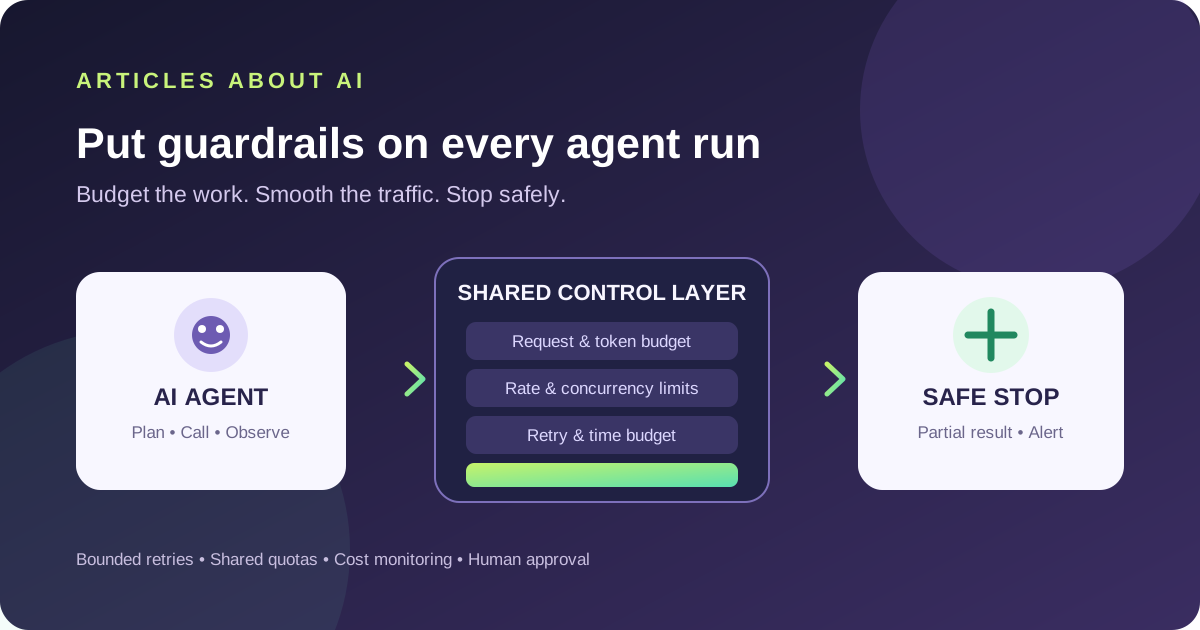
An AI agent can turn one user request into many model calls, tool invocations, retries, and background tasks. Without explicit limits, a loop or a burst of parallel work can exhaust an API quota, increase costs, or keep repeating a failing request. Reliable agent systems therefore need more than a model prompt: they need a budget, a rate-control policy, bounded retries, and a way to stop safely.
This guide presents a provider-neutral design you can adapt to OpenAI, Anthropic, xAI, or another API. Exact limits and response headers differ by provider and model, so always verify the current documentation for the service you use.
1. Set a budget for the whole task
Do not let every agent step spend independently without an overall limit. Before execution begins, define a maximum for the full task and pass the remaining budget to each worker or tool.
Useful controls include:
- Request budget: maximum model and tool calls for one task.
- Token budget: maximum input and output tokens, where the provider exposes them.
- Time budget: a deadline for the entire task, not just for an individual request.
- Spend budget: a per-task or per-user cost ceiling, plus an organization-level alert or hard limit where available.
- Retry budget: the maximum number of retry attempts across the workflow.
Keep separate limits for model calls and external tools. An agent that searches the web, runs code, and calls a model can consume resources in several systems. A single request counter will not account for all of them.
Set a clear stopping condition. If the agent reaches a budget, it should return a partial result or ask for approval—not silently start another chain of calls.
2. Rate-limit requests and control concurrency
Rate limits may apply to requests per minute, tokens per minute, daily usage, images, or other provider-specific dimensions. A workload can exceed one limit while staying below another. Check the exact model, project, organization, and API endpoint instead of assuming a single global cap.
Use a shared limiter across workers that consume the same quota. A semaphore can cap concurrent calls, while a token bucket or paced queue can smooth bursts over time. Per-process limits are not enough if several servers or background jobs share one API account.
For example, if your service allows 10 concurrent model calls in one process but you run five identical processes, the aggregate can reach 50 concurrent calls. A distributed limiter or queue is needed when the quota is shared across instances.
OpenAI’s official rate-limit guide explains request and token limits, headers, and mitigation strategies. Anthropic publishes its own API rate-limit documentation; do not copy one provider’s numeric limits or header assumptions into another provider’s client.
3. Retry only errors that may recover
Retries help with transient throttling and temporary server failures, but they do not fix invalid input, missing permissions, a revoked API key, or exhausted billing quota. Classify errors before retrying.
A robust retry policy should:
- Retry only explicitly selected transient failures.
- Honor a valid Retry-After value when the provider returns one.
- Otherwise use exponential backoff with random jitter.
- Limit both retry count and total elapsed time.
- Stop when the task deadline or retry budget is exhausted.
- Avoid stacking SDK, application, queue, and agent-level retry loops.
Exponential backoff increases the delay after each unsuccessful attempt. Jitter adds a small random variation so that many clients do not retry simultaneously. Unsuccessful requests can still count toward rate limits, so repeatedly sending the same request may worsen the problem.
The following is a policy sketch, not a drop-in HTTP client. Adapt the error classification and header parsing to your provider’s SDK:
delay = initial_delay
for attempt in range(max_attempts):
    if task_deadline_reached() or retry_budget_exhausted():
        stop_and_return_partial_result()
    try:
        return call_provider()
    except TransientRateLimitOrServerError as error:
        if not retry_is_allowed(error):
            raise
        wait = retry_after(error) or exponential_backoff(delay)
        sleep(wait + random_jitter())
        delay = min(delay * 2, maximum_delay)
raise RetryLimitExceeded()
Use a real deadline and a capped wait in production. If a server’s required delay is longer than your task can wait, defer the task or return control rather than retrying earlier than requested. Review your SDK’s built-in retry behavior before adding another layer.
4. Prevent agents from repeating expensive work
A model call can be repeated because of a tool error, a malformed result, an unclear stopping condition, or an agent that keeps trying to improve an already adequate answer. Instrument the workflow so that you can see which step is consuming the budget.
Practical controls include:
- Set a maximum number of agent steps and tool calls.
- Require structured tool results and validate them before continuing.
- Use idempotency keys where the provider or external tool supports them.
- Cache safe, repeatable reads when the underlying data and freshness requirements allow it.
- Avoid sending the same long conversation or document context when a smaller input is sufficient.
- Require approval before expensive, destructive, or externally visible actions.
- Detect repeated tool arguments and stop loops that make no progress.
Caching is not appropriate for every request. Do not reuse results when freshness, authorization, user-specific data, or privacy requirements make that unsafe. Similarly, an idempotency key only helps when the target service supports and honors it.
For broader agent deployment context, see our overview of Google Cloud’s Gemini agent workflows. If a provider request fails, our focused guides to Claude API 429 errors and Grok API 429 errors cover provider-specific troubleshooting.
5. Monitor cost, quota, and failure patterns
Track usage by task, user, model, and tool. Useful metrics include request count, input and output tokens, estimated cost, latency, retries, rate-limit responses, failed tool calls, and the percentage of tasks that stop because they reached a budget.
Create alerts before the system reaches a hard limit. Where a provider offers separate spend alerts and hard caps, understand the difference: an alert may notify you while requests continue, whereas a hard limit can reject further requests. Do not assume that setting an alert automatically stops usage.
Avoid logging secrets or full sensitive prompts just to debug consumption. Prefer request IDs, model names, timestamps, token counts, error categories, and redacted metadata. Review unusual spikes and repeated retries, especially after a new agent tool or workflow is deployed.
6. Design a safe stop and recovery path
A budget limit should be part of the agent’s control flow, not merely a dashboard setting. Decide what happens when the limit is reached: stop immediately, summarize completed work, queue a continuation for later, or ask a user to authorize additional resources.
Make the state visible. A useful status can say that the task stopped because it reached a request, time, or spend limit, and summarize what completed. Avoid presenting a partial result as if every planned step succeeded.
For workflows that can change external systems, use stronger safeguards: validate tool arguments, restrict credentials to the minimum permissions required, require approval for high-impact actions, and keep an audit trail. Rate limiting controls volume; it does not replace authorization or security boundaries.
Implementation checklist
Before deploying an agent workflow, confirm that you can answer “yes” to these questions:
- Is there a request, token, time, spend, and retry budget for each task?
- Are rate limits shared across workers that use the same quota?
- Are retryable errors distinguished from authentication, validation, and billing errors?
- Does the client honor provider retry instructions and cap total retry time?
- Can the agent detect repeated steps or tool calls that make no progress?
- Do users receive a clear partial result when the budget is exhausted?
- Are cost spikes, failures, and retries monitored without exposing secrets?
- Are destructive or costly actions protected by appropriate authorization and approval?
Key takeaway: the safest AI agent is not one that retries forever. It is one that has a bounded budget, adapts to the provider’s actual limits, and stops clearly when continuing would be unsafe or too expensive.
Official sources: OpenAI API rate limits · OpenAI API error codes · Anthropic API rate limits