
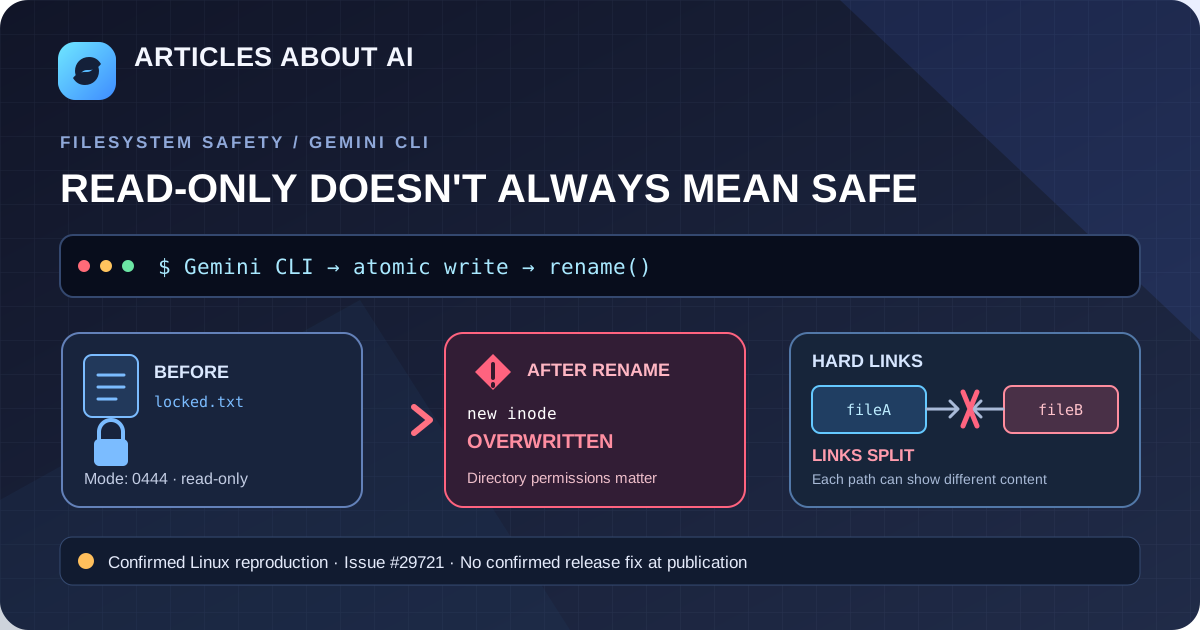
A newly reported Gemini CLI filesystem bug could overwrite a file marked read-only and break the relationship between two hard-linked paths. The report includes a small reproduction on Linux, so this is more than a vague user symptom. However, it remains an open issue, and the report does not prove that every Gemini CLI installation or operating system is affected.
Status checked October 12, 2026: GitHub issue #29721 is open. The behavior was reproduced against a source export of the project’s main branch at commit 9b6e026, using Linux x86_64 and Node.js v22.23.3. The reporter says no model call is involved; the affected behavior is in the local filesystem service.
What the report demonstrates
The reporter describes two related problems in StandardFileSystemService.writeTextFile:
- Read-only file overwritten: a file with mode
0444is replaced by the write operation instead of producing the expectedEACCESpermission error. - Hard link split: writing to one path that is hard-linked to another replaces that path with a new inode. The other path remains associated with the old content, so the two names no longer show the same data.
These are the results recorded in the issue’s reproduction. They are not evidence that Gemini CLI has overwritten files on every user’s machine, and the issue has not yet been independently confirmed by a maintainer.
Why atomic writes may cause this
The report traces the behavior to an earlier change that introduced atomic writes. In an atomic-write pattern, software writes new content to a temporary file and then renames that temporary file over the target.
On the reproduced Linux setup, the rename operation depends on permissions for the containing directory. It does not behave like opening the existing read-only file for a normal in-place write. Consequently, a file’s 0444 mode alone did not prevent the replacement shown in the report.
The same replacement changes the inode associated with the target path. Hard links refer to the same underlying inode, so replacing just one pathname can leave another hard-linked pathname pointing to the previous file.
The original change was merged on September 30, 2026, to serialize file-tool operations and make writes atomic. That earlier change’s stated purpose was to reduce concurrent file-operation races; issue #29721 reports a separate filesystem-semantics regression associated with the new write behavior. The exact final fix for this new report is not yet confirmed.
How to reduce the risk
There is no confirmed released fix documented in the issue as of October 12, 2026. Until maintainers resolve it, use the following precautions when running Gemini CLI in repositories or directories containing important files.
1. Keep important work under version control
Before asking an agent to edit a repository, review the working tree:
git status --short
git diff
Commit or back up important changes through your normal workflow. Git is not a complete backup for every file type or untracked file, so separately preserve valuable files that are not tracked.
2. Do not rely on chmod 444 alone
The reproduction specifically reports that a file with mode 0444 was still replaced by the atomic-write path. Therefore, setting a file read-only should not be treated as a reliable protection against this reported behavior.
Where practical, keep critical files outside directories the agent can modify, or restrict write access to the containing directory and run the tool with only the permissions it needs. Directory-level restrictions can also prevent legitimate writes and renames, so test them carefully in a non-critical workspace first.
3. Review hard-linked files before agent edits
On Linux, inspect a file’s mode and link count with:
stat -c '%A %a %h %n' -- path/to/file
A link count greater than 1 indicates that the inode has multiple hard links. It does not by itself identify every linked pathname. If a file must remain synchronized with another hard-linked path, avoid editing it through the affected tool until the issue is resolved.
4. Reproduce only in a disposable directory
If you need to test whether your installed version is affected, use a disposable checkout or temporary directory with files that contain no valuable data. Record the exact Gemini CLI version, operating system, Node.js version, and reproduction result. Do not test by pointing an agent at production configuration, secrets, or irreplaceable files.
The issue author provides a minimal script and reports that the affected filesystem service overwrites the read-only file and splits the hard links on the stated Linux environment. Consult the issue for the full reproduction rather than copying an unreviewed patch into a production installation.
Is there a fix?
At publication time, issue #29721 remains open and has no maintainer comments. No merged corrective change or released version containing a fix was confirmed in the evidence checked for this article.
The issue author suggests checking write access before creating the temporary file and using an in-place write when the target has multiple hard links. That is a proposed approach, not an accepted upstream fix. It also involves a trade-off: an in-place write avoids splitting hard links but does not provide the same atomic replacement behavior. A robust fix needs to account for permissions, hard-link semantics, symlinks, concurrent operations, and platform differences.
For now, do not assume that upgrading to an arbitrary newer version fixes this specific issue. Check the upstream issue and release notes for a maintainer-confirmed fix before changing your workflow.
Related troubleshooting
- Gemini CLI ESC cancellation bug: why retries may continue
- How to fix Google Gemini network errors
- Claude Code vs. Codex vs. Gemini CLI
Bottom line: the report provides a reproducible Linux example of a Gemini CLI file-write path replacing a read-only file and splitting hard links. Treat it as a credible, environment-specific bug report—not a confirmed universal vulnerability—and protect important files until an upstream fix is verified.
Sources
- Gemini CLI issue #29721 — the report, reproduction, tested environment, and proposed behavior.
- Gemini CLI PR #29499 — the earlier merged change introducing atomic file writes and serializing file-tool operations.