
GitHub announced on October 7, 2026, that local sandboxing for GitHub Copilot is generally available in GitHub Copilot CLI, the GitHub Copilot app, and Visual Studio Code sessions that use Agent Host. The release gives developers and organizations a way to put operating-system-enforced boundaries around many commands and tools that an AI coding agent launches on a local machine. GitHub says the feature is included with Copilot at no additional cost.
The change addresses a practical security problem in agent-assisted development. A coding assistant can be asked to inspect a repository, install dependencies, run tests, call local services, or modify files. Those capabilities make an agent useful, but a shell command launched under a developer’s account may inherit that account’s access to files, networks, and credentials. A mistaken instruction, an unexpected tool call, or an unsafe repository script can therefore have consequences beyond the code being edited.
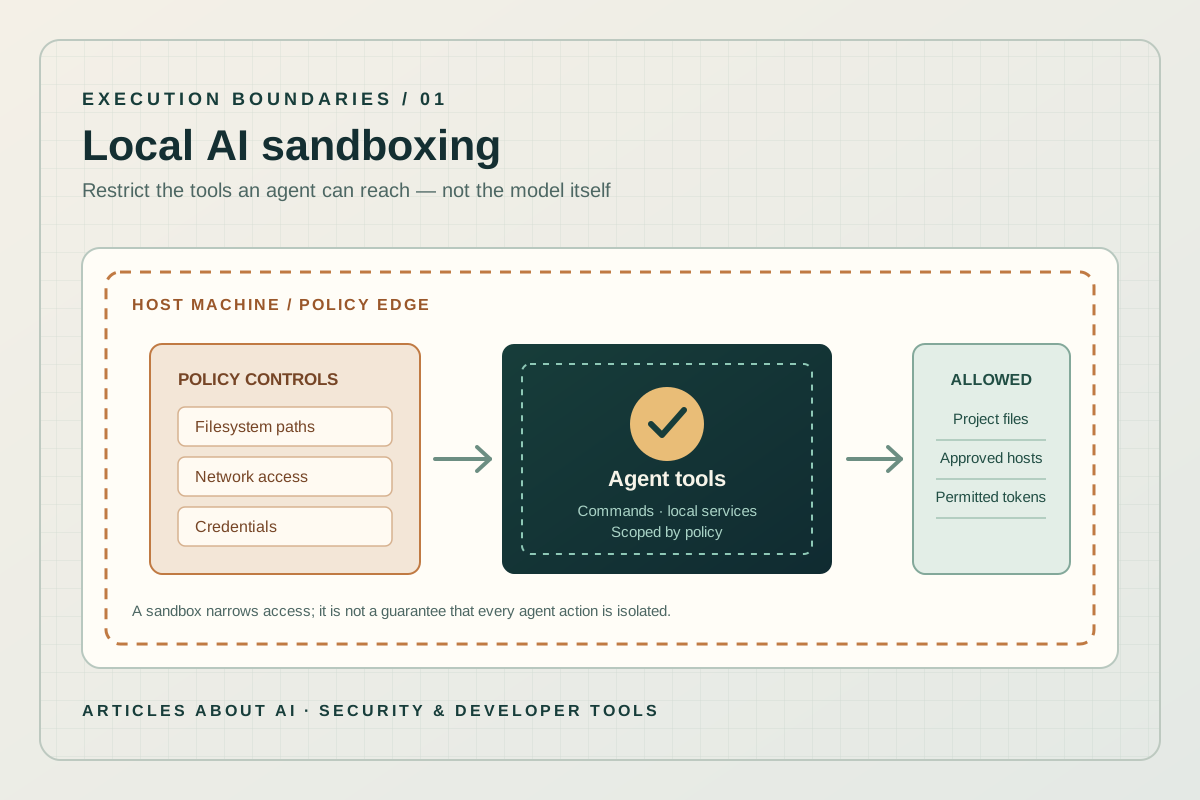
Local sandboxing is intended to narrow that exposure. Developers can limit which paths a process may read or write, control network access, and decide whether Git or GitHub CLI credentials are available to sandboxed tools. Organizations can also use managed settings to require sandboxing and prevent developers from weakening the policy. The important qualification is that sandboxing is a boundary around execution, not a guarantee that an AI agent will reason correctly or that every operation performed by the application is isolated in the same way.
This guide explains what GitHub officially announced, where the feature is available, how to enable it, which platform requirements matter, and what teams should test before relying on it for sensitive work.
What GitHub announced
GitHub’s October 7 release note marks local sandboxing as generally available across three product surfaces: Copilot CLI, the GitHub Copilot app, and VS Code sessions using Agent Host. The feature uses Microsoft eXecution Containers, usually abbreviated MXC, to translate a common sandbox policy into native controls appropriate to the operating system.
The central idea is to separate model choice from tool permissions. A model may propose a command, but the local execution boundary determines what the resulting process can access. GitHub says the policy can restrict filesystem access, internet and local-network connectivity, Git credentials, GitHub CLI credentials, and other system capabilities. Where supported, it can also apply to local Model Context Protocol (MCP) servers and language servers.
That distinction matters for teams using more capable coding agents. Model performance may change from one task to another, but the need to limit access to source code, local secrets, internal services, and personal files remains. A tool-execution policy can therefore provide a consistent layer of protection regardless of which supported model generated the command.
The announcement does not mean every Copilot workflow is automatically sandboxed. GitHub’s documentation says local sandboxing is turned off by default unless a user enables it or an organization policy requires it. Teams should verify the effective setting in the product they use rather than assume that installing an updated version enables protection automatically.
Official announcement: GitHub Changelog: Local sandboxing for GitHub Copilot is now generally available.
What a local sandbox actually restricts
A sandbox is a controlled execution environment. In Copilot’s local implementation, the policy is applied to processes and tools that the agent invokes, with the operating system enforcing important parts of the boundary. The goal is not to stop an agent from writing code; it is to limit the resources that the commands it launches can reach.
Filesystem access
Filesystem rules can allow read-only access to selected locations, grant read-and-write access to approved directories, or deny access to paths that should remain off-limits. This is useful when an agent needs to edit one project but should not be able to rewrite unrelated folders or inspect local files that are irrelevant to the task.
GitHub’s documentation describes a default working-directory policy for Copilot CLI: the current working directory is writable, temporary directories are available, and a repository’s Git metadata is writable. Other parts of the repository above the current working directory are readable but not writable under the documented default rules. Specific behavior can differ by product surface and configured policy, so developers should check the settings for the CLI or app they actually use.
Filesystem containment is especially relevant when opening an unfamiliar repository. Build scripts, test helpers, package hooks, and agent-generated commands may all touch files. Restricting write access reduces the scope of accidental changes, although it does not remove the need to review diffs and understand scripts before running them.
Network access
Network rules can limit outbound internet access, local-network access, or access to approved hosts. That matters because a command does not need to modify a source file to create risk: it could send data to an external endpoint, contact an internal service, or download and execute additional code.
Network controls are platform-dependent. Some operating systems and configurations support different combinations of host rules, local access, and proxy behavior. A policy that works on one developer’s laptop should not be assumed to behave identically on every operating system. Teams should test the network paths their build and test workflows require, then explicitly allow only the destinations that are needed.
Credentials and secrets
Git and GitHub CLI authentication can be controlled as part of the sandbox policy. Copilot’s documentation describes credential handling that can mask credentials from sandboxed tools and use a local proxy for approved HTTPS destinations. Additional environment variables can also be masked.
This is a useful defense against commands that do not need broad access to a user’s authentication context. It is not a reason to place secrets in source code or logs, and it does not remove the need for least-privilege tokens. Teams should use narrowly scoped credentials, review which tools are permitted to access them, and avoid exposing production secrets to development sessions without a clear requirement.
Supported operating systems and prerequisites
GitHub documents support for macOS, Linux, and recent Windows 11 builds, but the underlying enforcement mechanism differs by platform. That means availability should be understood as a combination of product surface, operating-system version, installed components, and policy configuration—not simply a single universal toggle.
- macOS: GitHub documents the Seatbelt backend and recommends macOS 15 (Sequoia) or later. The documentation says older versions are not blocked by Copilot CLI, but are not tested there.
- Linux: The documented backend uses Bubblewrap. Users need Bubblewrap version 0.5.0 or later, available as
bwrapon the PATH. When policy permits outbound traffic, additional networking utilities and system support may be required, includingslirp4netns, suitableunshareandnsentertools, firewall utilities, and access to/dev/net/tun. - Windows: Local sandboxing requires a recent Windows 11 update that supports the relevant ProcessContainer BaseContainer tier. GitHub’s current documentation lists Windows 11 version 25H2 with update KB5124010 or later, or Windows 11 version 26H1 with update KB5124006 or later. Support for individual capabilities, such as denied paths, localhost connections, and proxying, can vary by Windows build.
These prerequisites are operationally important. If a required backend or utility is missing, the sandbox may not be able to apply the requested policy. The documentation says Copilot reports requirements when a host cannot support a requested feature rather than silently running with weaker restrictions. Administrators should still validate this behavior in their own managed environment and document what happens when a workstation is out of compliance.
For the full current list, consult GitHub’s official guide to using local sandboxing and its overview of cloud and local sandboxes.
How to enable local sandboxing
The exact controls depend on whether the developer is using Copilot CLI, the Copilot app, or a VS Code agent session. Settings are configured separately in different surfaces; enabling local sandboxing in one does not automatically configure every other surface.
In Copilot CLI
Start an interactive Copilot CLI session and enter:
/sandbox enable
GitHub documents that this enables sandboxing immediately for the current session and saves the preference for subsequent interactive and programmatic sessions. To inspect or change the detailed policy, use the /sandbox interface. It exposes areas for general behavior, credentials, filesystem access, and network access.
If a command needs more access than the current policy grants, the product may request permission for an exception, depending on the effective configuration. An organization can manage the policy centrally. Where enterprise settings require sandboxing, an ordinary user setting or command-line option cannot override the requirement. If the policy permits bypassing the sandbox, a user may be able to disable it for the current session; that does not rewrite the organization’s saved policy.
In the GitHub Copilot app
The app supports session-level controls. GitHub documents /sandbox on to enable local sandboxing and /sandbox off to disable it for the active session, subject to enterprise policy. Project settings define defaults for new local sessions, while the active-session choice can take precedence for that session.
The app’s local sandbox controls expose a subset of the CLI’s configuration options, including filesystem, network, and credential access. Do not assume the app has every advanced CLI control simply because both use the same underlying technology.
In Visual Studio Code
GitHub’s general-availability announcement includes VS Code sessions that use Agent Host. The VS Code documentation separately describes how to sandbox agent terminal commands. Before relying on the feature, verify that the session is using the supported Agent Host path and review the current VS Code instructions rather than extrapolating from the CLI command syntax.
Official instructions: Using local sandboxing.
How local sandboxing differs from cloud sandboxing
GitHub also documents cloud sandboxes, but they solve a different problem. A local sandbox restricts processes running on the developer’s own machine. A cloud sandbox runs a session remotely inside an isolated, temporary Linux environment hosted by GitHub. The cloud environment can be useful when a task should be separated from the local workstation entirely, while local sandboxing is designed for workflows that need access to a local repository and working tree.
GitHub’s overview describes cloud sandboxing as a public-preview feature and says it is billed based on usage. Local sandboxing is available at no additional charge with Copilot. Access to cloud sandboxes for organization-provided Copilot can depend on organization or enterprise settings, and the feature is disabled by default at that level unless enabled.
The choice should be based on the workflow and threat model. Local sandboxing can be practical when the agent needs to work directly in a developer’s checkout. A cloud sandbox can offer stronger separation from the local environment, but may not have the files, services, credentials, or network access needed for a particular task. Neither option removes the need for review, access controls, and clear approval rules.
For a broader view of agent design and enterprise workflows, see our guide to Google Cloud’s Gemini agent and enterprise work automation. Different vendors expose different execution and governance models, so compare actual controls rather than relying on the label “agent.”
Important limitations: what sandboxing does not guarantee
A security feature is most useful when its boundaries are understood. GitHub’s own documentation makes several distinctions that developers should keep in mind.
First, local sandboxing is an operating-system-level containment mechanism, not a separate virtual machine or a complete containerized operating system. GitHub’s overview describes it as being toward the lighter-weight end of the isolation spectrum. It restricts what a process can read, write, and reach over the network, but organizations with especially strict isolation requirements should evaluate the implementation and decide whether it meets their security standard.
Second, not every operation is necessarily enforced in the same way. GitHub’s documentation explains that Copilot CLI’s built-in file tools run inside the CLI process itself. The operating-system sandbox does not see those in-process file operations as child-process activity; instead, the built-in tools check requests against the policy on a best-effort basis. Remote MCP servers are not placed inside the local process sandbox. Local MCP and language servers can be sandboxed where supported and configured, but teams should verify their actual setup.
Third, the sandbox does not judge whether a command is wise, whether a proposed code change is correct, or whether a dependency is trustworthy. It can limit the impact of some mistakes, but an agent may still produce defective code, run an unnecessary command within the allowed boundary, or misunderstand a request. Normal code review, dependency checks, testing, and human oversight remain necessary.
Fourth, network restrictions can break legitimate workflows. Package managers, test suites, development servers, and local services may require network access. The right response is to define a narrow policy and test the workflow, not to grant unrestricted access reflexively. If the team disables network controls to make a task work, it should understand the additional exposure that creates.
Finally, credentials require their own governance. A sandboxed tool should receive only the authentication access it needs. Do not treat sandboxing as a replacement for short-lived credentials, least-privilege permissions, secret scanning, or organization-level identity controls.
A practical rollout checklist for teams
Teams adopting local sandboxing should begin with a representative low-risk repository and test the whole developer workflow before making it mandatory across a large organization.
- Confirm the product surface. Record whether each workflow runs in Copilot CLI, the Copilot app, or a supported VS Code Agent Host session. Settings may not carry across surfaces.
- Check platform prerequisites. Confirm the operating-system version and, on Linux, the required sandbox and networking utilities. Keep a documented baseline for managed workstations.
- Start with filesystem least privilege. Permit writes to the intended working tree and temporary directories. Add other writable paths only when a specific workflow needs them.
- Test network dependencies. Run the project’s tests and build tools with the intended network policy. List required package registries, services, and approved hosts before widening access.
- Review credential access. Determine whether Git or GitHub CLI authentication is needed for the task. Avoid exposing broader credentials simply to remove a permission prompt.
- Test local integrations. Check MCP servers, language servers, localhost connections, and development services separately. Their support depends on the product and operating system.
- Set organization policy deliberately. If administrators require sandboxing, document the policy, permitted exceptions, and how developers request additional access. Verify the effective policy in a real session.
- Review changes as usual. Inspect diffs, run tests, and treat commands from unfamiliar repositories as untrusted until understood. Sandboxing is one layer in a defense-in-depth strategy.
The same discipline applies to other coding-agent products. Our coverage of faster Codex steering in the ChatGPT desktop app explains a different control: how a developer can redirect a running agent task. Steering changes an agent’s instructions; sandboxing constrains what its tools can access. They address complementary, not interchangeable, risks.
What the release means for developers
The general-availability announcement gives Copilot users a more explicit way to constrain local agent execution without paying an additional feature fee. For individual developers, the immediate benefit is the ability to let an agent perform useful work while reducing its default access to unrelated files, networks, and credentials. For organizations, managed settings create a path toward consistent rules across developer workflows.
The most sensible starting point is to enable the sandbox in a supported environment, inspect the effective policy, and test it with a real repository. Teams should pay particular attention to platform prerequisites and integrations, because the same policy may behave differently across operating systems. They should also understand the boundary between OS-enforced child-process restrictions and application-level checks.
This is not a claim that coding agents are now risk-free. It is a practical security control for a category of software that can execute commands and modify projects on a user’s behalf. Its value depends on an accurately configured policy, an understanding of what remains outside the boundary, and the same careful engineering practices expected of any tool that can change code.
For additional context on AI agent security and the consequences of granting tools broad authority, read our report on Anthropic’s open-source cyber mission and security tooling. As agent capabilities expand, the key question is not only what a model can do, but also what its execution environment permits it to do.
Official sources
- GitHub Changelog — Local sandboxing for GitHub Copilot now generally available (October 7, 2026)
- GitHub Docs — Using local sandboxing
- GitHub Docs — About cloud and local sandboxes for GitHub Copilot
- GitHub Docs — Configuring local sandbox settings
- Microsoft — Bringing local models and sandboxed tools to Windows and GitHub Copilot