
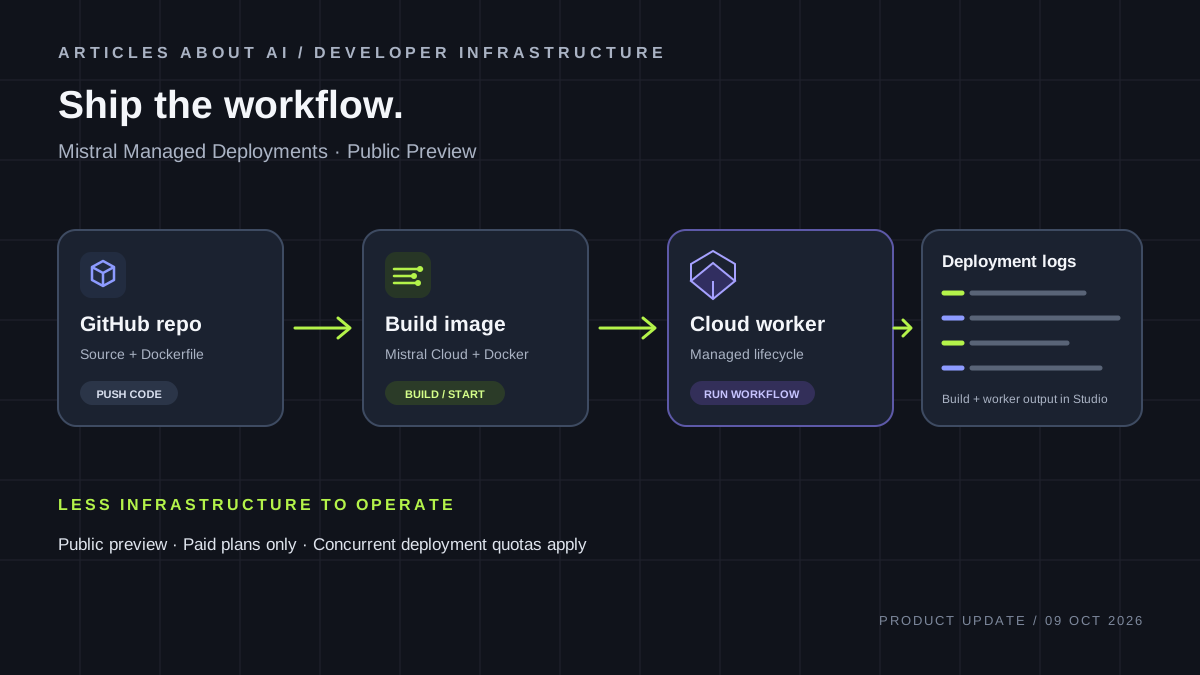
Mistral AI has introduced Managed Deployments, a public-preview feature that runs workflow workers on Mistral Cloud instead of requiring developers to provision and operate their own worker infrastructure. The release appeared in Mistral’s official Studio release notes on October 9, 2026. Developers can keep workflow code in a GitHub repository, configure a deployment, and let Mistral Cloud build and run the worker while providing lifecycle controls and logs in Studio.
This is a developer-infrastructure update, not a new foundation model or a consumer chatbot feature. It is aimed at teams building AI automations with Mistral Workflows and looking for a simpler route from a locally tested worker to a hosted runtime. The preview has important constraints: the Free plan cannot run managed deployments; Pay-as-you-go organizations can run up to three concurrently; Enterprise organizations can run up to ten by default. The documented worker region is the Netherlands, and Mistral warns that preview features and limits can change.
What Mistral announced
Mistral’s release notes list Managed Deployments as a Studio public-preview feature hosted by Mistral. Instead of asking a developer to provision a server and keep a worker process running, the service accepts a GitHub repository and deployment configuration. Mistral Cloud clones the repository, builds a Docker image, and runs the workflow worker.
The release brings several related capabilities together:
- Repository-based builds: the source repository can be public or private on GitHub.com, subject to Mistral GitHub App access and connection setup.
- Lifecycle controls: developers can create, update, stop, start, restart, redeploy, and delete deployments through Studio or the API.
- Service-account authentication: managed workers use a rotating service-account token supplied by the platform rather than needing a workspace API key for worker authentication.
- Logs in Studio: build and worker logs are available through the user interface.
- Hardening controls: Mistral documents controls that restrict which users and service accounts may register workflow implementations. The release notes also list network-egress restriction as a deployment-hardening capability.
These features make the update relevant to teams already using Mistral Workflows. The announcement does not say that Mistral Cloud is a general-purpose host for any application. The product is described specifically as a managed runtime for Mistral workflow workers.
Official references: Mistral Studio release notes and Managed Deployments documentation.
How the deployment model works
A deployment starts with a workflow project in a GitHub repository. Mistral’s getting-started guide uses a starter project generated by its Workflows CLI. It includes a Python project, the Workflows SDK, an example workflow, and a Dockerfile prepared for deployment.
The repository becomes the build input for the hosted worker. Mistral Cloud clones it through the Mistral GitHub App, builds a Docker image, and runs the resulting container. The container’s entrypoint or command must start the worker process; there is no separate entrypoint setting that can compensate for an image that does not launch the worker correctly.
When the worker starts and registers its workflows, the deployment can become active. Developers can then execute those workflows through the Workflows interface. Mistral manages hosting and lifecycle operations, but the developer remains responsible for workflow logic, dependencies, configuration, error handling, and verifying results.
This can reduce routine infrastructure work. A small team may no longer need to create a separate server, install the worker manually, and maintain its own basic restart process. It does not eliminate deployment engineering. The repository must build successfully, the worker must start reliably, and the workflow must behave correctly under realistic inputs.
Mistral recommends testing the worker locally before deploying it. That is a useful first checkpoint because dependency and startup failures can often be reproduced outside the cloud environment. An active deployment is an operational signal, not proof that a workflow’s business logic is correct. Teams should separately verify outputs, external side effects, and failure behavior.
Availability and prerequisites
As of October 10, 2026, Managed Deployments are in Public Preview, not general availability. Mistral says the feature and its limits may change. Organizations should therefore avoid treating the current interface, quotas, or runtime behavior as a permanent contract.
The feature is accessed through Mistral Studio and the Workflows API. The official getting-started guide lists these prerequisites:
- A Mistral account on a paid plan.
- Python 3.12 or later and the uv package manager for the documented starter project.
- A GitHub account with permission to create a repository.
- A repository that can be accessed through the Mistral GitHub App.
- A suitable Dockerfile and a command that starts the workflow worker.
The guide says that only public GitHub at github.com is supported for now. GitLab and GitHub Enterprise are described as future support, not current capabilities. A private repository on GitHub.com can be used, but the Mistral GitHub App must be installed for that repository and the GitHub connection must be configured in Studio. “Private repository supported” does not mean every Git hosting service or enterprise-hosted GitHub installation is supported.
The documentation identifies the managed worker region as nl-north-1 in the Netherlands. Organizations with data-residency, latency, or contractual requirements should confirm whether this location is acceptable before using the service for sensitive or production workloads. The cited public documentation does not describe a region selector, so teams should not assume they can choose another region.
Mistral has not published a region-by-region availability matrix in the release note. Developers should confirm access in their own Studio account rather than infer eligibility from the availability of public documentation.
Plan requirements and deployment quotas
Managed Deployments cannot run on the Free plan. Mistral’s quota page lists these default limits on concurrently running managed deployments:
Plan Concurrent managed deployments ————— ——————————– Free 0 Pay-as-you-go 3 Enterprise 10
These are concurrency caps, not a published limit on the number of workflow executions or a statement about how many stopped deployments may exist. Mistral says that creating or starting a deployment beyond the cap fails with a 403 error. Stopping or deleting a deployment frees a slot, and organizations can contact Mistral support to request a higher cap.
For a small team on Pay-as-you-go, three concurrent deployments may be enough for an initial experiment, but it can become restrictive if development, staging, and production workers each need isolation. Enterprise’s default cap is higher, yet ten workers may still be limiting for organizations with multiple teams or independently operated services.
Do not confuse deployment quotas with model inference limits or API rate limits. They control how many managed workers can run simultaneously. The official release notes and quota page do not provide a complete, separate per-worker price or a dedicated cost calculator for this feature. They specify the paid-plan requirement. Organizations should review their current commercial terms and account billing information before estimating total costs.
Authentication and SDK requirements
Each managed deployment runs under its own service account. Mistral’s documentation says the platform mounts a rotating service-account token into the container as a file and sets the MISTRAL_SA_TOKEN_PATH environment variable to its location. The Workflows SDK reads the token and handles rotation.
This is different from a setup in which a developer copies a long-lived workspace API key into a repository or a static environment variable and must manage that key manually. A managed worker does not receive a provisioned API key for its own Mistral Workflows authentication. That can reduce one credential-management burden, but it does not mean an application will never need secrets.
There is a version requirement: the worker image must install mistralai-workflows version 3.10 or later to read service-account tokens. Earlier versions cannot authenticate through this mechanism. Teams migrating an existing worker should verify the SDK version before deployment rather than assume their old configuration will work unchanged.
The release notes also say existing API-key deployments migrate automatically on their next restart. That is a platform-authentication migration, not a reason to remove credentials used by the application for other purposes. A workflow may still need a token for a third-party service, a database, or another API. Those credentials have separate scopes and must be handled separately.
Secrets and security considerations
Mistral documents integration with its workspace Secrets Manager. A team can bind a workspace secret to an environment variable for a deployment, and the worker reads that value when it starts. Only secrets from the deployment’s workspace can be bound.
One operational detail matters during credential rotation: changing a secret does not automatically restart the worker. The running process continues to use the value it read at boot until the deployment is restarted. If an external API token is rotated, teams should plan a restart rather than assume the active worker immediately uses the new value.
Build-time secrets require particular caution. Mistral warns that Docker build arguments can be stored in image history and layers, where someone with access to the image may be able to recover them. Developers should avoid passing high-value, long-lived credentials as build arguments. Prefer narrowly scoped credentials and use runtime secret injection for values needed by the running worker.
Mistral also documents hardened deployments. New managed deployments created in Studio default to hardened, with an explicit opt-out during creation. The hardening documentation describes a registration-control mechanism: approved users or service accounts are pinned so only authorized principals can register workflow implementations. This helps reduce the risk of an unexpected worker registering a different implementation under the same workflow name.
Hardening is not a code audit. Mistral says it restricts workflow registration to authorized principals but does not validate code submitted by an authorized principal or replace credential protection. Teams still need code review, least-privilege access, secret hygiene, and tests. The release notes also list a network-egress restriction option; organizations should review the current Studio controls and documentation to understand the exact settings available to their deployment.
Logs and lifecycle operations
The release provides lifecycle controls through Studio and the API. Developers can create or update a deployment, stop and start it, restart it, redeploy it, or delete it. These operations matter because a hosted worker may need a new build after a code change, a restart after configuration changes, or a controlled shutdown during maintenance.
Build and worker logs are available in Studio. They can help diagnose dependency installation failures, container startup problems, and worker-registration issues. They are not a substitute for application-level observability. Teams operating business-critical automations should still define useful outputs, track failed executions, and decide which events require alerts. The release note confirms logs in the interface; it does not promise every metric or alerting feature a mature observability stack might provide.
Mistral chooses the instance size for managed workers. The quota documentation says each managed worker receives the same size and that per-deployment CPU and memory metrics are not exposed yet. This is a real limitation for teams that need precise resource tuning. Workflows with heavy dependencies or memory-intensive processing should be tested carefully before production use.
Deployment status, logs, and workflow results are different signals. A worker can be active while its business logic is wrong; a workflow can return an answer while an external integration is stale; and a successful build does not guarantee correct handling of production data. Teams should test these layers separately.
A cautious first-deployment checklist
Developers evaluating the preview should begin with a small, low-risk workflow rather than moving a production process immediately.
Start locally. Use the official Workflows CLI starter project and verify that it runs. This checks the project structure, dependencies, and worker command before cloud deployment adds another variable.
Connect GitHub. Push the project to GitHub.com and install the Mistral GitHub App on the repository. Configure the GitHub connection in Studio. Do not assume GitLab or GitHub Enterprise will work until Mistral documents support.
Review the Dockerfile. Confirm that the container command starts the worker and that files copied during the build are inside the configured build context. If the Dockerfile is in a subdirectory or uses a nonstandard name, configure the corresponding paths. Test the image locally if the hosted build fails.
Check the SDK. Confirm that the project uses mistralai-workflows 3.10 or later. Do not add a workspace API key to the repository as a workaround for an incompatible SDK.
Configure secrets intentionally. Bind only the credentials the worker needs. Keep sensitive values out of source control and be cautious with build arguments. Plan a restart when a secret changes so the process reads the updated value.
Review authorization. Check whether hardening is enabled and which users or service accounts can register workflows. Access controls reduce certain risks but do not prove that the code itself is trustworthy.
Deploy and test. Wait for the deployment to become active, inspect build and worker logs, and execute a harmless test workflow. Verify outputs, error behavior, and external side effects before routing real users or important business processes through the service.
Test lifecycle behavior. Try restarting after a code change, updating configuration, and stopping the worker. Document what to do if deployment fails or credentials rotate. A deployment process that works once is not yet a reliable operating procedure.
Who should consider it?
Managed Deployments are most relevant to developers already building with Mistral Workflows who want Mistral to handle worker hosting. The service may be attractive to small teams with a working automation that do not want to maintain a separate runtime just to keep the worker available.
It may also help teams standardize how workflow code moves from a repository to a running worker. Repository-based builds make the source-to-deployment relationship clearer, while Studio lifecycle controls provide a central place to manage the service. Service-account authentication can reduce the need to provision a workspace API key for the worker itself.
The preview is less suitable for organizations that require a different deployment region, a free-tier environment, more concurrent workers than their plan allows, or detailed per-worker CPU and memory visibility. It should not be treated as a reason to skip testing, secrets management, or security review. Mistral manages part of the infrastructure burden, not the correctness of every automation.
Teams using GitLab or GitHub Enterprise should wait for explicit support rather than assume compatibility. The official guide describes those integrations as future support, which is different from saying they are available in this preview.
What remains uncertain
The public documentation establishes the preview status, default concurrency caps, Netherlands worker region, GitHub integration requirements, and service-account authentication model. It does not establish general availability, a region selector, or a complete separate price schedule for each managed worker. Instance sizing is handled by Mistral, and per-deployment CPU and memory metrics are not yet exposed.
The product is for Mistral Workflows workers rather than arbitrary web applications. The Mistral GitHub App mediates repository access. The worker’s platform authentication is managed, but applications can still require separate credentials for external systems. Secret updates require a restart before a running worker reads the new value.
These boundaries do not erase the value of the feature. They define where the preview can reasonably be tested today. Teams can try it with a small workflow and evaluate whether reduced infrastructure work outweighs the current limits.
The bottom line
Mistral Managed Deployments, listed in the Studio release notes on October 9, 2026, offers a managed way to run Mistral Workflows workers from GitHub repositories. It combines Docker-based builds, hosted execution, service-account authentication, lifecycle controls, and Studio logs. The design can reduce infrastructure work while leaving workflow code, application secrets, and validation in the developer’s hands.
The immediate constraints are concrete: public preview, paid plan required, three concurrent deployments on Pay-as-you-go and ten on Enterprise by default, GitHub.com support rather than GitLab or GitHub Enterprise, and a documented worker region in the Netherlands. Mistral chooses the worker instance size and does not yet expose per-deployment CPU and memory metrics.
For teams already using Mistral Workflows, the sensible next step is a controlled trial with a small workflow, a reviewed Dockerfile, minimal secrets, and explicit tests for deployment, restart, and failure behavior. Organizations with strict residency or capacity requirements should evaluate those constraints before relying on the preview in a production architecture.
Official sources
- Mistral Studio release notes — Managed Deployments, October 9, 2026
- Managed Deployments documentation
- Getting started with managed deployments
- Managed deployment quotas
- How managed deployments work
- Secrets in managed deployments
- Hardened deployments