
An AI assistant becomes more useful when it can do more than answer questions. It may be able to read information from connected services, work through a website, prepare a message, or carry out a task on your behalf. That same capability changes the security question. You are not only deciding what information to share; you are deciding what an automated system may be able to do with the accounts and services you rely on.
The safest way to use Instinct AI is to give it only the access a task needs, start with low-consequence work, require meaningful human review for important actions, and verify the result in the service where the action took place. A clear instruction is useful, but it is not a substitute for a permission boundary or a real confirmation control.
This guide translates Instinct’s current public terms and privacy documentation into a practical setup and operating routine. It also explains what the company documents, what remains unclear in public materials, and how to respond if an account or integration appears to be compromised. The official documents reviewed for this article were last revised on November 17, 2026; product screens and access conditions can change.
The short answer: use a narrow permission boundary
Instinct describes itself as a personal assistant that people can text or call and that can use a phone and computer to perform tasks. Its Terms of Service explain that it may interact with third-party services you connect, and may also interact with some third-party websites or platforms that you have not separately connected. That is the source of its usefulness—and the reason to treat access carefully.
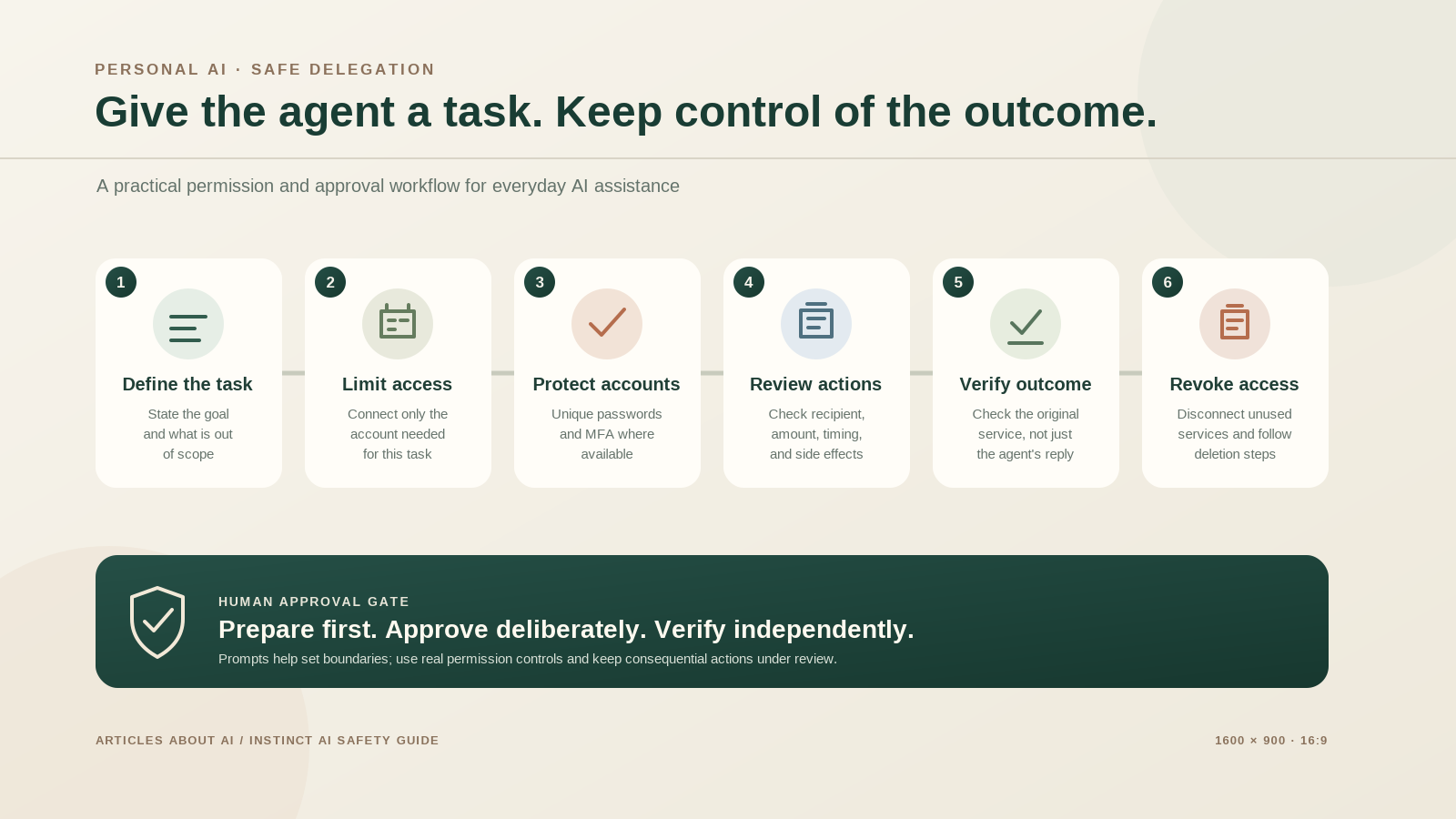
A safe operating boundary has five parts:
- Limit the task. State exactly what you want done and what is outside scope.
- Limit the access. Connect only the account or service needed for that task.
- Separate preparation from execution. Ask for research or a draft first; do not authorize sending, buying, deleting, or changing something by implication.
- Review consequential actions. Check the recipient, amount, date, terms, and likely side effects before approval.
- Verify independently. Confirm the result in the merchant, email, calendar, or account itself rather than relying only on the assistant’s completion message.
For a broader assessment of the product’s safeguards and risks, see Is Instinct AI Safe to Use? Security and Privacy Explained. The companion guide What Information Does Instinct AI Need to Access? explains the categories of data that may be involved.
1. Start at the official access point
Before connecting an account, make sure you are using the real service. Begin at the official Instinct website and follow the login or invitation route shown there. The public homepage currently describes text and phone interaction and links to login and an invitation option.
Do not buy an invitation, sign-in code, or account from an unofficial seller. Do not follow a login link sent unexpectedly in a direct message. A look-alike page can collect credentials even when the product it imitates is legitimate. If an invitation is offered, check that the destination remains on an official Instinct domain before entering information.
Access is not necessarily open to everyone. TechCrunch reported on November 21, 2026 that Instinct remained in private beta. The company’s Terms also say that access and features are not guaranteed on every device or in every geographic location. Treat the official site and the terms presented to your account as the current source of truth rather than assuming that a guide, invitation listing, or old screenshot describes today’s onboarding flow.
The same distinction applies to price. Instinct’s Terms of Service, revised November 17, 2026, say the service is currently available without charge, while reserving the right to introduce fees and promising notice before applicable fees become payable. Mobile carrier charges and third-party purchases are separate costs. Do not treat today’s fee status as a permanent guarantee.
Sources: Instinct official website, Instinct Terms of Service, and TechCrunch’s November 21, 2026 overview of messaging-based AI agents.
2. Decide what the task is allowed to do
Before giving Instinct a task, divide it into three stages:
- Research: find information, compare options, summarize a message, or identify available times.
- Preparation: draft an email, fill out a proposed form, assemble a booking, or prepare a purchase for review.
- Execution: send, submit, book, cancel, pay, publish, delete, or change an account.
The first stage is usually the lowest risk. Preparation can still expose private information, but it gives you a chance to inspect the proposed result. Execution changes something outside the conversation and deserves a higher level of control.
A useful default is to authorize research and preparation first. Give permission for execution only after the details are visible and correct. For example, ask for three travel options and their cancellation conditions before asking the assistant to book one. Ask for an email draft before authorizing it to send. Ask it to locate a subscription’s cancellation route before allowing it to cancel the subscription.
This approach is consistent with Instinct’s Terms. They say users remain responsible for actions taken in response to their instructions and must maintain meaningful human oversight. The terms also say that appropriate approval workflows should be used where the nature and consequences of an action justify them.
3. Connect only the account needed for the job
Do not connect every service simply because an integration is available. Start with the smallest useful connection.
Before approving a connection, ask:
- Which account is being connected?
- What categories of information will the service be able to read?
- Can it create, edit, send, or delete information, or is access read-only?
- Does the requested access make sense for the task?
- Can you use a narrower account or provide the relevant information manually?
- How will you disconnect the service later?
Google’s guidance for third-party connections says users should review the developer’s privacy policy and the requested access before authorizing an app. It also explains that an app can only access the Google data and services authorized by the user, although some permissions may allow it to modify data. See Manage links between your Google Account and apps from other developers.
Instinct’s public documents describe categories of connected-service access, but they do not publish a complete, feature-by-feature list of every permission scope that every account may see. The permission screen presented during your own setup is therefore important. Read the actual request rather than assuming that all users receive identical access.
For a first test, prefer a low-risk account or a limited set of data where that is practical. Avoid connecting a primary financial account, password manager, medical portal, or an account containing confidential work material unless the specific benefit justifies the exposure and you have reviewed the provider’s security requirements.
4. Protect the accounts behind the assistant
An AI assistant does not replace the security of the accounts it uses. If your email account is compromised, an attacker may be able to reach password-reset messages, invoices, personal conversations, and other connected services. Protect the underlying accounts before delegating work through them.
Use these baseline controls:
- Give every important account a unique password. Do not reuse your email password on other services.
- Enable multi-factor authentication on your primary email account and on connected services that support it.
- Prefer a passkey, authenticator app, or hardware security key where available. The U.S. Federal Trade Commission explains that a second factor makes account access harder even if a password is stolen, and that security keys provide strong protection.
- Keep recovery email addresses and phone numbers current.
- Review signed-in devices and active sessions periodically.
- Protect the phone number and messaging account through which you communicate with the assistant.
- Keep your operating system, browser, and security updates current.
- Never send a password, recovery phrase, private key, or one-time verification code in an ordinary chat message.
These are protections for the connected accounts, not claims that Instinct itself offers every authentication feature listed above. Check the security options actually available for each account. Instinct’s Terms place responsibility on users to safeguard their account credentials and say that suspected compromise or unauthorized account use should be reported promptly to [email protected].
The FTC’s guide, Use Two-Factor Authentication to Protect Your Accounts, explains the different second-factor methods and why they matter.
5. Write instructions that separate drafting from acting
A precise request reduces ambiguity. It should identify the goal, the account or service involved, the allowed actions, the actions that are prohibited, and the point where the assistant must stop and ask you.
For example:
For email
Review the message and draft a reply. Do not send it, forward it, add recipients, or attach files. Show me the complete draft and wait for my explicit approval.
For a reservation
Find available options for this date and party size. Do not book or provide payment details. Show the restaurant, time, cancellation policy, deposit, and total cost before I decide.
For a purchase
Compare these products and calculate the full delivered cost. Do not add anything to the cart or place an order. Ask me before any purchase-related action.
For calendar changes
Identify the conflicting events and suggest a new time. Do not move, delete, or invite anyone until I approve the exact change.
For a subscription
Find the cancellation instructions and explain any remaining billing period or penalty. Do not cancel the service or accept a retention offer without asking me.
These prompts make your intention explicit, but they are not technical access controls. A natural-language instruction may be misunderstood, and a system safeguard may not appear for every action. Instinct’s Terms say that safeguards or confirmation requirements may be implemented for certain actions, but do not guarantee that they will prevent unintended or erroneous actions. Use any actual confirmation or permission controls shown by the product or the third-party service, and do not rely on wording alone for a high-impact task.
6. Match the level of oversight to the consequence
Not every task needs the same review. A practical risk scale can help you decide how much autonomy to allow.
| Risk level | Examples | Safer operating rule |
|---|---|---|
| Lower | Public research, product comparisons, summaries of non-sensitive material, draft reminders | Review the result before using it |
| Moderate | Drafting an email, preparing a booking, editing a calendar event, contacting a business | Inspect the exact change and approve before execution |
| High | Sending sensitive information, making purchases, cancelling paid services, changing account security, deleting records | Require direct review in the relevant service; avoid unattended execution |
| Unsuitable for delegation | Medical, legal, investment, tax, or other high-risk professional decisions; actions that could endanger someone | Do not rely on Instinct as the decision-maker or professional adviser |
Instinct’s Terms say the service is not intended for high-risk activities and that its outputs are not a substitute for medical, mental-health, legal, investment, tax, financial, or other professional advice. They also say actions may be incorrect, incomplete, or irreversible. This is stronger than a generic reminder to double-check a chatbot: the product’s own terms tell users to retain meaningful human review.
For more on the failure modes that make this necessary, read Can Instinct AI Make Mistakes? Risks of Autonomous AI Agents.
7. Inspect every consequential action before it happens
Before approving an action, slow down and check the details that could cause harm if wrong.
For a message, inspect the recipient, subject, body, attachments, and any copied recipients. For a booking, inspect the date, time zone, party size, location, deposit, cancellation deadline, and final price. For a purchase, inspect the merchant, product variant, quantity, delivery address, shipping, taxes, recurring charges, and return conditions. For an account change, inspect what will be changed and whether it can be reversed.
Do not approve an action just because the assistant describes it as routine or urgent. If a webpage, email, document, or message contains instructions that conflict with your original request, treat those instructions as untrusted content. A website being researched is not authorized to change the task you gave the assistant.
OWASP’s 2026 guidance identifies agent goal hijacking and tool misuse as important risks. Its recommendations include treating external natural-language content as untrusted, limiting tool permissions, validating the agent’s intended action against the user’s goal, and requiring human approval for high-impact actions. See ASI01: Agent Goal Hijack and ASI02: Tool Misuse and Exploitation.
8. Be careful with group chats and other people’s information
Instinct’s Terms say that when the assistant is added to a group chat, it may access and process communications and other content made available through that chat. The terms place responsibility on the user to obtain any permissions needed to add it. They also say participants may receive notice that an AI assistant is present and that the assistant can be removed from the group at any time.
Before adding an assistant to a family, work, or friends’ conversation:
- Tell participants that an AI assistant will be included.
- Explain what kind of task it is expected to perform.
- Obtain any consent or authorization required by the group and applicable law.
- Avoid using a group chat for confidential, medical, financial, or identity information.
- Remove the assistant when the task is finished if continued access is unnecessary.
Do not forward another person’s private messages, documents, contact details, or sensitive information unless you have the right and permission to do so. Instinct’s Privacy Policy says that users may be responsible for the information about other people they make available to the service.
9. Monitor recurring and autonomous work
A one-time task is easier to supervise than an instruction that continues for days or repeats automatically. If you ask an assistant to monitor a thread, follow up with a business, or manage a recurring task, define the scope and the stopping condition.
Specify:
- What event should trigger an action.
- Which sources the assistant may use.
- How often it may act.
- Which actions require fresh approval.
- A maximum budget or other limit, where relevant.
- When the task should expire.
- How you will review the activity.
Do not authorize open-ended purchases, messages, cancellations, or account changes. A recurring task should have a clear end date or a review point. Check the relevant service’s activity history, sent items, calendar changes, and billing records. Instinct’s Terms caution that records of actions available through the service may not always be accurate, so independently verify the result.
10. Know how to disconnect access
If you no longer need an integration, disconnect it rather than leaving it connected indefinitely.
Instinct’s Privacy Policy identifies Workspace settings as the place to disconnect connected services. It says that after disconnecting Google Workspace, Instinct will no longer retain or use data collected from that account, except where required by law. For other connected services, the policy says previously collected information—including information already present in conversation history—may be retained. A separate deletion request can be sent to [email protected].
You can also review third-party app access from your Google Account. Google’s instructions explain how to inspect the data access a connected app has and remove access. Remember that revoking a Google connection prevents future access through that authorization; it does not, by itself, delete information a third-party developer has already received. Read Google’s connected-app guidance and Instinct’s Privacy Policy together.
If you want to stop eligible information from being used for model training, Instinct’s policy points to Instinct settings. The opt-out applies going forward, has a stated safety-review exception, and does not undo prior training. The policy separately says that Vault materials are used to provide the service to you and are not used to train AI models. These statements concern training; they do not mean that the information is never processed to provide the service.
For a fuller explanation of these distinctions, see Instinct AI Privacy: How to Protect Your Personal Information.
11. What to do if something looks wrong
If you see an action you did not authorize, a suspicious login, or an unexpected message sent through a connected account, treat it as an incident rather than waiting for the assistant to explain it.
- Stop further delegation. Do not give the assistant new tasks while you investigate.
- Secure the account used to sign in. Change its password from the provider’s official website or app, and end sessions you do not recognize.
- Revoke suspicious connections. Use the relevant provider’s connected-app or security page, and disconnect the service in Instinct where appropriate.
- Enable or reset multi-factor authentication. Check recovery methods and remove devices or factors you do not recognize.
- Inspect account activity. Review sent email, forwarding rules, filters, calendar changes, purchases, subscription changes, and recent sign-ins.
- Contact the affected provider. If a payment or booking is involved, contact the bank, card issuer, merchant, or booking service using a verified channel.
- Notify Instinct. Its Terms say to contact [email protected] promptly if account credentials may have been compromised or unauthorized use is suspected. For privacy requests, the Privacy Policy lists [email protected].
- Keep evidence. Save timestamps, confirmation messages, transaction references, and screenshots of the relevant account activity. Do not include passwords or one-time codes in a support message.
Disconnecting a service and deleting data are not always the same operation. Follow the separate deletion instructions where necessary, and keep the confirmation of your request.
Frequently asked questions
Can I tell Instinct to ask before every action?
You can state that requirement in your instructions and use any confirmation controls the product or connected service provides. However, Instinct’s public Terms do not promise that every action will trigger a confirmation. They say some safeguards may be used, but do not guarantee that they will prevent every error. For consequential tasks, keep the action in draft or preparation mode until you can review it.
Is it safe to connect Gmail or Google Calendar?
There is no universal yes-or-no answer. Review the exact permissions requested, decide whether the task justifies them, and check the connected account’s security. Instinct’s Privacy Policy says Google Workspace API data is not used to train or improve AI models or for advertising, but the data is still processed to provide the service. Disconnect access when it is no longer needed.
Does removing a Google connection delete data already shared with Instinct?
Not necessarily. Google’s guidance says removing a third-party app’s access stops future access but does not delete data already held by the developer. Instinct’s own policy makes a specific commitment for disconnected Google Workspace data, subject to legal retention requirements. Other connected-service data may remain until a separate deletion request is made.
Is Instinct currently free?
The Terms of Service revised November 17, 2026 say Instinct is currently available without charge, while allowing future fees with notice before they become payable. The service was still described as being in private beta by TechCrunch on November 21, 2026. Confirm the latest access and any account-specific terms on the official website.
Should I let Instinct manage financial, medical, or legal tasks?
Do not rely on it as a professional decision-maker. Instinct’s Terms say it is not intended for high-risk activities and is not a substitute for qualified medical, legal, investment, tax, or financial advice. You can use ordinary research or organization assistance where appropriate, but consequential decisions should remain with you and qualified professionals.
A safer way to delegate
Instinct’s value comes from its ability to work across messages, accounts, and third-party services. Using it safely means treating each connection as a grant of authority, not merely a convenience setting. Begin with a narrow task, limit the data and account access, separate drafts from actions, and keep direct human review over anything that could create a financial obligation, affect another person, disclose sensitive information, or be difficult to reverse.
The company’s own terms make that responsibility explicit. They acknowledge that actions can be wrong or irreversible, require meaningful human oversight, and place responsibility on users to configure appropriate permissions and verify what happened. The practical rule is therefore straightforward: delegate the preparation, supervise the decision, and verify the action.
Sources and further reading
- Instinct Terms of Service — revised November 17, 2026
- Instinct Privacy Policy — revised November 17, 2026
- Instinct Acceptable Use Policy — revised August 20, 2026
- Instinct official website
- Google Account Help: Manage links between your Google Account and apps from other developers
- Federal Trade Commission: Use Two-Factor Authentication to Protect Your Accounts
- OWASP Agentic Applications 2026: Agent Goal Hijack
- OWASP Agentic Applications 2026: Tool Misuse and Exploitation
- TechCrunch: Here are the top AI agents that can live in your text messages — November 21, 2026