
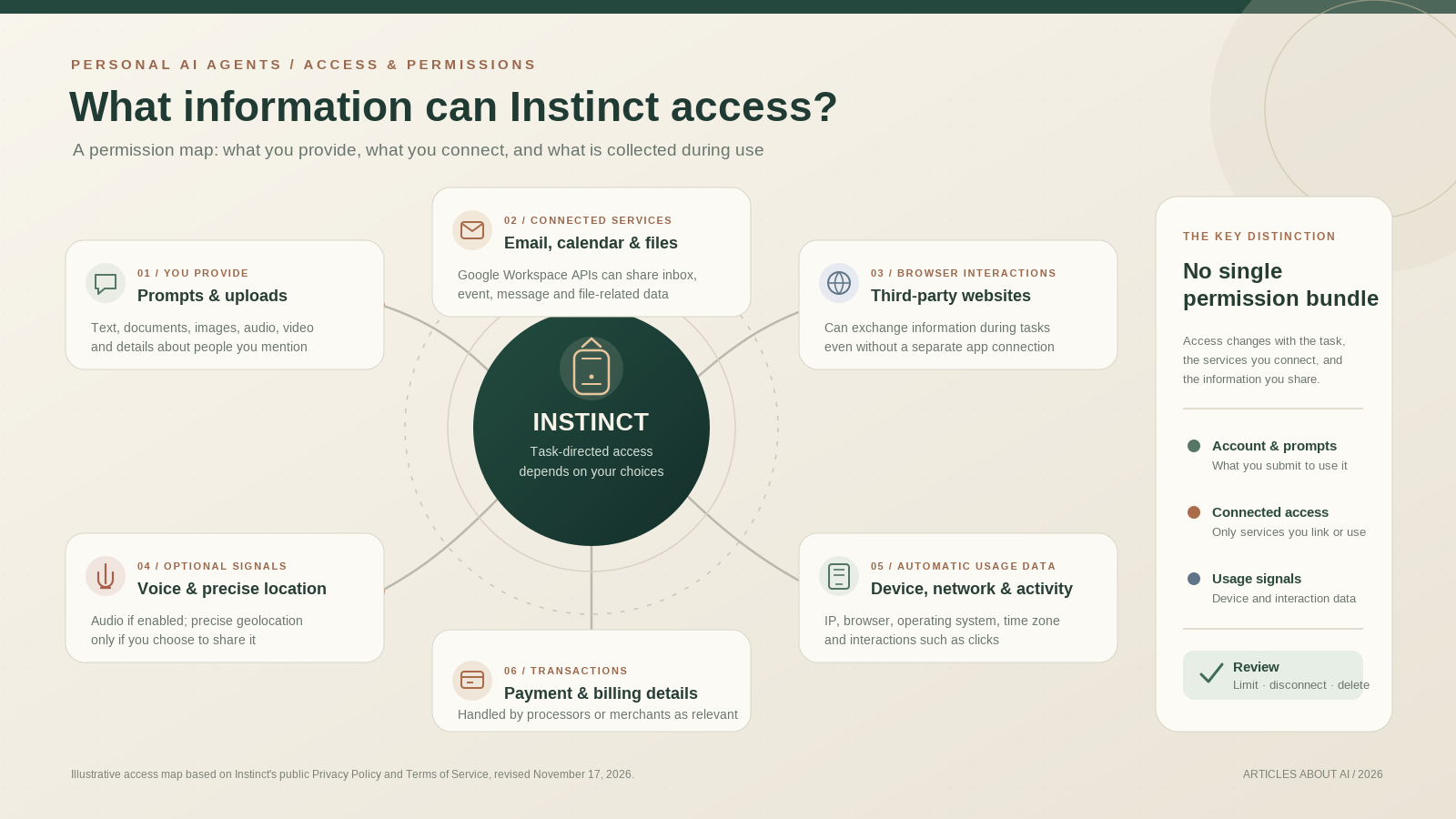
An AI assistant can only complete personal tasks when it has enough context to understand what you want and, sometimes, access to the services where the work needs to happen. That raises a practical question before connecting an inbox, calendar, browser session, or payment method: what information does Instinct AI actually need to access?
The answer is not one universal list of permissions. Instinct’s Privacy Policy says the information it receives depends on what you choose to share and how you use the service. Some information is supplied directly in prompts or account details. Other information becomes available only when you connect a third-party service, enable a feature, share a location, or ask the assistant to interact with a website. The policy also describes device and usage information collected during ordinary use.
This guide separates those categories, explains what is optional or task-dependent, and shows how to review and revoke access. It is based on the public Instinct Privacy Policy and Terms of Service, both last revised on November 17, 2026. It does not assume that every feature or permission is available to every account.
The short answer: Instinct does not need every category for every task
Instinct is designed to work through messages or calls and to use a phone and computer to carry out user-directed tasks. The official website gives examples such as ordering groceries, booking a train, and sending flowers. Those tasks may require different information. A grocery request might need a delivery address and product preferences; a calendar task may need event details; a simple research question may need only the prompt and public web information.
The privacy policy makes the same distinction: what Instinct collects depends on what you provide, what you make available, and which features you enable. Linking Google Workspace is described as a choice, not as a universal prerequisite for every use of the assistant.
The important distinction is between information you submit, services you authorize, and signals collected as you use the service. They should not be treated as one blanket permission.
What information can Instinct AI access?
The categories below are drawn from the company’s current privacy documentation. They describe information that may be processed, not a claim that every item is required from every user.
1. Account and contact information
When you create or maintain an account, Instinct may receive contact and account details. Its Privacy Policy lists examples such as:
- Name
- Phone number
- Email address
- Birthday
- Gender
The list describes categories the company may collect; it does not establish that every field is mandatory for every account or feature. The Terms say that if an account is required, the user must provide accurate, complete, and updated account information and protect their login credentials.
Your phone number and email address can also be relevant to the messaging channel you choose. The Terms explain that you may interact with Instinct through a third-party messaging platform without downloading a separate Instinct app, but you are responsible for having any separate account needed for that platform.
2. Prompts, messages, files, and uploads
Anything you deliberately send to Instinct can become part of the information it processes. The policy lists prompts and other content supplied through the service, including:
- Text and written instructions
- Documents and other files
- Images and screenshots
- Audio and video
- Other data included in a message or upload
This category can include information about other people. For example, a request to arrange a meeting may contain a colleague’s name and availability; a travel request may include a companion’s details; a restaurant request may mention an allergy. The policy notes that some information can be sensitive or special-category data depending on what you share.
A useful rule is to provide the context needed for the task, not an entire folder or conversation by default. If a short summary will do, avoid uploading a document containing unrelated personal information.
3. Connected services: Gmail, Calendar, and related data
Connecting an outside account gives Instinct access to information made available by that service. The clearest example in the current policy is Google Workspace.
If you choose to link Google Workspace, Instinct says it may receive information from Google products such as your email inbox and calendar. The policy also identifies related file and message metadata, calendar-event details, and other content Google shares through Workspace APIs.
That can be useful for tasks such as finding a message, checking an appointment, preparing a reply, or coordinating a schedule. It also means that the information available to the assistant can extend beyond the text of the prompt you send at that moment.
The policy does not publish a complete, feature-by-feature table of OAuth scopes or a definitive list of every Gmail and Calendar permission shown to every user. It would therefore be inaccurate to claim that all accounts receive an identical set of read, send, edit, or delete permissions. The consent screen and the connected-service settings shown in your own account are the place to inspect the access being requested.
Google’s Workspace User Data and Developer Policy sets out Limited Use requirements for data obtained through Workspace scopes. Instinct’s privacy policy says its use of Google Workspace API information adheres to Google’s User Data Policy, including Limited Use.
For practical examples, see the guides to managing Instinct AI emails and follow-ups and organizing calendars and appointments.
4. Browser interactions with third-party websites
A connected-app list is not necessarily the whole picture. Instinct’s Privacy Policy says its browser functionality may interact with third-party websites, applications, and services even when you have not separately connected each one to Instinct.
This is how an assistant may carry out a task on a website—for example, looking up a service, preparing a reservation, or writing an email through a browser-based workflow. It does not mean that Instinct has permanent, unrestricted access to every account on the internet. The actual information available depends on the website, the task, and any sign-in or account details involved.
The Terms also say that Instinct may access, copy, collect, index, exchange, and act on information from third-party services in connection with user-directed tasks. Users remain responsible for ensuring that actions comply with the third party’s terms.
5. Location information
The policy distinguishes between approximate location information and precise geolocation that you choose to share.
Approximate location may be collected as usage information. Precise geolocation is described as information shared if you choose to provide it. Location can be relevant when a task depends on nearby services, travel, delivery, or local availability, but the public policy does not say that precise location must be enabled for every task.
If a request does not need your exact position, provide a city or neighborhood instead of sharing a precise location. If you do enable location access on a device, review the device’s own location controls as well as any settings inside the service.
6. Voice and audio
Instinct’s policy says it may collect audio and voice data if you enable those features. This is different from the text and files you send in a normal message.
If you prefer not to use voice, do not enable voice-related features unless you need them. If you do use them, avoid speaking passwords, one-time codes, payment-card numbers, or other secrets into a voice interaction.
7. Device, network, and usage information
Some information is collected as part of using the service rather than being typed into a prompt. Instinct’s Privacy Policy lists examples such as:
- IP address
- Device type and operating system
- Browser type and version
- Time-zone setting
- Dates and timestamps
- Usage information such as clicks, navigation, and time spent on pages
- Cookies, pixels, and similar tracking technologies
The policy says these signals can help operate, secure, personalize, and analyze the service. It also notes that blocking cookies may cause some features or general functionality to work incorrectly.
8. Payment and transaction information
Payment information can enter the picture in two different ways.
First, the privacy policy lists credit- or debit-card information and billing address among information collected through a third-party payment processor when you provide payment details for the service.
Second, if you ask Instinct to make a purchase on another website, its Terms say relevant information—including your payment method—may be shared with the third-party service or its payment provider to complete the transaction. The Terms describe Instinct as facilitating the interaction; the user is the buyer, and the purchase remains subject to the merchant’s prices, fees, shipping, cancellation, and refund rules.
This does not mean that Instinct needs your bank password for ordinary use. Do not send banking credentials or one-time verification codes in a prompt. If a task requires signing in to a payment or shopping account, understand the exact authentication flow before proceeding and review the transaction yourself.
9. Group chats and information about other people
The Terms say you may be able to add Instinct to group chats or other communications. If you do, you authorize it to access and process communications and other content made available in that chat. You are responsible for obtaining any permissions needed from the other participants. The Terms say you can remove Instinct from the group chat to stop its continued participation.
This matters in family, workplace, and community chats. Do not add an assistant to a conversation containing private information unless the participants understand that an AI assistant may process the content.
Which access is essential, optional, or task-dependent?
The table is a practical guide based on the public documents, not a substitute for the permission screen in your account.
| Information or access | How it becomes available | Practical classification |
|---|---|---|
| Account and contact details | Account setup and service administration | May be needed for an account; exact fields can vary |
| Prompts and uploads | You send text, files, images, audio, or video | User-provided |
| Gmail and Calendar data | You choose to link Google Workspace | Optional connection |
| Other third-party services | You connect a service or provide account information | Task-dependent |
| Browser interactions | The assistant uses browser functionality for a task | Task-dependent |
| Approximate location | Collected as usage information | May be collected during use |
| Precise location | You choose to share it | Optional |
| Voice and audio | You enable or use voice features | Optional feature |
| Device and usage signals | Collected while interacting with the service | Automatically collected |
| Payment details | A paid feature or third-party purchase requires them | Transaction-dependent |
| Group-chat content | You add Instinct to a group conversation | Optional and context-dependent |
The most important limitation is that the public documents describe data categories and processing purposes, but do not provide a complete permission matrix for every feature, device, or account. If an authorization screen asks for access that appears broader than the task requires, pause and review it rather than assuming it is unavoidable.
Does Instinct need your Google password?
The public documentation does not say that every user must give Instinct a Google password. It describes Google Workspace as a service you can choose to link and says information is received through Google Workspace APIs.
For other connected services, the Terms say Instinct may interact with services you connect or for which you provide login credentials or other account information. That is a broader description and does not establish that every connection uses the same sign-in method.
Prefer an official authorization flow that clearly identifies the service and requested access. Do not paste a password, recovery code, or one-time passcode into a chat merely because an assistant asks for it. If the sign-in process is unclear, stop and verify the request through the service’s official website.
Google’s developer policy says applications should request only the minimum relevant permissions needed for their features and should explain why the data is needed. That is a useful standard when reviewing any Google authorization screen.
What happens after Instinct receives the information?
Access and data use are related, but they are not the same thing. Receiving information to complete a task does not automatically mean that every category is used for every other purpose.
Instinct’s policy says it may share information with service providers involved in hosting, system administration, payment processing, security, analytics, and AI model operations. It also says information from outside the United States may be transferred to, remotely accessed, stored, or processed in the United States or other countries.
There are specific distinctions for Google Workspace and Vault:
- Google Workspace API data: Instinct says it does not use information received directly through Workspace APIs to train, fine-tune, evaluate, or improve AI models, and does not use it for advertising.
- Vault materials: The policy says materials added to Vault are used to provide Instinct to you and are not used to train AI models.
- Other service materials: The company says certain materials may be used to develop and improve its products, including model training. Users can opt out through Instinct settings. The opt-out applies going forward, has a stated safety-review exception, and does not reverse earlier training.
These are policy commitments, not a technical audit of the systems. For a fuller examination of the implications, see Is Instinct AI Safe to Use? Security and Privacy Explained.
How to review, disconnect, or request deletion
If you have connected a service and no longer want Instinct to receive new information from it, the company’s policy points users to Workspace settings.
There is an important distinction between disconnecting and deleting previously collected information:
- Disconnect the service. This stops Instinct from receiving new information from that connection.
- For Google Workspace, check the specific rule. Instinct says it will no longer retain or use data collected from a disconnected Google Workspace account, except where required by law or regulation.
- For other connected services, request deletion separately. The policy says previously collected data may remain, including material already included in conversation history. It directs users to contact [email protected].
- If you want to delete the account, treat that as a separate request. Instinct says account deletion may take up to 90 days, and some records may be retained longer for legal, security, fraud-prevention, dispute, or financial-record purposes.
Do not assume that switching off model training disconnects an account, or that disconnecting an account automatically deletes every item already collected. These are separate controls.
A practical permission audit before connecting Instinct
Use this checklist before giving a personal AI agent access to another service:
- Start with the task. Write down exactly what you want the assistant to do. Do not connect an account just because an integration exists.
- Choose the narrowest useful source. If you only need help drafting an email, consider sharing the relevant thread rather than connecting an entire mailbox.
- Read the authorization screen. Check the service name, the data categories, and whether the access appears to be read-only or allows changes. The public policy does not replace the account-specific consent screen.
- Keep unrelated accounts separate. Avoid connecting financial, medical, identity, or work accounts unless the task clearly requires them and the benefit justifies the exposure.
- Limit sensitive prompts. Remove unnecessary names, addresses, account numbers, attachments, and personal details about other people.
- Set an approval boundary. Ask Instinct to prepare a message, booking, or purchase for review before it sends, confirms, or pays.
- Protect the account itself. Use a unique password and multi-factor authentication where available. The FTC’s account-security guidance recommends strong passwords and two-factor authentication.
- Review group-chat consent. Make sure participants understand that Instinct may process content before adding it to a shared conversation.
- Check the result. Confirm important messages, bookings, purchases, and account changes directly with the relevant service.
- Revisit access periodically. Disconnect services you no longer need and submit a separate deletion request where appropriate.
For examples of task-specific access, see How to Use Instinct AI to Manage Everyday Tasks and How to Use Instinct AI to Manage Subscriptions and Recurring Tasks.
Is Instinct AI free, and does access vary by country?
As of November 26, 2026, Instinct’s Terms of Service, last revised November 17, state that the service is currently available without charge. The same terms reserve the right to introduce fees later and say users will receive notice before applicable fees become payable. Mobile data or messaging charges from a wireless provider, and the cost of purchases made through third-party services, are separate.
The terms also say Instinct does not guarantee that every feature will be available on every device or in every geographic location. The official website currently offers login and an invitation route, but a public website alone does not establish that every person can access every feature immediately.
For current cost and access details, see Is Instinct AI Free? Pricing, Availability, and Access Explained.
Frequently asked questions
Does Instinct AI need access to Gmail?
No public document says Gmail access is mandatory for every user. The Privacy Policy describes Google Workspace linking as a choice. If you connect it, Instinct may receive inbox information and related metadata or content through Workspace APIs.
Can Instinct access my Google Calendar?
The policy specifically says a linked Google Workspace account can expose calendar information, including event details. The exact permission set for an individual account should be checked in its authorization screen.
Does Instinct need my precise location?
The policy distinguishes approximate location information from precise geolocation that you choose to share. It does not say that precise location is required for every task.
Does Instinct listen to my microphone all the time?
The public policy says audio and voice data may be collected if you enable those features. It does not describe continuous microphone recording as a universal requirement. Check the feature settings and your device’s microphone permissions.
Does Instinct need my bank password or card details?
The policy lists payment information collected through a third-party payment processor for service payments. The Terms also say a relevant payment method may be shared with a merchant or its payment provider when you authorize a third-party purchase. That is not a statement that a bank password is required for ordinary use.
Can I revoke access after connecting an account?
Yes. Instinct directs users to Workspace settings to disconnect connected services. The policy gives Google Workspace data a specific post-disconnection treatment and says other services may retain previously collected information until a separate deletion request is made.
Is Instinct currently free?
Yes. The Terms of Service state that it is currently available without charge as of November 26, 2026, but reserve the right to introduce fees after notice. Third-party purchases and mobile-provider charges are separate.
The bottom line
Instinct does not have one fixed information requirement for every task. It may process account details, prompts and uploads, connected-service data, browser interactions, location, voice, device signals, and payment information—but the route and purpose differ by category.
The most consequential choice is often whether to connect an account such as Google Workspace. That can make email and calendar tasks more useful, but it also gives the assistant access to private information beyond a single prompt. Before approving a connection, inspect the exact permissions, consider whether the task really needs them, and decide what should require your confirmation.
The safest approach is not to grant every possible access in advance. Start with the minimum information needed, expand only when a task genuinely requires it, and review or revoke access when it is no longer useful.