
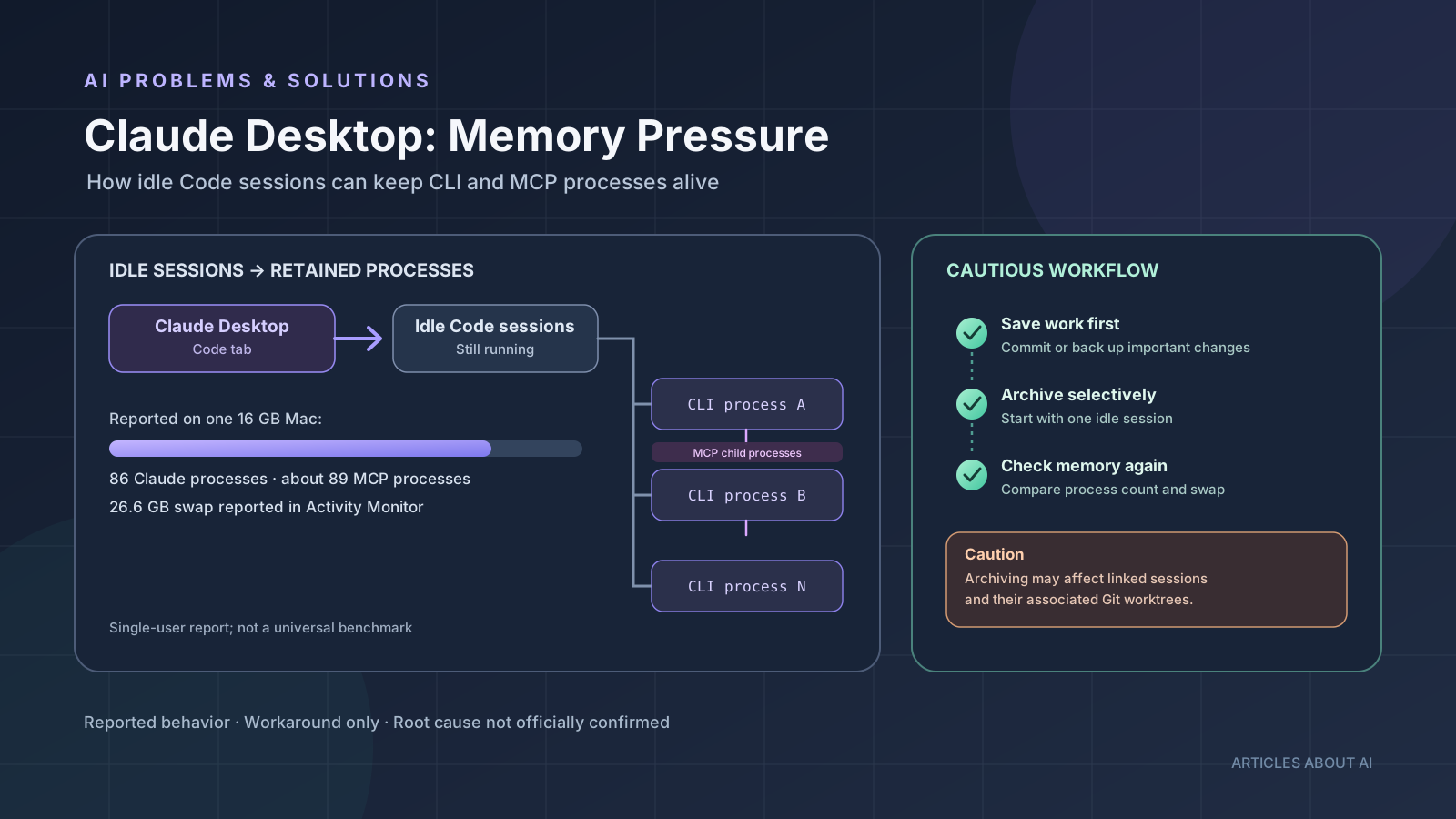
If Claude Desktop’s Code tab seems to use more memory the longer you work, a new macOS report suggests one possible reason to investigate: idle Claude Code sessions may keep their command-line processes and associated Model Context Protocol (MCP) servers alive after a turn has finished. In the reported setup, many sessions remained idle but still had live processes, adding memory pressure and swap usage over time.
This is a report from one user’s Apple Silicon Mac, not proof of a confirmed memory leak affecting every Claude Desktop installation. Anthropic had not confirmed a root cause or announced a universal fix in the issue examined for this guide. Treat the steps below as cautious troubleshooting, not as an official repair procedure.
What the new Claude Desktop memory report says
On October 24, 2026, a user opened Claude Code issue #104888, describing idle sessions in the Claude Desktop Code tab that continued to hold CLI and MCP processes. The reporter was using an Apple Silicon Mac with 16 GB of RAM, Claude Desktop with bundled Claude Code 2.1.304, and several MCP servers, including a Dart/Flutter-related server.
The report included these measurements from that machine:
- 86 Claude CLI processes, with approximately 2.6 GB of resident memory attributed to them.
- About 89 Dart MCP server processes or related process entries.
- 26.6 GB of swap reported in Activity Monitor at one point.
- After archiving approximately 94 idle sessions, the Claude process count dropped from 86 to 12, while the swap reading in the later comparison dropped from 16.7 GB to 3.5 GB.
These are user-reported observations, not independently reproduced benchmark results. The swap figures also come from the reporter’s observations at different points, so they should not be read as a controlled before-and-after performance test. The evidence is useful because it provides a specific troubleshooting lead: compare idle session count, live Claude processes, MCP child processes, and macOS memory pressure on the affected Mac.
Why idle Claude Code sessions may use memory
The reporter observed that sessions marked as not running could still have a live Claude CLI process. MCP servers launched for those sessions also appeared to remain alive. In that environment, the processes were reportedly released after the session was archived rather than when the session became idle.
That observation supports a possible relationship between idle sessions and retained processes in the reported setup. It does not establish the cause for other users, and it does not prove that every retained process is unnecessary. The issue could depend on the Claude Desktop version, session behavior, MCP server implementation, or a combination of factors.
The reporter expected idle sessions to release their CLI process and MCP children after a timeout, then resume when reopened. That is the reporter’s expected behavior, not a documented promise from Anthropic. Until the maintainers investigate and clarify the intended lifecycle, describe the issue as a reported process-retention problem rather than a confirmed, universal Claude Desktop memory leak.
Step 1: Measure memory and process counts before changing anything
Start by checking whether the symptom matches the report. On macOS, open Activity Monitor and review the Memory tab. Note the memory pressure graph, swap used, and processes associated with Claude Desktop, Claude Code, and any MCP servers you recognize.
For a command-line count similar to the one in the report, open Terminal and run:
pgrep -af 'claude-code/.*output-format stream-json'
This lists matching processes rather than changing or terminating them. The exact command output can differ by version and installation, so do not assume every Claude process will match that pattern. You can count matching lines if useful, but keep the full process list available for inspection.
If you use MCP integrations, check which servers are configured and whether one server launches a separate process for each session. Do not terminate unfamiliar processes simply because they contain the word “claude” or “MCP”; first determine what they belong to and whether they are serving active work.
Record a baseline before troubleshooting: current memory pressure, swap usage, Claude-related process count, and the number of sessions you know are idle. This makes it easier to see whether a change helped.
Step 2: Archive one idle session as a cautious test
The reporter said that archiving idle sessions reduced the number of live Claude processes in their environment. That makes selective archiving a reasonable test if you have confirmed that a session is genuinely inactive and no longer needed.
Before archiving, take these precautions:
- Save or commit important code changes, and make a backup if the work is valuable.
- Check whether the session has linked sessions, subagents, or an associated Git worktree.
- Archive just one clearly idle session first.
- Return to Activity Monitor and compare the Claude process count and memory pressure.
- Repeat only if the result is clear and the first test has not affected work you need.
Do not archive dozens of sessions at once as a first attempt. The original report noted an unexpected side effect: archiving one session also archived linked side sessions, including one that owned a Git worktree. The branch survived in that case, but the behavior was not what the reporter expected. That is a reason to proceed gradually and verify the state of linked work.
Archiving is a user-reported workaround, not a confirmed fix from Anthropic. If archiving does not change the process count or memory pressure on your system, stop and investigate other causes instead of continuing to archive sessions.
Step 3: Check MCP servers and their process behavior
MCP integrations can launch their own processes, and the report associated retained processes with servers used by individual sessions. This does not mean MCP itself is defective; a server may be behaving as designed while its parent session remains alive.
Make a short inventory of the MCP servers enabled in Claude Desktop and Claude Code. Note which ones are essential, which launch separate processes, and whether the same server is enabled globally or across multiple projects. If you suspect one integration, test with it disabled only after saving your configuration and confirming that you can restore it.
Do not delete MCP configuration files or remove server settings indiscriminately. The report does not establish that changing MCP configuration is necessary to resolve the process-retention behavior. Its main observation was that archiving sessions correlated with a reduction in live processes in that specific environment.
For additional context on a different Claude troubleshooting case, see our guide to fixing Claude Code API no-response errors. If your actual problem is missing conversation history rather than memory usage, read our guide to Claude Code missing transcript messages on Windows. Those are separate symptoms and should not be treated as the same bug.
Step 4: Recheck memory after a controlled change
After archiving one session or temporarily disabling a suspected MCP integration, give the system time to settle and check Activity Monitor again. Compare the process count, memory pressure, and swap usage with your baseline. A change in swap alone does not prove the underlying process lifecycle is fixed, and macOS memory figures can vary as the system reclaims and compresses memory.
If the process count remains high, restart Claude Desktop only after saving work and confirming that no active tasks depend on its running sessions. Then recheck the process list. A restart can be a diagnostic step, but the report does not establish it as a permanent fix.
If memory usage continues to rise, collect the Claude Desktop version, macOS version, approximate number of idle sessions, MCP servers enabled, and relevant process counts. Remove personal paths, account details, tokens, and other secrets before posting logs publicly.
What not to do
Avoid aggressive cleanup based only on a high memory number.
- Do not force-quit every Claude or MCP process blindly. Some may belong to active sessions or work.
- Do not delete session storage or configuration files as a first step. The report does not show that deleting data is required.
- Do not archive all sessions without checking linked work. The reporter observed linked sessions being archived as a side effect.
- Do not assume a high swap reading alone proves a memory leak. It is a signal to investigate alongside process counts and memory pressure.
- Do not present this report as a confirmed issue affecting all macOS users. It is one detailed report, and the root cause was not officially confirmed in the source examined.
Is this a confirmed Claude Desktop memory leak?
Not yet, based on the cited issue. The reporter provided a detailed reproduction idea and process measurements, but a user report is not the same as a confirmed diagnosis by Anthropic. The observed process retention may be a lifecycle bug, an interaction with session management, an MCP integration issue, or a behavior limited to a particular setup.
The most accurate description is that a new report alleges idle Claude Code sessions can keep CLI and MCP processes alive on macOS, with high memory and swap usage in the reporter’s environment. Watch the original issue for maintainer responses, reproduction details, and any fix or workaround confirmed by the project.
Frequently asked questions
Does Claude Desktop use too much RAM on every Mac?
The available report does not show that. It describes one Apple Silicon Mac with 16 GB of RAM, a particular Claude Desktop and Claude Code setup, and multiple MCP integrations. Other users may have different results.
Will archiving idle Claude Code sessions reduce memory usage?
It reduced the process count and was associated with lower swap usage in the reporter’s environment. Your result may differ. Archive one session at a time, protect important work, and verify the effect before doing more.
Can MCP servers cause high memory usage?
An MCP server can run as a separate process, and the reporter observed many MCP-related processes associated with idle sessions. That does not establish that MCP servers are inherently faulty or that every server contributes equally to memory pressure.
Should I disable every MCP server?
No. Disable only a server you have reason to test, preserve the configuration first, and confirm that active workflows will not be disrupted. The report does not identify disabling all MCP servers as a verified fix.
Has Anthropic released a permanent fix?
The issue cited here was open when reviewed, and no official root-cause confirmation or universal fix was established by the source. Check Claude Code issue #104888 for the latest maintainer response before treating any workaround as permanent.
The bottom line
A report published on October 24, 2026 describes Claude Desktop on macOS retaining Claude Code and MCP processes for idle sessions, with substantial memory pressure on one 16 GB Mac. Archiving idle sessions reduced the reporter’s process count, but it also produced an unexpected side effect involving linked sessions and a Git worktree.
If you see a similar pattern, measure process counts first, save important work, test archiving one idle session, and verify the result. The report is a useful troubleshooting lead, not proof of a universal memory leak or an official Anthropic fix.
Sources
- Claude Code issue #104888: macOS desktop idle sessions keep CLI and MCP processes alive — original report opened October 24, 2026.
- Claude Code issue tracker — check for subsequent maintainer responses and fixes.
- Fix Claude Code API no-response errors — related internal troubleshooting guide.
- Claude Code missing transcript messages on Windows — related guide for a different symptom.