
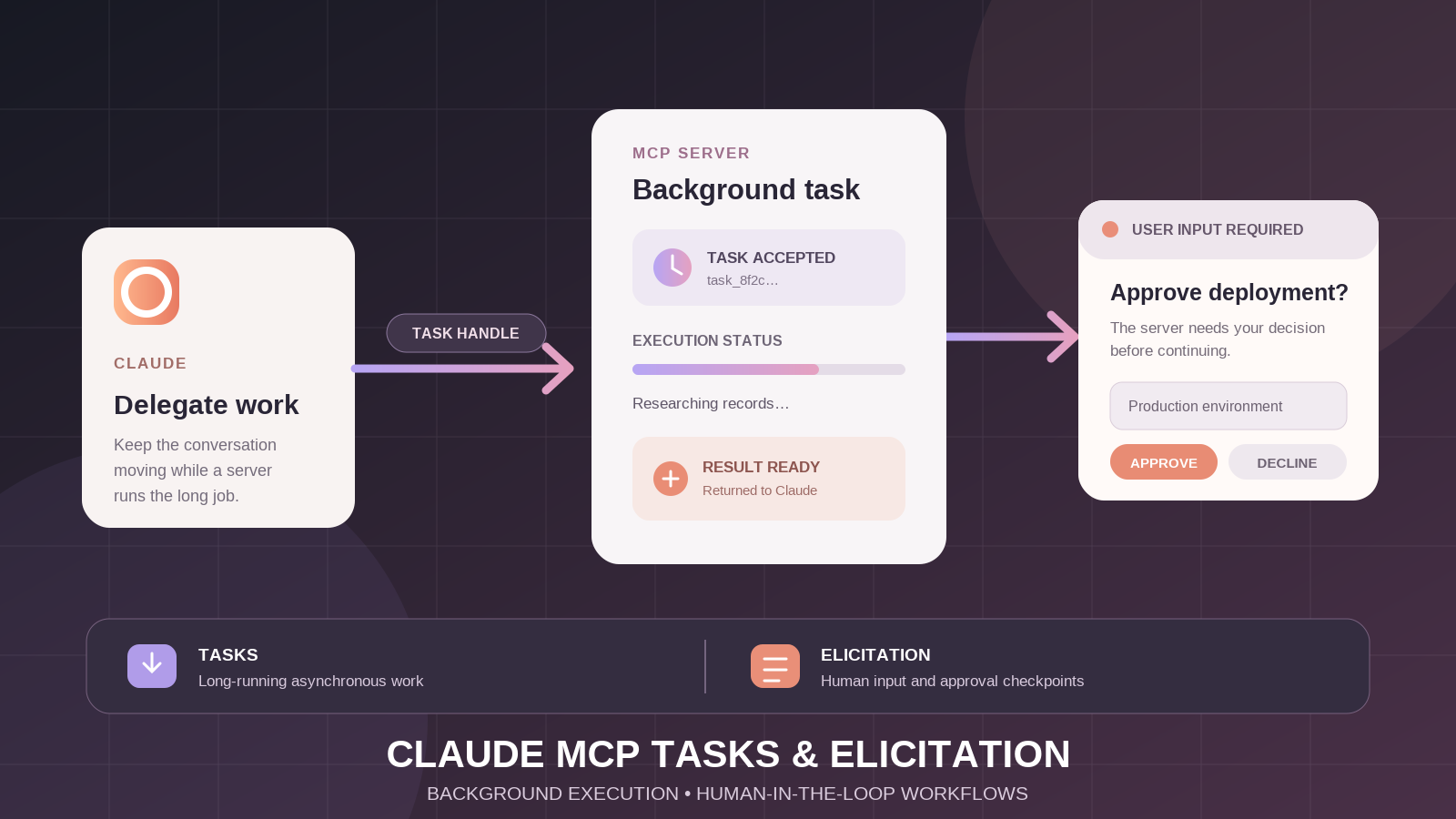
Anthropic has made two important Model Context Protocol (MCP) capabilities generally available in Claude and Claude Code: MCP Tasks and Elicitation. Announced on November 24, 2026, the features help Claude work with connected services when an operation takes longer than a normal tool call or needs a decision from the user before it can continue.
MCP Tasks let a server accept a long-running operation and return a task handle while the work continues. Elicitation lets a server pause an interaction and request structured information or approval through the client. Together, they make MCP workflows better suited to research, deployments, data operations, account changes, and other multi-step jobs.
This guide explains what each feature does, how they work together, what Claude plan access looks like, how developers can implement them, and the compatibility and security details worth checking before relying on them.
What changed in Claude MCP on November 24, 2026?
Anthropic’s announcement covers several MCP updates. The two relevant to this guide are:
- Tasks: MCP servers can run longer operations or agent loops in the background. Claude can continue working and retrieve the result when the server reports completion.
- Elicitation: An MCP server can ask the user for information or approval in the middle of a tool interaction, then continue after receiving a response.
Anthropic says Tasks and Elicitation are generally available in Claude and Claude Code for Pro, Max, and Ultra plans, and are rolling out to Team and Enterprise organizations. Availability in an organization can depend on rollout status and administrative controls.
The same announcement introduced Skills over MCP in public beta. Skills let an MCP server provide workflow instructions and domain expertise alongside its tools. They are related to the broader update, but they are not the same as Tasks or Elicitation:
| Capability | Main purpose | Example |
|---|---|---|
| MCP Tools | Perform an action or retrieve information | Search a CRM or create an issue |
| Skills over MCP | Supply instructions and reusable workflow knowledge | Explain the approved process for onboarding a customer |
| MCP Tasks | Run a long operation without holding the original tool call open | Generate a large report or run a deployment |
| MCP Elicitation | Request missing information or a human decision mid-workflow | Ask for confirmation before deleting a service |
The important change is not simply that Claude has more connectors. MCP servers can now support a more complete workflow: give Claude instructions, accept delegated work, ask the user a question when needed, and return the result.
What are MCP Tasks?
MCP Tasks are an extension to the Model Context Protocol for asynchronous, long-running operations. Instead of keeping a tool call open until every step finishes, a server can return a durable task handle. The client can check the task’s status and retrieve its result later.
This is useful when an operation may take seconds or minutes—or longer—because it depends on an external job system, a batch process, a deployment, or a multi-stage workflow.
How MCP Tasks work
A typical task follows this sequence:
- Claude calls a tool exposed by an MCP server.
- The server determines that the requested operation should run as a task.
- The server creates a task and returns a task ID with its initial status.
- Claude can continue with other work instead of waiting for the full operation.
- The client checks the task status at the suggested polling interval.
- When the task finishes, the client retrieves the final result or error and makes it available to Claude.
The MCP Tasks extension defines task states that help the client understand what is happening:
| Status | Meaning |
|---|---|
working |
The server is still processing the operation |
input_required |
The server needs information or a response before continuing |
completed |
The task finished and has a result |
failed |
The operation ended with an error |
cancelled |
The task was cancelled |
A task also has metadata such as a task ID, timestamps, an optional status message, a time-to-live (TTL), and a suggested polling interval. The server is responsible for managing the durable task state.
Example: research that takes several minutes
Imagine asking Claude to investigate 200 companies, collect public information, compare each company’s product focus, and prepare a structured report.
Without asynchronous task support, a server may have to keep one tool request open while it processes the entire list. Long waits can run into connection or request timeouts.
With MCP Tasks, the server can accept the research job and return a task handle. Claude can move on to another part of the conversation while the server continues. When the task completes, Claude can retrieve and summarize the report.
Other suitable use cases include:
- Exporting a large dataset from a business platform
- Running a CI pipeline or test suite
- Building a report from multiple external systems
- Processing a batch of records
- Triggering a cloud deployment
- Waiting for a queued job in an external service
- Running a server-side agent loop with multiple steps
Tasks do not make an operation instant. They provide a better way to represent and follow work that takes time.
What is MCP Elicitation?
Elicitation is the MCP mechanism that allows a server to request additional information from the user through the client during an interaction. The server can pause, explain what it needs, display a form or ask the user to open a URL, and then continue after the user responds.
This matters because an AI agent should not guess important details or silently make consequential decisions. A deployment may need an environment name. A billing action may need explicit approval. A destructive database operation may require a human to confirm the target.
MCP Elicitation supports two modes.
1. Form mode
In form mode, the MCP server requests structured information that the client presents to the user. The request can include a JSON Schema describing the fields and expected values.
For example, before creating a paid cloud project, a server could ask the user to confirm a project name, select a region, and acknowledge an estimated cost. The client collects the response and passes it back to the server.
Form mode is useful for:
- Confirming a project or repository name
- Selecting an environment such as staging or production
- Choosing from a list of options
- Confirming a non-sensitive action
- Supplying a missing date, identifier, or configuration value
- Approving a workflow step before it proceeds
The user should be able to review the requested information and decline or cancel the request.
2. URL mode
URL mode sends the user to an external page to complete an interaction outside the MCP client. This is especially important for sensitive flows such as signing in or authorizing access to another service.
For example, a service may need the user to complete an OAuth authorization step in a browser. The MCP client can show the destination and ask whether the user wants to open it. The server handles the sensitive credential flow outside the client conversation.
The MCP specification says clients should clearly display the target domain and obtain consent before navigating to the URL.
A critical security rule: do not request secrets in a form
MCP’s Elicitation specification explicitly prohibits servers from using form mode to request sensitive information such as:
- Passwords
- API keys
- Access tokens
- Payment credentials
Use URL mode for interactions involving these secrets so that the credentials do not pass through the MCP client as ordinary form data.
A well-designed server should request only the minimum information required, explain why it needs that information, and let the user decline.
How Tasks and Elicitation work together
Tasks and Elicitation solve different problems, but the MCP Tasks extension can use Elicitation while a job is running.
Consider a server that deploys an application to a cloud environment:
- Claude asks the deployment server to prepare a release.
- The server accepts the operation and returns a task handle.
- The task runs validation and prepares the deployment.
- Before production deployment, the server needs a human approval.
- The task moves to
input_requiredand includes an elicitation request. - Claude’s client displays the question or approval form.
- The user approves, declines, or supplies the requested information.
- The client sends the response back through the task update flow.
- The server resumes the operation and eventually reports completion or failure.
This creates a human-in-the-loop workflow: the server can perform the technical work, but a person remains involved at the decision points that matter.
Anthropic highlights practical examples from its ecosystem:
- Supabase: confirm costs before creating a paid project and before running destructive SQL.
- Railway: request approval before potentially destructive changes, such as removing a service.
- GitHub: ask the user to provide a repository name before an agent deletes it.
- ZoomInfo: use Tasks for deeper account and contact research that previously required several prompts.
These are examples described by Anthropic, not a claim that every MCP integration automatically supports every workflow.
How to use MCP Tasks in Claude Code
For developers using Claude Code, MCP Tasks can appear when a tool call and session meet the required compatibility conditions. Start by updating Claude Code and checking that the MCP server itself supports the Tasks extension.
Step 1: Check your Claude Code version
Anthropic’s current MCP documentation lists Claude Code v2.1.304 or later for MCP Tasks in supported terminal sessions. VS Code and local desktop app sessions have a later requirement: v2.1.331 or later, along with feature-flag fetching.
Check the installed version in your terminal:
claude --version
If the installed version is older than the requirement for your environment, update Claude Code using the installation method you normally use, then start a new session.
Step 2: Confirm that your MCP server supports Tasks
A client cannot turn an ordinary server operation into a server-side MCP Task by itself. The server must implement the Tasks extension and advertise support. The client and server also need to negotiate the appropriate protocol capabilities.
If the server does not support Tasks, the tool may continue to run as a regular synchronous call, or it may return a capability error if task support is required.
Step 3: Call the MCP tool normally
When the server and session support Tasks, Claude can call the relevant tool in the usual way. The server decides whether that particular operation should be returned as a task.
You do not need to invent a special prompt syntax for every task-enabled server. Ask Claude to perform the operation and let the server’s implementation determine whether it should run asynchronously.
For example:
Run the full integration test suite using the connected build server. If the server supports MCP Tasks, let the job continue in the background, report its progress, and summarize the final result. Do not deploy anything or modify production resources.
Step 4: Monitor or stop the task
In a supported interactive Claude Code terminal session, use:
/tasks
The task interface lets you inspect active tasks. You can select a task and request cancellation. You can also ask Claude for the result after the task completes.
Cancellation is not a guarantee that the underlying work has stopped. The server may already have performed some actions, or the external job may continue despite the cancellation request. Verify the actual state in the service that owns the job.
How to respond to MCP Elicitation requests in Claude Code
When a server requests additional information, Claude Code can display an interactive dialog in the terminal. The server may request a form response or ask you to open an external URL.
- Form mode: review the requested fields, enter the required values, and submit or decline.
- URL mode: review the destination, approve opening the link if appropriate, and complete the external flow.
- Unexpected or risky request: decline it and verify why the server needs the information before trying again.
No special client-side setup is required for the standard interactive terminal flow when the server requests a supported elicitation mode. Developers building their own MCP server still need to implement the protocol correctly and handle declines, cancellations, and client capability differences.
Claude MCP Tasks compatibility: what works and what to check
General availability in Claude does not mean every MCP server, client, session, or account can use Tasks in exactly the same way. The server must support the extension, and the client must advertise the capability for the current connection.
Anthropic’s Claude Code documentation describes different support conditions by environment:
| Environment | Important compatibility notes |
|---|---|
| Claude Code terminal | MCP Tasks are enabled for supported interactive sessions on v2.1.304 or later |
| Claude Code VS Code extension | Requires v2.1.331 or later and feature-flag fetching |
| Claude Code desktop app local sessions | Requires v2.1.331 or later and feature-flag fetching |
| Claude Code cloud sessions | Supported with eligible Claude connectors that implement the required protocol revision |
One-shot claude -p "prompt" |
Does not receive MCP Tasks in the standard one-shot mode |
| Agent SDK or stream-JSON runs | Require the documented background-task configuration and an open input stream |
There are additional limitations worth knowing:
- A task that asks a question may not be answerable in every client surface. Some VS Code and desktop app sessions may cancel the task unless an Elicitation hook handles the request.
- A server configured only through
claude_desktop_config.jsondoes not automatically receive MCP Tasks in the local Claude Code desktop session described in Anthropic’s documentation. - Some cloud chat and project contexts do not support task execution. A new chat or a supported terminal session may be necessary.
- Tasks can continue on a remote server after the Claude Code session exits, but a local stdio server process stops when Claude Code exits.
- A task’s tracking handle can expire or become unavailable even if the underlying external job has not stopped.
For these reasons, check the official compatibility section for your exact Claude Code environment before designing a workflow that depends on asynchronous tasks.
Developer guide: implementing Tasks and Elicitation in an MCP server
If you maintain an MCP server, implementing these features requires more than changing a tool description.
Implement Tasks for long-running operations
A task-enabled server should:
- Check that the client has declared the Tasks extension capability.
- Decide whether the requested operation should run synchronously or as a task.
- Create durable task state before returning the task handle.
- Return a unique task ID, an initial status, a TTL, and a suggested polling interval.
- Update task status as the worker progresses.
- Store the final result or a structured error.
- Handle cancellation requests and document whether cancellation is cooperative.
- Enforce task ownership and protect task identifiers from enumeration or unauthorized access.
The MCP Tasks lifecycle uses operations such as tasks/get, tasks/update, and tasks/cancel. The extension documentation describes the task state model and the way a task can request mid-flight input.
Implement Elicitation for user decisions
An MCP server should use Elicitation only when the workflow genuinely needs user input. A robust implementation should:
- Explain why the input is required.
- Identify the server requesting the information.
- Request only the fields necessary to continue.
- Use a schema that validates the expected response.
- Handle acceptance, decline, cancellation, and client errors.
- Use URL mode for credentials and other secrets.
- Avoid treating a missing response as approval.
Do not assume every MCP client supports every elicitation mode. Check the capability information provided by the client and provide a safe fallback when the required mode is unavailable.
Example: a production deployment approval
A deployment server might request a boolean confirmation before proceeding:
{
  "method": "elicitation/create",
  "params": {
    "mode": "form",
    "message": "Approve deployment to production?",
    "requestedSchema": {
      "type": "object",
      "properties": {
        "approved": {
          "type": "boolean",
          "title": "Approve production deployment"
        }
      },
      "required": ["approved"]
    }
  }
}
This is an illustrative form-mode request based on the MCP Tasks extension documentation. A real server must also implement the surrounding task lifecycle, validate the response, and ensure that the approval is tied to the correct user and operation.
Security and reliability best practices
MCP Tasks and Elicitation make agent workflows more capable, but they do not remove the need for access controls and careful system design.
Keep approval separate from execution
A request to approve a deployment should clearly identify the target environment and the consequences. Avoid vague prompts such as “Continue?” when the action can delete data, incur costs, or affect production.
Do not put credentials in elicitation forms
Never ask users to paste passwords, API keys, access tokens, or payment credentials into form-mode elicitation. Use a secure external authorization flow through URL mode.
Validate every response on the server
A client form is not a substitute for server-side validation. Validate the response against the expected schema and re-check authorization before performing the requested operation.
Treat cancellation as a request, not proof of rollback
A cancellation message does not necessarily reverse actions already performed. Check the job’s state in the external service and design compensating actions where appropriate.
Protect task IDs and stored state
Task identifiers should be unguessable and associated with the correct user and server-side authorization context. Do not expose one user’s task results to another user.
Make retries safe
Long-running tasks may be retried after network interruptions. Design operations to avoid duplicate payments, repeated deployments, or duplicated records. Use idempotency keys or equivalent safeguards where the external service supports them.
MCP Tasks vs. ordinary background tool calls
Claude Code can also move some long-running tool calls into background execution. That is related to MCP Tasks, but it is not the same mechanism.
| Feature | What runs in the background | Who manages the job |
|---|---|---|
| Automatic backgrounding | A tool call that has exceeded the configured foreground threshold | Claude Code manages the background call |
| MCP Tasks | A durable asynchronous operation returned by an MCP server | The MCP server manages the task and its state |
The distinction matters when you close a session, reconnect, or need to retrieve a result later. A server-side MCP Task can persist on a remote server beyond the client session, subject to the server’s task retention and tracking rules. A client-managed background call has different lifecycle behavior.
Do not assume that seeing a background task indicator means the server implements the MCP Tasks extension.
Frequently asked questions
Are MCP Tasks and Elicitation available in Claude now?
Anthropic announced general availability for Pro, Max, and Ultra plans in Claude and Claude Code on November 24, 2026. The features are rolling out to Team and Enterprise organizations, so availability may depend on the organization’s rollout and settings.
Do I need to install an MCP plugin to use Tasks?
Not necessarily. The connected MCP server must support Tasks, and the client session must support and negotiate the extension. A server that does not implement Tasks cannot provide server-side task handles.
Can MCP Tasks run for hours?
The Tasks extension is designed for long-running work, including jobs that may take minutes or hours. Actual duration depends on server implementation, task retention, infrastructure, and client tracking limits.
Can Claude continue working while an MCP Task runs?
Yes. That is one of the main purposes of MCP Tasks. The server accepts the job and returns a task handle, allowing Claude to continue instead of waiting for the operation to finish.
Can an MCP server ask me a question after a task starts?
Yes. A task can enter the input_required state and provide an Elicitation request. The client presents the request, sends the user’s response back, and the server can resume the task.
Is Elicitation safe for passwords or API keys?
Do not use form mode for passwords, API keys, access tokens, or payment credentials. The MCP specification requires URL mode for interactions involving these secrets.
Does every Claude Code session support MCP Tasks?
No. Support depends on the Claude Code version, session type, protocol revision, feature-flag availability, server transport, and whether the MCP server implements Tasks. Consult Anthropic’s compatibility documentation for the exact environment.
Does cancelling a task guarantee that the operation stops?
No. Cancellation is cooperative. The server or external service may have already completed some work or may continue running. Verify the actual job state before repeating an operation.
Final take: why MCP Tasks and Elicitation matter
MCP Tasks and Elicitation address two practical limits of tool-connected AI agents. Tasks give Claude a way to delegate operations that take time without blocking the conversation. Elicitation gives servers a structured way to ask for missing information or human approval before continuing.
The combination is particularly useful for deployments, database operations, large exports, research pipelines, and business workflows where an agent needs both autonomy and clear human checkpoints.
For users, the key is to connect only trusted MCP servers and review each approval request. For developers, the key is to implement capability negotiation, durable task state, safe elicitation, cancellation handling, and server-side authorization. These details are what turn a promising demo into a dependable agent workflow.
Official sources and documentation
- Anthropic: MCP servers can now ship skills, run tasks, and more with Claude — November 24, 2026
- Claude Code documentation: Connect Claude Code to tools via MCP
- Model Context Protocol: Tasks extension overview
- Model Context Protocol: Elicitation specification
- Model Context Protocol: Specification overview