
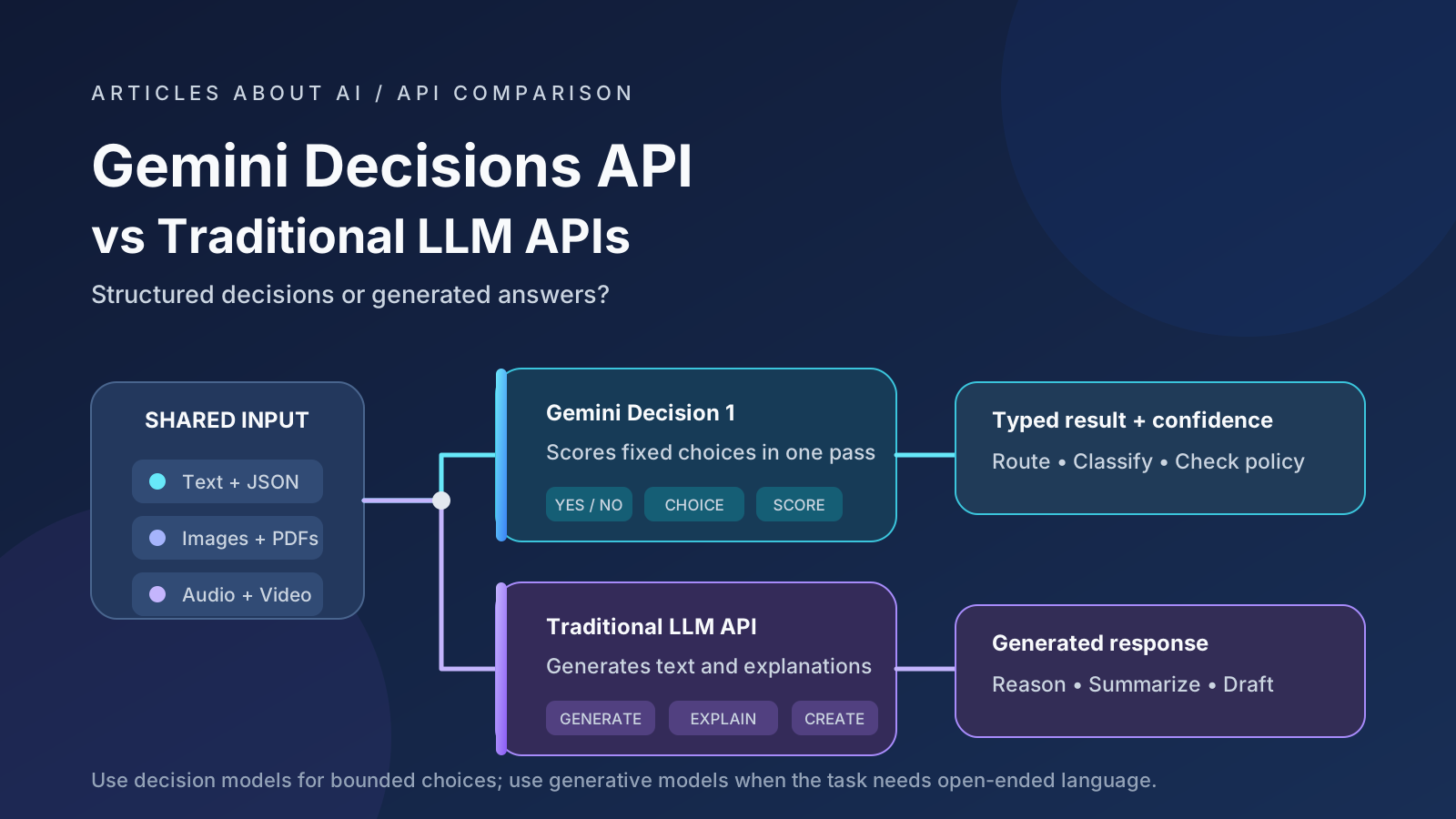
A traditional large language model (LLM) API is designed to generate language: an answer, explanation, summary, or block of structured JSON. But many applications do not need another paragraph. They need a reliable decision that software can act on: choose a model, classify a support ticket, select a tool, or flag a request for review.
That is the problem the Gemini Decisions API, powered by Gemini Decision 1, is designed to address. Announced by Google on November 11, 2026, the API evaluates fixed-choice questions and returns typed answers with probabilities and confidence scores instead of generating a natural-language response.
This guide compares Gemini Decisions API with traditional generative LLM APIs across model routing, classification, policy checks, structured outputs, cost, latency, and production design. It explains where a decision model can simplify an application—and where a conventional LLM remains necessary.
Scope and methodology: This is a technical comparison based on Google’s official announcement and API documentation available on November 13, 2026, plus independently reported evaluation results. Articles About AI has not run a controlled head-to-head test. Google’s latency and benchmark statements are identified as vendor claims; independent results are attributed separately.
Quick answer: decision API or traditional LLM API?
Use Gemini Decisions API when the application must select from a known set of outcomes and can define those outcomes in advance. Examples include routing a request to one of several models, classifying a message into fixed categories, scoring a document against a rubric, or deciding whether a case should be escalated.
Use a traditional generative LLM API when the task requires open-ended language: drafting a response, explaining a decision, summarizing a document, extracting information in a flexible format, or reasoning through a problem that cannot be represented as a fixed list of choices.
The two approaches are not mutually exclusive. A practical architecture can use a decision model for fast classification and routing, then call a generative model only when the request needs deeper reasoning or a written response.
What is Gemini Decisions API?
Google introduced Gemini Decisions API as a dedicated endpoint for closed-set decisions. Its underlying model is named gemini-decision-1. Rather than asking the model to write an answer token by token and then parsing that answer, a developer supplies shared input and one or more typed questions. The API scores the available answers and returns structured results.
According to the official Google announcement, one request can contain up to 1,000 independent questions. The shared input can include text, images, audio, video, and PDF documents. Google’s Decisions API documentation specifies a 262,144-token context window for the combined request.
The API currently uses the v1beta version in Google’s quickstart examples. Treat it as a beta interface: check the documentation and release notes before relying on a particular behavior in a production system.
The three supported decision types
Gemini Decisions API offers three question types:
| Type | What it does | Typical application |
|---|---|---|
noul |
Estimates the probability that a yes/no condition is true | Is this request in scope? Is a required disclosure present? |
choice |
Selects from 2 to 255 defined options and returns probabilities for the options | Which model, department, queue, or tool should handle this request? |
score |
Rates an input against an ordered rubric and returns a weighted score and level probabilities | How urgent is this ticket? How closely does a document match a review rubric? |
A choice question does not require the model to invent a category. The developer defines the allowed options and describes when each one applies. A score question uses ordered criteria, from the lowest level to the highest.
Each answer includes a confidence value. That value can help an application decide whether to proceed automatically, request another model’s assessment, or send the case to a human reviewer. It is not a guarantee that the answer is correct.
Gemini Decisions API vs traditional LLM APIs
A conventional LLM API can already perform classification. A developer can prompt a generative model to return JSON, use a JSON schema, or constrain the response format. The difference is the API’s primary output and execution path: a generative model produces tokens, while Gemini Decision 1 scores predefined outcomes and returns typed values.
| Comparison area | Gemini Decisions API | Traditional generative LLM API |
|---|---|---|
| Primary purpose | Bounded decisions over defined outcomes | Generate text, explanations, code, and flexible structured responses |
| Output | Typed answer, probabilities, confidence | Generated text or schema-constrained JSON |
| Classification | Direct yes/no, choice, or rubric scoring | Prompt the model to classify and return a label |
| Model routing | Select from developer-defined model or tool options | Ask the model to recommend a route, then parse its response |
| Policy checks | Score specific conditions and policy-related questions | Review a request or response and generate a verdict or explanation |
| Input types | Text, images, audio, video, and PDFs | Depends on the selected model and API |
| Multiple checks | Up to 1,000 independent questions over shared input | Can request multiple outputs, but generation and response format depend on the model |
| Output-token billing | Google lists $0 output-token charges | Usually depends on the provider, model, and generated output |
| Latency | Google reports 150–250 ms end-to-end in its stated test conditions | Varies with model, prompt length, reasoning settings, output length, and serving conditions |
| Open-ended explanations | Not its purpose | A core strength |
| Best fit | Routing, classification, scoring, and bounded checks | Drafting, summarization, explanation, extraction, and flexible reasoning |
The comparison is about task fit, not a claim that every decision model is more accurate or faster than every generative model. A short classification prompt sent to a small generative model may already be inexpensive and fast enough. The right choice depends on the input, error costs, output requirements, and measured performance on your own data.
1. Model routing: choose the right model before paying for generation
Model routing is one of the clearest uses for a decision endpoint. An application may have several model tiers:
- A low-cost model for simple questions.
- A stronger reasoning model for complex requests.
- A vision-capable model for image-heavy tasks.
- A coding model for software development questions.
- A human-review path for sensitive or ambiguous requests.
A traditional LLM router can read a prompt and generate a label such as fast, reasoning, or vision. The application then parses the label and calls the selected model. This can work well, but it uses a generative response for a decision with a limited set of valid answers.
With Gemini Decisions API, the developer defines the allowed routes as a choice question. The result includes the selected option and probabilities for the alternatives. The application can apply a confidence threshold and use a fallback when the result is uncertain.
For example, a router could define these options:
fast_model: short factual questions and simple transformations.reasoning_model: multi-step analysis or difficult planning.vision_model: requests that depend on image content.human_review: requests outside the supported routes or with insufficient confidence.
Practical point: routing is not simply about choosing the most capable model. It is about balancing answer quality, latency, and cost. Test the router on representative requests and measure whether it sends difficult questions to an appropriate model without overusing expensive models.
Google says it uses the Decisions API inside Gemini Notebook to route queries to different model tiers and thinking levels. The company reports up to 40% lower latency for routine queries in that workflow. This is a Google-reported product result, not an independent benchmark of every routing setup.
2. Classification: fixed labels without parsing a paragraph
Classification assigns an input to one of a known set of categories. Common examples include:
- Support ticket classification: billing, technical, shipping, or account access.
- Lead qualification: sales-ready, nurture, or out of scope.
- Document triage: invoice, contract, receipt, or other.
- Feedback analysis: feature request, bug report, complaint, or praise.
- Content workflow: news, tutorial, product review, or comparison.
A generative LLM can perform all of these tasks. You can ask it to return a JSON object containing a category and a short explanation. However, if your application only needs the category, the explanation may be unnecessary output.
Gemini Decisions API lets the developer define a choice question and provide descriptions for the categories. It returns the chosen label and probability distribution. If none of the listed options is suitable, include a catch-all category such as other, or add a separate yes/no question to check whether the input belongs to the expected scope.
This detail matters: a multiple-choice model must select among the supplied options, even when the input is a poor fit. A catch-all option and a confidence threshold reduce the risk of forcing an unsuitable label into the workflow.
3. Policy checks: useful as a review signal, not a security boundary
Policy checks ask whether an input or proposed action meets a defined condition. Examples include checking whether a customer message contains a prohibited request, whether a generated response includes a required disclosure, or whether an agent’s proposed tool call matches an allowed purpose.
A decision model can evaluate these as separate yes/no questions. The application can then route uncertain or flagged cases to a human reviewer or a more capable analysis step.
However, a model-based policy check should not be the only security control. A confidence score does not prove that a request is safe, authorized, or compliant. Keep permission checks, authentication, transaction limits, allowlists, and approval requirements in deterministic application code. For high-impact actions, require independent validation and human approval where appropriate.
Use a decision model to help prioritize or classify cases—not to replace access control, legal review, or a properly designed safety system.
4. Cost: why zero output tokens can matter
Google lists Gemini Decision 1 at $0.10 per 1 million input tokens and $0 per output tokens. The company also says that the shared input is billed once per request, regardless of how many questions are evaluated. Each question still adds its own instructions and criteria tokens.
This shared-input design can matter when an application needs many checks against the same record. Consider an illustrative request containing:
- 4,000 tokens of shared customer, order, and message data.
- 20 questions.
- 50 additional instruction and criteria tokens per question.
The total is approximately 5,000 input tokens. At Google’s published rate, that input would cost about $0.0005 per request, or $0.50 per 1,000 requests, before any additional infrastructure or application costs.
This is an arithmetic example, not a measured production bill. Actual usage depends on tokenization, media resolution, input modality, question wording, and the amount of data sent. Separate requests that resend the same record will incur input charges again.
A traditional generative LLM API usually bills both input and generated output according to the selected model’s pricing. If a classification task produces a long explanation that the application never uses, output generation may add avoidable cost. On the other hand, if the application needs a detailed explanation, a generative API may complete the whole task in one call while a decision endpoint would need a second model call.
Compare cost per correctly handled case, not just cost per million tokens. Include retries, fallback models, human review, storage, and media processing in the calculation.
5. Latency: fast decisions are not the same as fast end-to-end systems
Google reports 150–250 milliseconds end-to-end latency for Gemini Decision 1 in its stated tests, with median model compute of 50–100 milliseconds. Google says latency remained nearly flat from one to 100 questions per request in tests using contexts up to 16K tokens.
These are vendor-reported figures, not a service-level guarantee for every region, input size, or application. Uploading a large PDF or video, network distance, queueing, retries, and application logic can all affect the time a user experiences. The full 262,144-token context limit should not be confused with the context size used for Google’s published latency figures.
A generative LLM’s response time depends partly on how many output tokens it must produce. A short label may be quick, while a long explanation or high-reasoning response can take longer. But a small generative model may also be fast enough for a simple router. Benchmark the exact model and request pattern you plan to deploy.
What do independent results say?
Google’s launch benchmarks compare Gemini Decision 1 with selected decision and generative models on a shared set of tasks. Those results are useful context, but they are published by the vendor.
A separate report by VentureBeat summarizing Artificial Analysis Decision Index v2.1 placed Gemini Decision 1 ninth among 18 models at launch, with a score of 65.98, a weighted average of 211 ms per task, and an estimated $345 per million tasks for that benchmark mix. The same report notes that Gemini led some knowledge and reasoning tests, while other models performed better on particular document and tool-use evaluations.
Do not compare the index’s estimated cost per million tasks directly with Google’s $0.10 per million input tokens: they measure different things. The index combines multiple tasks and model rates, while token pricing is a unit price. The useful lesson is that task-level results vary. A model that is inexpensive per token is not automatically the cheapest system for every real workflow.
6. A practical Gemini Decisions API example
The following Python example classifies a support message into a fixed department. It follows the structure in Google’s official quickstart and uses the google-genai SDK.
Install or update the SDK:
pip install -U google-genai
Then set your Gemini API key in the environment and run:
from google import genai

client = genai.Client(
    http_options={"api_version": "v1beta"}
)

result = client.decisions.create(
    model="gemini-decision-1",
    input=(
        "I was charged twice for my order, "
        "and I need help getting one payment refunded."
    ),
    questions={
        "department": {
            "type": "choice",
            "instructions": (
                "Which department should handle this customer request?"
            ),
            "criteria": {
                "billing": "Payments, invoices, duplicate charges, and refunds.",
                "technical": "Problems using or accessing the product.",
                "shipping": "Delivery, tracking, or missing packages.",
                "other": "Requests that do not fit the listed departments."
            }
        }
    }
)

answer = result.answers["department"]

print("Selected department:", answer.choice)
print("Confidence:", answer.confidence)
print("Probabilities:", answer.probabilities)

if answer.confidence >= 0.75:
    print("Route to:", answer.choice)
else:
    print("Escalate to human review")
The 0.75 threshold is only an example. It is not a universal recommended setting. Choose thresholds using labeled examples from your own traffic, and consider the different costs of false positives and false negatives. For a sensitive workflow, a lower confidence should normally trigger review rather than an automatic action.
The API also supports combining independent checks in one request. For example, the same support message could be evaluated for product defect, next action, and churn risk. The questions are evaluated independently: if one decision depends on another, your application must combine the results in code or make a follow-up request.
See Google’s Decisions API quickstart and reference for the current Python, JavaScript, and REST request formats.
7. Important limitations before production
Gemini Decisions API is specialized. Consider these limitations before choosing it:
- It does not write the final answer. If a customer needs an explanation, a generative model or application template must produce it.
- Options must be defined. A
choicequestion selects from the options you provide. Add an explicitotheror escalation path for out-of-scope inputs. - Questions are independent. Do not assume one question can read another question’s result inside the same request.
- Confidence requires calibration in your workflow. Test thresholds against real, labeled examples and monitor errors after deployment.
- The API is documented as
v1beta. Review changes before depending on the endpoint in a critical system. - Media and context have costs and limits. Resolution, document size, and the combined request context affect token usage.
- Privacy depends on the access tier and terms. Review Google’s current Gemini API pricing and data-use details before sending customer or confidential data. The page distinguishes Free and Paid service data handling; do not assume that free-tier and paid-tier terms are identical.
For policy and security use cases, keep deterministic controls outside the model. A model can identify a likely policy issue, but your application should decide whether the user is authorized and whether an action is permitted.
8. When should you use each API?
| Your requirement | Practical starting point |
|---|---|
| Select one model from a known list | Gemini Decisions API |
| Route customer tickets into fixed queues | Gemini Decisions API |
| Check several defined conditions on one PDF or recording | Gemini Decisions API |
| Score submissions against a fixed rubric | Gemini Decisions API |
| Generate a customer-facing explanation | Traditional generative LLM API |
| Summarize a long report in natural language | Traditional generative LLM API |
| Extract a value that was not known in advance | Generative or dedicated extraction API |
| Plan a multi-step task with changing requirements | Traditional generative LLM or agent workflow |
| Combine a decision with a written response | Use both in a hybrid workflow |
A useful hybrid pattern is:
- Receive the user’s text, document, or media.
- Use Gemini Decisions API to classify the request and select a route.
- Apply application-level permissions and confidence thresholds.
- Send complex cases to a suitable generative model.
- Return a written response and log the decision for monitoring.
This separates the control step from the generation step. It can reduce unnecessary generation for routine cases while preserving a full LLM for tasks that genuinely need language and reasoning.
Frequently asked questions
Is Gemini Decisions API a replacement for ChatGPT or Gemini chat models?
No. It is designed for structured decisions, not general conversation. It can select options and score inputs, but it is not intended to write essays, explain concepts, or generate open-ended responses.
Can Gemini Decisions API classify text?
Yes. It supports yes/no checks, fixed-choice classification, and rubric scoring. It can also evaluate multimodal inputs such as images, audio, video, and PDFs.
Does Gemini Decisions API generate output tokens?
Google states that the endpoint returns typed answers and probabilities without generating text tokens. Its published price lists zero output-token charges.
Is it faster than every traditional LLM API?
No universal speed claim is justified. Google reports 150–250 ms end-to-end under specified test conditions. Actual latency depends on the request, model, region, network, and application. Measure your own workload.
Can I use it for AI safety or policy enforcement?
It can support policy checks and escalation decisions, but it should not be the only enforcement mechanism. Keep authorization, access control, and high-impact approval rules in deterministic code.
Can I ask multiple questions in one request?
Yes. Google’s documentation allows 1 to 1,000 questions per request, subject to the combined context limit. Questions run independently against the shared input.
Final verdict: use the right API for the job
Gemini Decisions API adds a specialized option for applications that need fast, structured judgments rather than another generated paragraph. Its fixed decision types, shared multimodal input, confidence values, and zero output-token billing make it relevant to routing, classification, triage, and rubric-based checks.
Traditional generative LLM APIs remain the better fit for open-ended reasoning, content creation, summarization, and explanations. For many production systems, the strongest architecture may combine both: a decision endpoint for the control plane and a generative model for the work that requires language.
Before switching, run both approaches on the same labeled examples. Compare accuracy, calibration, false-positive and false-negative rates, p95 latency, and total cost per correctly handled case. That evidence will be more useful than assuming a specialized API is automatically better for every classification task.
Related reading
- Best AI Models in 2026: Benchmark Rankings Explained — understand why model rankings and benchmark results can disagree.
- Gemini 4 vs GPT-6 for Multimodal Tasks — compare multimodal model capabilities and evaluation methods.
- How to Use Gemini Guided Learning to Prepare for Exams in 2026 — see a practical Gemini workflow in a different use case.