
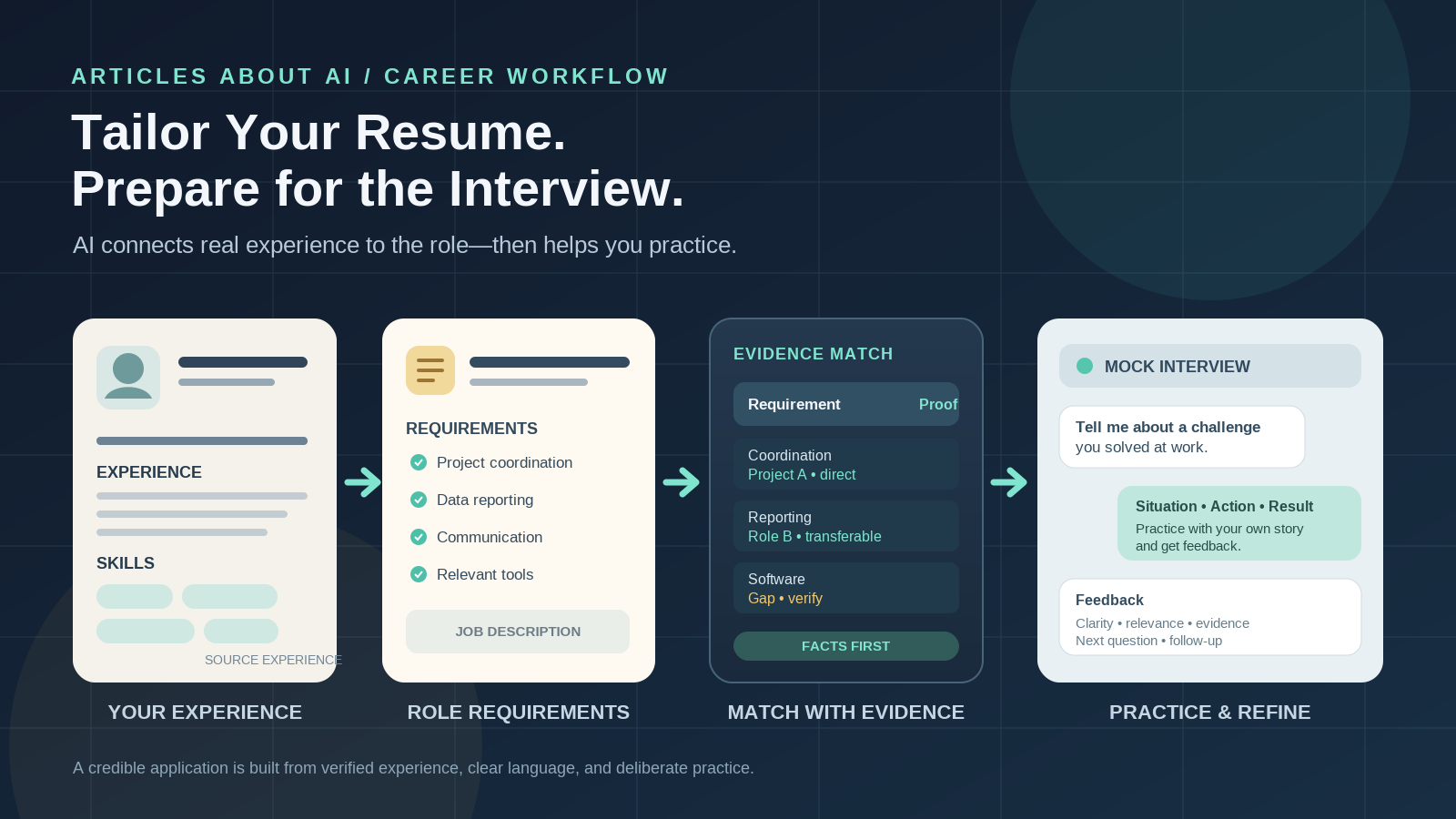
Applying for a job is not simply a matter of sending the same résumé to every employer. A strong application makes it easy for a recruiter to see how your real experience relates to the role, while an interview requires you to explain that experience clearly and convincingly. AI can help with both tasks: it can analyze a job description, identify relevant evidence in your background, suggest more focused résumé wording, and simulate interview questions.
The best approach is to use an AI assistant as a career-writing and practice partner—not as a source of invented qualifications. You supply the facts, examples, constraints, and decisions. The AI helps organize them, spot gaps, and improve clarity. You verify every statement before submitting it.
This guide walks through a repeatable workflow for using ChatGPT or another AI assistant to tailor a résumé to a job description, prepare a cover letter when one is requested, and practice for interviews. It includes prompts you can copy, an evidence-matching method, practical ATS formatting advice, and a final quality-control checklist.
What AI can—and cannot—do in a job application
AI is useful for turning a long job posting into a manageable list of priorities; comparing those priorities with your experience; improving the wording of résumé bullets; identifying transferable skills; brainstorming interview questions; and rehearsing answers with feedback. OpenAI Academy’s Helping Job Seekers with ChatGPT guide recommends a similar coaching workflow: understand the role, map experience to requirements, draft bullets, and review the result with the job seeker.
AI cannot know whether you actually performed a task, managed a budget, used a particular tool, earned a certification, or achieved a metric unless you provide reliable evidence. It can also misread a job posting, overstate a skill, or produce polished but generic language. Treat its output as a draft to examine, not a finished application.
A practical rule is simple: every résumé claim and every interview story must be something you can explain, substantiate, and defend in a conversation with a hiring manager.
Step 1: Build a reusable job-search information pack
Before tailoring your résumé, gather the source material in one place. Starting from a blank chat for every application often leads to inconsistent descriptions of your experience and repeated work.
Create a master résumé containing all relevant jobs, projects, education, volunteer work, certifications, tools, and skills. It does not need to be the version you submit. It is an inventory from which you can select the most relevant evidence.
Add an accomplishment bank: short notes about problems you solved, responsibilities you took on, decisions you made, difficult situations, and outcomes. Include examples from paid work, internships, education, community work, independent projects, and volunteering where they are relevant. If you do not know a number, leave it blank rather than guessing.
For each target role, collect:
- The full job description, including responsibilities and qualifications.
- The employer’s official careers page and a brief description of its products, services, or mission.
- Your current résumé or master résumé.
- Relevant projects and work examples.
- Constraints that affect your search, such as location, schedule, salary range, travel, or work authorization.
If your AI tool supports a persistent workspace, you can keep these materials in a dedicated project or conversation. ChatGPT Projects is one way to organize a recurring job-search workflow; features and file limits may vary by account and platform. Keep a separate application-specific chat or document for each vacancy so that requirements from different employers do not get mixed together.
Remove unnecessary personal information before uploading documents. You generally do not need to share your full home address, government identification numbers, bank information, private references, or confidential employer material to receive résumé feedback. OpenAI Academy’s job-seeker resource also recommends protecting sensitive information and verifying important facts.
Step 2: Ask AI to decode the job description
Do not begin by asking, “Rewrite my résumé for this job.” First, understand what the employer is asking for. Job descriptions often mix essential qualifications, preferred skills, daily responsibilities, and generic company language.
Paste the complete posting and ask the AI to separate those elements. A useful analysis should distinguish a requirement explicitly stated by the employer from an inference made by the model.
Prompt: Analyze a job description
Act as a careful career analyst. Analyze the job description below without writing my résumé yet.
Return:
- The five to eight most important responsibilities.
- Required qualifications and preferred qualifications in separate lists.
- Technical skills, tools, domain knowledge, and interpersonal skills.
- The exact phrases or terminology the employer uses for important skills.
- Likely performance outcomes for the role.
- Which requirements appear essential and which may be flexible.
- Questions I should research about the employer or role.
Do not infer qualifications that are not stated. Quote or identify the relevant wording from the posting for each major conclusion.
Job description: [PASTE THE JOB DESCRIPTION]
Review the output against the original posting. Correct omissions and remove any interpretation that is not supported. AI may group similar requirements together, but you should preserve distinctions that matter—for example, “experience with SQL” is not the same as “advanced SQL,” and “supporting a team” is not necessarily the same as managing it.
Create a priority map
A simple table helps turn the posting into a plan:
| Job requirement | Priority | Evidence the employer wants | Where it appears in my background |
|---|---|---|---|
| Project coordination | Essential | Scheduling, follow-up, delivery | Project A |
| Data analysis | Essential | Reports, spreadsheets, decisions | Role B |
| Customer communication | Preferred | Written and verbal communication | Role C |
| Specific software | Preferred | Hands-on use | Course or project |
The table should be based on the posting and your actual background. It is a working map, not a score that predicts whether an employer will hire you.
Step 3: Match requirements to evidence from your experience
The most important step in tailoring a résumé is deciding which experience demonstrates the employer’s requirements. A keyword alone is not evidence.
Paste your master résumé or accomplishment notes after the job-description analysis. Ask AI to build an evidence matrix with four columns: requirement, evidence from your background, strength of the match, and missing information.
Prompt: Build an evidence-matching matrix
Compare the job description with my résumé and accomplishment notes.
Create a table with:
- The requirement or skill from the job posting.
- The exact experience or project that supports it, quoting my source notes where possible.
- A strong, partial, transferable, or unsupported match.
- A question I should answer if more evidence is needed.
- A recommendation for where to place the evidence in my résumé.
Do not invent experience, metrics, employers, job titles, dates, tools, or qualifications. If the evidence is missing, label it “not demonstrated” rather than trying to fill the gap.
Job description: [PASTE]
Résumé and experience notes: [PASTE]
Use the matrix to make decisions, not to blindly follow an AI ranking. A transferable skill can be valuable even if you have not held the exact job title. For example, organizing a student event may demonstrate scheduling, coordination, communication, and problem-solving. It does not automatically prove professional project-management experience; the wording should describe the real scope.
If the AI identifies a gap, ask yourself whether you have an unlisted example, relevant training, or a project that demonstrates the skill. If not, leave the gap visible and consider how you could develop that capability. An honest application is stronger than a résumé that creates interview questions you cannot answer.
Step 4: Tailor the résumé’s top section
Recruiters should be able to understand your fit quickly. Use the job description to decide which supported qualifications deserve the most prominent placement.
Professional summary
A summary is optional, but it can be useful when you have relevant experience across several roles, are changing careers, or need to make a clear connection between your background and a specific vacancy.
Ask AI to draft two or three versions using only the evidence in your résumé. Each version should emphasize a different legitimate strength, such as relevant experience, technical skills, or transferable experience.
Prompt: Draft a targeted summary
Based on my verified résumé and the job description, draft three professional summaries of two to three sentences.
Version A should emphasize directly relevant experience. Version B should emphasize transferable skills. Version C should emphasize a combination of experience and technical skills.
Use plain, specific language. Do not add qualifications, years of experience, achievements, or tools that are not in my source material. Avoid clichés such as “dynamic professional,” “results-driven,” and “proven track record.”
Résumé: [PASTE]
Job description: [PASTE]
Choose the version that accurately represents you, then edit it until it sounds natural. Do not force every keyword into the summary.
Step 5: Rewrite résumé bullets around relevant achievements
AI can be especially useful for improving vague descriptions of work. A résumé bullet should explain what you did, how you did it when that detail matters, and why it mattered.
A useful structure is:
Action + task or problem + method or scope + result
Not every bullet needs a numerical result. If you have a verified metric, include it when it provides useful context. If you do not, describe the outcome accurately without inventing a percentage, dollar amount, number of people, or time saved.
Example of a clearer bullet
Original:
Responsible for customer service and scheduling.
Improved, without inventing results:
Scheduled customer appointments, responded to service inquiries, and maintained accurate records to support daily operations.
If your notes support a specific result, you can add it:
Scheduled [verified number] appointments per week and introduced [verified process], reducing [verified problem] by [verified amount].
The bracketed details are placeholders to be filled only with facts you can substantiate.
Prompt: Rewrite selected résumé bullets
Rewrite the following résumé bullets for the target role.
For each bullet, give me:
- A concise version.
- A version that emphasizes the most relevant skill from the job description.
- A version that emphasizes a verified outcome, if my notes support one.
Keep the facts, dates, scope, and level of responsibility unchanged. Do not invent numbers. If an outcome could be quantified but I have not supplied the data, ask a question or use a clearly marked placeholder. Keep the wording natural and easy to scan.
Target job: [TITLE]
Job requirements: [PASTE]
Original bullets and supporting notes: [PASTE]
Review each rewrite carefully. A phrase such as “led cross-functional initiatives” may sound impressive, but if you only contributed to a small part of a project, it may overstate your role. Ask the AI to explain what changed and why, then keep only the improvements that accurately describe your work.
Step 6: Make the résumé readable by applicant tracking systems
An Applicant Tracking System (ATS) is software employers use to manage applications. Some systems extract résumé information, organize it, search for relevant terms, or help recruiters filter and compare candidates. Their capabilities and configurations differ.
The University of Connecticut’s ATS guide explains that systems may extract and structure résumé information and compare it with job-related terms. It also notes that ATS platforms do not necessarily automatically reject applicants; they may prioritize applications for recruiter review.
The goal is not to “beat an ATS” with hidden keywords. It is to make your qualifications easy for both software and people to understand.
Formatting practices worth checking
- Use a simple, single-column layout for online applications unless the employer’s instructions specify another format.
- Use conventional section headings such as Experience, Education, Skills, Projects, and Certifications.
- Use a readable font and consistent date formats.
- Keep job title, employer, and dates clearly associated with each position.
- Use ordinary bullets and straightforward spacing.
- Avoid placing critical information only in images, icons, complex tables, text boxes, or decorative headers and footers.
- Follow the employer’s requested file format. If no format is specified, a text-based DOCX or PDF is usually a reasonable choice.
- Make sure a PDF contains selectable text rather than only a scanned image.
These are practical readability recommendations, not guarantees about every ATS. The University of California, Berkeley’s résumé guidance also recommends standard formatting and following the file-format instructions provided by the employer.
Use keywords naturally
Compare the language of the job description with your own experience. If the posting asks for “stakeholder communication,” and you have genuinely performed that work, you may use that term in a relevant bullet rather than a vague phrase such as “worked with people.”
If the employer uses both a full term and an acronym, you can include both once when appropriate—for example, “Customer Relationship Management (CRM).” Do not add a skill simply because it appears in the posting. Do not repeat keywords in hidden text or add a keyword list that claims abilities you do not have.
Prompt: ATS readability review
Review this résumé for machine readability and human readability.
Identify possible issues with section headings, layout, columns, text boxes, tables, graphics, date consistency, abbreviations, file structure, and missing relevant terminology.
Do not claim that you can predict an ATS score or guarantee that the résumé will pass a screening system. Explain each issue and suggest a simple fix.
Résumé text or file: [PASTE OR UPLOAD]
Job description: [PASTE]
Step 7: Tailor the skills section without keyword stuffing
The skills section should be a concise inventory of capabilities relevant to the job. AI can help organize your skills into categories, but you should decide what belongs there.
For a technical role, categories might include programming languages, platforms, data tools, and methods. For an operations role, they might include scheduling, reporting, process documentation, customer support, and relevant software. For a career changer, transferable skills may deserve more attention than a long list of tools.
Ask the AI to compare your skills list with the posting and return three groups:
- Skills you can demonstrate with direct evidence.
- Skills you have used in a limited or transferable context.
- Skills mentioned in the posting that you do not currently demonstrate.
Include the first group confidently. Include the second group only with accurate context. Do not present the third group as a qualification.
Step 8: Create a targeted cover letter when it adds value
A cover letter should connect your background to the employer’s needs, not repeat the résumé. If a cover letter is required, tailor it. If it is optional, decide whether it helps explain your interest, career transition, or relevant achievement.
Use AI to organize your ideas, research the employer, and refine your draft. Verify company information on the employer’s official website and avoid generic claims about its culture or mission.
Prompt: Draft a cover letter from verified evidence
Help me improve a cover letter for this job.
Structure it as:
- A brief opening explaining why I am applying for this specific role.
- One or two paragraphs connecting the employer’s needs with examples from my actual experience.
- A concise closing.
Use the job description and my résumé as sources. Do not invent company facts, achievements, or personal motivations. Flag information I need to supply. Keep it professional, specific, and in my natural voice.
Job description: [PASTE]
Employer research from official sources: [PASTE]
My résumé and draft: [PASTE]
After editing, read it aloud. Remove sentences that could be sent unchanged to any employer.
Step 9: Prepare for interviews from the same evidence matrix
A tailored résumé and interview preparation should use the same verified evidence. This creates consistency: the skills you emphasize in your application are the skills you can explain with examples.
Ask AI to convert your strongest experiences into a story bank. The STAR framework—Situation, Task, Action, Result—is a useful structure for behavioral answers, although not every question requires a formal four-part response.
Create stories for common themes:
| Theme | What to prepare |
|---|---|
| Problem-solving | A problem you diagnosed and how you approached it |
| Collaboration | How you worked with others or resolved disagreement |
| Leadership | How you influenced a decision or took responsibility |
| Failure or setback | What happened, what you learned, and what changed |
| Ambiguity | How you handled incomplete information |
| Prioritization | How you managed competing deadlines |
| Customer or user focus | How you understood and responded to someone’s needs |
| Learning | How you learned a tool, skill, or process |
A story bank does not need eight dramatic achievements. Small, concrete examples can demonstrate judgment, reliability, communication, and learning.
Prompt: Build an interview story bank
Use my verified work, project, education, and volunteer notes to create an interview story bank.
Organize stories by problem-solving, collaboration, leadership, conflict, failure, ambiguity, prioritization, customer focus, and learning.
For each story, provide:
- Situation and context in one or two sentences.
- My specific responsibility.
- Actions I personally took.
- The result or observable outcome.
- Skills demonstrated.
- Job requirements that the story supports.
- Missing details I should clarify.
Do not invent a result or assign actions to me that I did not perform.
Notes: [PASTE]
Step 10: Run a realistic AI mock interview
A useful mock interview is interactive. Ask the AI to pose one question at a time, wait for your answer, and then ask a follow-up. This is better than receiving a long list of questions and reading prepared answers.
Prompt: Mock interview
Act as a hiring manager interviewing me for [JOB TITLE] at [COMPANY].
Use the job description to create a realistic interview covering role-specific skills, behavioral questions, and motivation for the position.
Ask one question at a time. Wait for my answer before continuing. Do not provide a model answer before I respond.
After each answer, give brief feedback on:
- Relevance to the question.
- Specificity and evidence.
- Structure and clarity.
- Whether I explained my personal contribution.
- Whether I gave a result or lesson where appropriate.
Ask a follow-up when my answer is vague. At the end, summarize my strongest answers and three areas to practice.
Job description: [PASTE]
If voice conversation is available in your AI app, use it to practice speaking naturally rather than reading a script. See the ChatGPT Voice Mode guide for a walkthrough. Voice availability and controls vary by platform and account.
Practice role-specific questions
Ask the AI to generate questions based on the responsibilities—not merely generic questions such as “What are your strengths?”
For a data analyst role, practice explaining how you validated data, selected a method, and communicated findings. For a project coordinator, practice prioritization, stakeholder updates, and handling delays. For a sales role, practice discovery, objection handling, and customer outcomes.
You can also request a technical interview simulation. Tell the model which tools or concepts the job actually requires, your experience level, and whether you want hints or strict interview conditions. Verify any technical feedback against reliable documentation; AI-generated interview questions and evaluation are not necessarily representative of the employer’s actual process.
Step 11: Research the company and prepare questions
AI can help summarize company information, but current facts should be checked against official sources. Give it the employer’s website, relevant product pages, recent announcements, and the job description. Ask it to separate facts from interpretations and identify anything that needs verification.
Prepare a few questions that demonstrate you understand the role:
- What would success look like in the first 90 days?
- Which responsibilities are the highest priority for this position?
- How does this role work with the other teams mentioned in the posting?
- What tools or processes does the team currently use?
- What are the most common challenges someone in this role faces?
- How is performance or progress evaluated?
Avoid asking questions whose answers are plainly available in the posting or official company pages. AI can help you refine the wording, but your questions should reflect genuine curiosity.
Step 12: Use AI to review—not automatically approve—your final application
Before submitting, ask for a final comparison between the résumé and the job description. Request a short list of the strongest matches, weak or unsupported claims, missing evidence, and formatting problems. Then conduct your own review.
The University of California, Berkeley’s guidance on generative AI for career preparation recommends using AI to identify keywords and customize application materials while ensuring the final résumé and cover letter communicate your own experience and voice. The University of Connecticut’s AI résumé and cover-letter guide similarly advises applicants to review suggestions, preserve authenticity, and avoid false or embellished accomplishments.
A repeatable 30-minute workflow for each application
Once you have a master résumé and accomplishment bank, tailoring can become a focused process rather than a complete rewrite.
| Time | Task | Deliverable |
|---|---|---|
| 0–5 minutes | Analyze the job posting | Priority requirements and keywords |
| 5–10 minutes | Match evidence | Requirements-to-experience matrix |
| 10–20 minutes | Tailor résumé | Summary, selected bullets, skills, ordering |
| 20–25 minutes | Review formatting and accuracy | Clean, readable application file |
| 25–30 minutes | Prepare interview stories | Three relevant examples and questions |
The time estimate is a starting point. A complex senior role, career transition, or application requiring a portfolio may take substantially longer. The objective is to reuse a reliable process—not rush through a high-stakes application.
Common mistakes when using AI for job applications
1. Copying an AI-generated résumé without reviewing it
AI may add tools, responsibilities, or results that sound plausible but are not in your background. Verify every sentence.
2. Stuffing the résumé with keywords
Keywords should appear in context where you demonstrate the skill. Repeating terms without evidence makes the document less credible to a recruiter.
3. Making every application sound identical
Tailoring means selecting relevant evidence and adjusting emphasis. It does not mean replacing your personality with generic corporate language.
4. Treating an ATS score as a hiring prediction
A third-party tool may provide a score, but that score is not the employer’s system and cannot reliably predict an interview. ATS platforms differ, and hiring decisions involve many factors.
5. Memorizing AI-generated interview answers
Prepared answers can help you organize your thoughts, but memorized scripts may sound unnatural and fail when the interviewer asks a follow-up. Practice with your own stories and key points instead.
6. Uploading sensitive or confidential information
Remove unnecessary personal identifiers and confidential details. Follow your AI provider’s data controls and your employer’s or institution’s rules. Do not upload private company documents or another person’s personal information without permission.
7. Letting AI replace company research
AI may produce outdated information about an employer, role, product, salary, or hiring process. Verify current facts on official websites and in the actual job posting.
Final checklist before submitting
- I analyzed the complete job description.
- I identified the most important requirements and keywords.
- Every skill and achievement on my résumé is supported by real evidence.
- My summary and selected bullets emphasize relevant experience.
- I used keywords naturally and did not claim skills I lack.
- My résumé is readable, consistent, and follows the employer’s file-format instructions.
- The document contains selectable text if I am submitting a digital résumé.
- My cover letter, if included, is specific to this role.
- I prepared several interview stories based on actual experience.
- I practiced answering questions aloud and responding to follow-ups.
- I researched the employer using current, reliable sources.
- I removed unnecessary personal and confidential information.
- I reviewed the final application myself and can explain every statement.
The bottom line
AI can make a job search more organized and help you present relevant experience more clearly. The most effective workflow starts with the job description, maps requirements to evidence, edits the résumé selectively, checks readability, and uses the same evidence to practice interviews.
Use AI to find the clearest way to describe what you have actually done—not to manufacture the candidate an employer wants. A targeted, credible application and a well-practiced explanation of your experience are more useful than a résumé filled with polished but unsupported claims.
Sources and further reading
- OpenAI Academy: Helping Job Seekers with ChatGPT — job analysis, experience mapping, résumé bullets, and interview practice.
- OpenAI Forum: ChatGPT Job Search Playbook — a structured job-search workflow, résumé tailoring, story banks, and mock interviews.
- University of Connecticut: Applicant Tracking Systems — ATS parsing, formatting, file types, and keyword guidance.
- University of Connecticut: Using AI for Résumé and Cover Letter — responsible résumé and cover-letter editing.
- University of Connecticut: Prompt Engineering for Career Success — practical prompts for career research, résumé refinement, and interview preparation.
- UC Berkeley Career Engagement: Utilizing Generative AI — AI-assisted career preparation and application customization.
- University of Michigan Career Center: Résumé Resources — résumé structure, tailoring, and AI examples.