
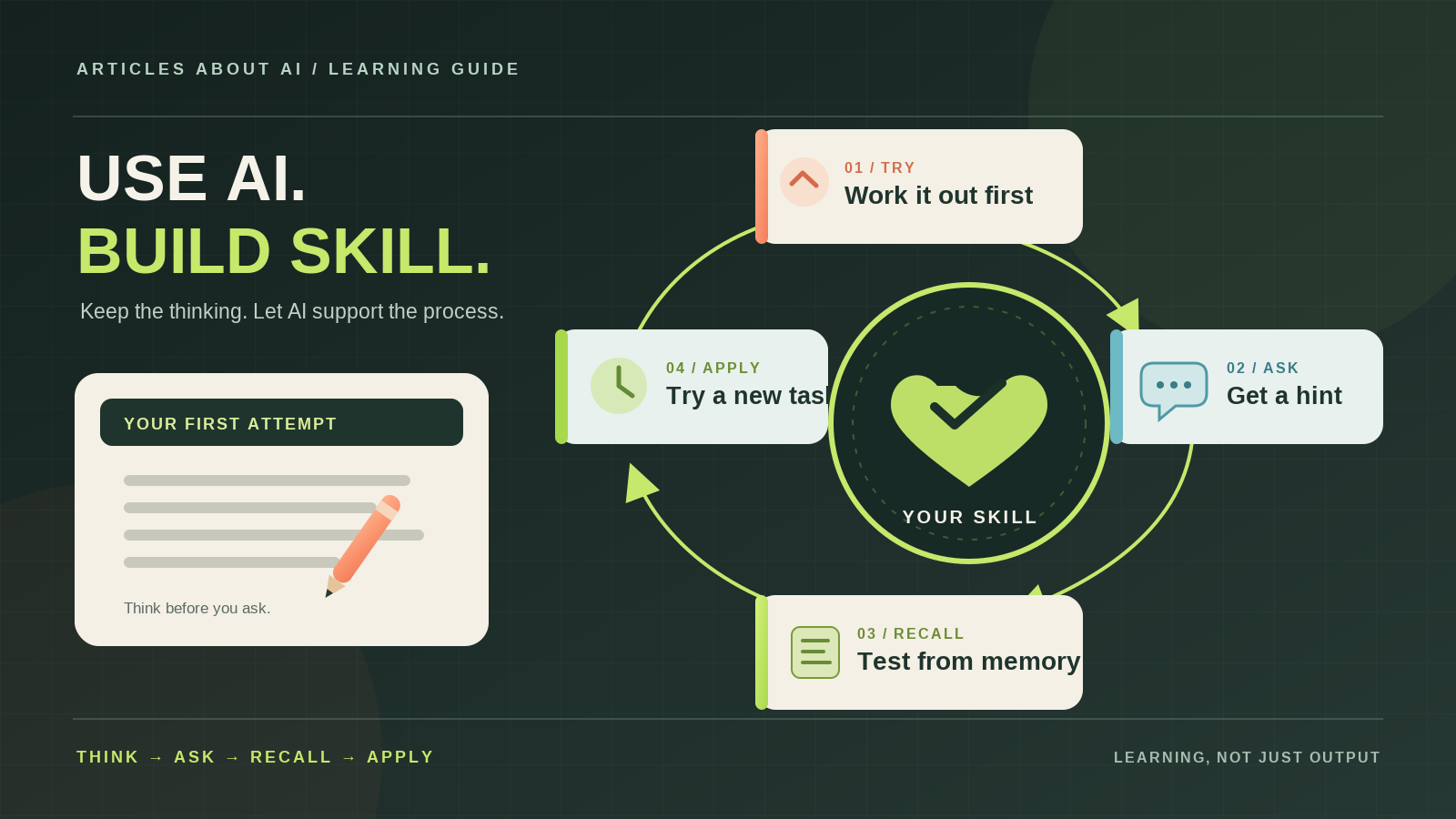
AI can explain a difficult concept, generate practice questions, give feedback on your work, and help you find a way through a problem when you are stuck. Used deliberately, an AI tutor can make learning more accessible and more personal. Used as an answer machine, however, it can make it easy to finish a task without developing the skill that task was supposed to teach.
The difference is not simply how often you use AI. It is which parts of the learning process you hand over to it. If your goal is to learn mathematics, programming, a language, writing, research, or another practical skill, you still need opportunities to retrieve information, make decisions, solve problems, explain ideas, and apply what you know without assistance.
This guide explains how to use AI to learn effectively while preserving independent thinking. It includes a practical learning workflow, prompts for AI tutors, examples for different skills, and a simple routine for checking whether you are actually improving.
Getting an answer is not the same as learning a skill
When an AI gives you a clear explanation, the answer may feel familiar and easy to understand. That feeling is useful, but it is not proof that you can remember or apply the idea later.
Learning requires more than exposure. Depending on the skill, you may need to:
- Recall a concept without looking at the explanation.
- Choose the correct method for a new problem.
- Explain why a solution works.
- Recognize an error and correct it.
- Transfer what you learned to a different example.
- Produce something independently, such as code, an argument, a translation, or a calculation.
Cognitive offloading means using an external tool to handle part of a mental task. It is not inherently bad. A calculator can remove arithmetic that is irrelevant to a lesson about statistical reasoning; a calendar can help organize a study schedule; AI can turn a long reading into a set of questions. The risk comes when the tool performs the very thinking you are trying to develop and you never reconstruct that thinking yourself.
A useful rule is: let AI reduce unnecessary friction, but keep the core learning activity in your hands.
What research says about AI-assisted learning
The evidence does not support a simple claim that AI always improves learning or always weakens it. Results depend on the task, the design of the tutor, the learner’s behavior, and what is measured.
Retrieval practice helps knowledge stick
A 2021 systematic review of retrieval practice in real classroom settings examined 50 experiments and 5,374 learners. The review found that most reported effect sizes were medium or large, across a range of subjects and learning contexts. Retrieval practice means trying to recall information from memory—through a question, explanation, quiz, or practice problem—rather than merely rereading it.
This evidence is not specifically about AI. It provides a learning principle that AI can help you implement: ask it to test you, wait for your attempt, and give feedback after you have tried.
A well-designed AI tutor can support learning
In a randomized study published in Scientific Reports in June 2025, researchers tested a custom AI tutor designed around research-based teaching practices against an active-learning class. Students using the AI tutor learned more in less time in that particular study.
The result is encouraging, but it should not be generalized to every chatbot, subject, or way of prompting. The tutor was deliberately designed to support learning rather than simply return answers.
Source: AI tutoring outperforms in-class active learning: an RCT.
Access and use patterns matter
A December 2025 IZA discussion paper reported a randomized experiment with 334 university students preparing for an exam. AI tutoring increased test performance relative to the control group, and unrestricted access outperformed restricted access in that study. The authors observed different patterns of prompting and engagement, suggesting that AI support can become part of a learner’s study process rather than automatically replacing reading.
A separate 2026 IZA discussion paper involving 2,379 undergraduates across 30 instructors reported lower final grades and participation in the course-integrated AI-tutor condition. These studies used different settings and interventions, and discussion papers are preliminary research rather than definitive consensus.
Taken together, they are a reason to evaluate your learning behavior and independent performance, not to assume that the presence of AI guarantees a benefit.
Sources:
- IZA Discussion Paper 18338 — AI Tutoring Enhances Student Learning Without Crowding Out Reading Effort, December 2025.
- IZA Discussion Paper 18989 — The Effects of Course-Integrated AI Tutoring on Student Performance and Engagement, 2026.
Five rules for learning with AI without becoming dependent
1. Attempt the task before asking for help
Spend a few minutes trying to solve the problem, explain the concept, write the paragraph, translate the sentence, or predict what the code will do. Your attempt gives the AI something specific to diagnose and forces you to activate what you already know.
It does not need to be correct. A wrong attempt can reveal a misconception that a polished explanation would otherwise hide.
2. Ask for a hint, not the finished answer
When you are stuck, request the smallest useful clue. If the hint is insufficient, ask for another. This keeps you involved in the reasoning and makes it easier to notice which step you cannot perform.
You can tell an AI tutor to pause after every hint and wait for your answer. If it gives away the solution, remind it to coach rather than complete the task.
3. Explain the idea in your own words
After receiving an explanation, close or minimize it and describe the concept from memory. Ask AI to evaluate your explanation for missing steps, inaccurate definitions, or unsupported assumptions—but do not let it rewrite the explanation before you have made your own attempt.
A strong check is whether you can explain not only what happens, but why it happens and when the idea does not apply.
4. Practice a new example
Do not repeat only the exact example the AI solved. Ask for a variation with different numbers, conditions, wording, or context. Solve it independently, then compare your reasoning.
This is a transfer test. It helps distinguish understanding a worked example from learning a method you can use elsewhere.
5. Review after a delay
Return to the material later without opening the previous chat. Try to recall the main ideas, solve a fresh problem, or write a short summary. Then use AI to check the gaps and create the next review questions.
Spacing review across days is generally more useful for long-term retention than concentrating all practice in one sitting. AI can help schedule and generate review, but the recall attempt should still come from you.
A practical AI learning workflow
Use this sequence for a new subject, a difficult chapter, or a skill you want to improve. Adapt the time to your goal; the point is the order of activities, not a rigid timer.
| Stage | What you do | How AI helps |
|---|---|---|
| 1. Define the goal | Name the skill and what independent performance will look like | Turn a broad goal into a focused learning objective |
| 2. Try first | Attempt a question, task, or explanation without help | Diagnose your attempt; identify one specific gap |
| 3. Learn the missing piece | Study one concept at a time | Give a layered explanation, analogy, or hint |
| 4. Practice | Solve a similar task yourself | Generate a new example and provide feedback after your attempt |
| 5. Recall | Close the explanation and answer from memory | Quiz you one question at a time; withhold answers |
| 6. Transfer | Apply the idea to a new context | Create a harder or unfamiliar problem |
| 7. Review | Return after a day or more | Build a short review quiz based on your previous errors |
This workflow is compatible with ChatGPT, Claude, Gemini, Perplexity, and other AI assistants. Learning-focused features can make the process easier, but the same instructions work in an ordinary chat.
If you want a dedicated ChatGPT walkthrough, see How to Use ChatGPT Study Mode to Master Difficult University Subjects. For a broader tool comparison, read The Best AI Tools for Students in 2026.
Prompts that make AI a tutor instead of an answer machine
The prompts below are designed to preserve your participation. Replace the bracketed details with your subject, level, and goal.
Prompt 1: Start with a diagnostic
I am learning [TOPIC] at [LEVEL]. My goal is to be able to [INDEPENDENT SKILL]. Before teaching me, ask five short diagnostic questions, one at a time, to find out what I already understand. Do not give the answers until I have attempted each question. Based on my responses, identify the two most important gaps to work on first.
Prompt 2: Ask for one hint at a time
Help me with this problem as a tutor. Do not solve it for me. First identify what the question is asking, then give me one hint about the next step. Wait for my attempt before giving another hint. If I make a mistake, explain the specific misconception without revealing the complete solution.
Prompt 3: Check my explanation
I will explain [CONCEPT] in my own words. Evaluate my explanation for accuracy, missing reasoning, and confusion between related ideas. Do not rewrite it first. Identify the strongest part, the first important error or gap, and ask me a question that helps me correct it myself.
Prompt 4: Create active-recall practice
Create eight short questions about [TOPIC] using the material I provide. Mix recall, explanation, and application. Ask one question at a time and wait for my answer. Do not reveal the answer in the question. After each attempt, give concise feedback and record the concept I should review.
Prompt 5: Test transfer
I can solve the standard examples of [SKILL]. Create three new problems that use the same underlying principle but change the context or conditions. Do not show solutions. After I solve each one, check my reasoning and explain any errors. Make the final problem slightly harder than the first two.
Prompt 6: Plan spaced review
Based on the concepts I struggled with today, create a review schedule for the next seven days. Include a short retrieval task for each review session. Do not repeat the same question; vary the wording and application. Keep the questions hidden until I attempt them, and prioritize the concepts I could not explain independently.
For more prompt-writing techniques, see How to Write Better ChatGPT Prompts and the AI Prompt Library, which includes research and learning prompts.
How to apply the method to different skills
Learning a language
Try translating or forming a sentence before asking AI for the correct version. Ask it to explain one grammatical error, give you a similar sentence, and then test you again later. Use AI conversation practice to increase opportunities to speak, but include listening, reading, and speaking without a script.
A useful prompt is: “I will write five sentences in [LANGUAGE]. Correct only the errors that affect meaning or grammar, explain each correction briefly, and then give me five new sentences using the same pattern. Wait for me to attempt them.”
Learning programming
Predict the output of a code snippet before running it. When debugging, identify the likely cause and propose a test before asking AI to fix the code. Request a hint, write the correction yourself, and run tests. If AI produces code, make sure you can explain the algorithm, edge cases, and why the solution works.
Improving writing
Write your own thesis, outline, or first paragraph before requesting feedback. AI can critique structure, point out unclear claims, ask what evidence supports an argument, or identify repetitive sentences. Keep the original reasoning and voice yours; use generated alternatives as material to evaluate, not as a replacement for your writing practice.
Studying mathematics and science
Try to identify the principle or formula that applies before requesting a worked solution. Ask AI to explain why the method is appropriate, then solve a similar problem with different values. Check units, assumptions, diagrams, and the final result against your course materials or a trusted source.
Learning a professional skill
For presentation, interviewing, project management, analysis, or customer support, use AI for role-play and feedback. Perform the task yourself, then ask for a rubric-based critique. Repeat the scenario with a new constraint. The final test should be a real task or simulation without AI assistance.
A seven-day routine to build independent learning
You can use this lightweight plan for one topic or skill. Each session can be 15–30 minutes, depending on your available time.
- Day 1 — Baseline: Attempt a short task without AI. Record what you can do and what you cannot.
- Day 2 — Targeted help: Ask AI to explain one gap, then complete a practice task yourself.
- Day 3 — Recall: Close your notes and AI chat. Write or solve what you remember; then check the gaps.
- Day 4 — Practice: Complete a new problem or task with hints only when necessary.
- Day 5 — Transfer: Apply the skill in a different context. Ask AI to create a realistic variation, not to solve it.
- Day 6 — Teach back: Explain the topic as if teaching a beginner. Use AI to critique the explanation.
- Day 7 — Independent check: Repeat a baseline-style task without AI. Compare your performance with Day 1 and choose the next skill to practice.
The point is not to ban AI on the final day. It is to create a reliable way to measure what you can do when the tool is not supplying the reasoning.
Signs that AI is helping—and signs that it is replacing practice
Helpful use
- You ask more precise questions because you understand the problem better.
- You can recall the key ideas after closing the chat.
- Your independent attempts improve over time.
- You can spot mistakes in AI answers and explain why they are mistakes.
- You need fewer hints on familiar tasks and can handle new variations.
Warning signs
- You routinely ask for complete answers before trying.
- You recognize explanations but cannot reproduce them.
- You copy generated code, writing, or solutions you cannot explain.
- You stop checking sources because the answer sounds confident.
- Your work is faster, but your unaided performance is not improving.
If you notice the warning signs, change the interaction—not necessarily the tool. Add a first-attempt rule, request hints, hide the answer until you respond, and schedule an independent test.
Common mistakes when using AI to learn
Asking for a complete explanation every time. A lecture can be useful at the start, but it should be followed by recall and practice. Do not confuse reading an explanation with being able to use it.
Practicing only with AI-generated answers in view. Remove the solution, change the example, or work from a blank page. Recognition is easier than retrieval.
Trusting the AI’s feedback without checking. AI systems can make factual errors, misread a question, invent a source, or overlook a mistake in your reasoning. Verify important details with course materials, original sources, or a qualified teacher.
Using the same prompt for every task. Learning a language, solving equations, writing an argument, and debugging code require different kinds of practice. Ask for the specific skill you want to develop.
Measuring progress by chat length or speed. A long session can produce little learning. Measure whether you can remember, explain, solve, and transfer the skill independently.
Ignoring privacy and academic rules. Do not upload sensitive information or restricted course materials unless you are authorized and understand the service’s data terms. Follow your school’s, employer’s, or certification program’s AI-use rules. UNESCO’s Guidance for Generative AI in Education and Research emphasizes human agency, privacy, and protecting learners’ opportunities to develop cognitive abilities and social skills.
How to measure whether you are actually learning
Choose a small set of indicators before you begin. For example:
- Unaided recall: Can you list or explain the main ideas without notes?
- Independent performance: Can you solve a new task without the AI giving the steps?
- Transfer: Can you use the skill in a different context?
- Error detection: Can you identify and correct an AI mistake?
- Delayed retention: Can you still perform after a day, a week, or longer?
- Effort calibration: Do you know which tasks you can do alone and which genuinely require support?
Keep a brief learning log with the topic, your first attempt, the main error, the practice completed, and the result of a later independent check. This provides better evidence of progress than simply saving AI conversations.
Frequently asked questions
Can AI help me learn faster?
It can make explanations, practice, and feedback more accessible. Whether that leads to faster or more durable learning depends on the quality of the interaction, the task, your prior knowledge, and whether you actively practice and verify what you learn.
How do I use ChatGPT without becoming dependent on it?
Attempt the task first, request hints rather than finished answers, explain the concept in your own words, solve a new example, and review later without the chat. You can use ChatGPT Study Mode for guided practice, but ask it to pause and wait for your attempt when necessary.
Is AI good for studying for exams?
AI can help explain concepts, generate quizzes, and review mistakes. Use it to practice retrieval and problem-solving rather than to create answers you memorize without understanding. Check important information against the course materials and follow your instructor’s rules.
What is the best AI tool for learning?
There is no single best AI learning tool for every task. ChatGPT Study Mode, Gemini, Claude, Perplexity, and specialized learning platforms offer different capabilities. Choose a tool that supports the practice you need, and evaluate it by your independent learning results rather than the volume or polish of its responses.
Does using AI reduce critical thinking?
It can replace some thinking when you delegate decisions, reasoning, or recall and never examine the result. It can also support critical thinking when you use it to challenge your explanation, compare alternatives, reveal assumptions, or give feedback on an attempt you made yourself. The way you use it matters.
The bottom line
Use AI to make learning more interactive, not to remove the effort that builds competence. Start with your own attempt, ask for targeted help, practice with feedback, retrieve the knowledge from memory, and test it in a new situation. Then return later and check what you can still do without assistance.
A good AI learning session should leave you with more ability—not merely a better answer.
Sources and further reading
- OpenAI Help Center — Using study mode in ChatGPT. Official description of guided questions, explanations, quizzes, and limitations.
- Carnegie Mellon University — Retrieval Practice for Improved Learning. Overview of retrieval practice and its learning benefits.
- McDermott (2021) — Practicing Retrieval Facilitates Learning. Review in Annual Review of Psychology.
- Kestin et al. (2025) — AI tutoring outperforms in-class active learning. Randomized controlled study published in Scientific Reports.
- Fischer, Rau & Rilke (2025) — IZA Discussion Paper 18338. Randomized study of AI tutoring during exam preparation; preliminary discussion paper.
- Liu et al. (2026) — IZA Discussion Paper 18989. Randomized university trial reporting reduced grades and participation in a specific course-integrated AI-tutor setting; discussion paper.
- UNESCO — Guidance for Generative AI in Education and Research. Human-centred guidance emphasizing agency, privacy, and learner development.
This article is educational information, not a substitute for your instructor’s guidance or the rules of your school, university, employer, or certification program.