
A complex algorithm is difficult to understand when its explanation jumps directly from a problem statement to a block of code. The missing part is usually the sequence of decisions: what the algorithm knows at the beginning, what it changes at each iteration, why a particular choice is safe, and how the process eventually produces the answer.
Qwen can help make that sequence visible. Instead of asking only for a definition, you can ask it to identify the inputs and assumptions, explain the data structures, write pseudocode, trace a small example, state the correctness invariant, and analyze the running time. The important improvement is not simply asking for a longer answer. It is asking for an explanation that can be checked one stage at a time.
This guide shows how to use Qwen to explain a complex algorithm step by step. It uses Dijkstra’s shortest-path algorithm as a worked example, then develops a reusable prompt workflow for sorting, dynamic programming, graph traversal, greedy algorithms, recursion, and other computer-science topics. If you want a broader teaching pattern built around plain-language explanations and worked examples, see the site’s Meta AI guide to explaining difficult topics.
Why a structured algorithm prompt works better
A request such as “Explain Dijkstra’s algorithm” leaves several important decisions to the model. It does not specify the reader’s background, whether the graph is directed, whether edge weights can be negative, which implementation is being discussed, or whether the goal is conceptual understanding or code review.
Those details matter. An explanation of Dijkstra that omits the non-negative-weight requirement is incomplete. A description of dynamic programming that does not define the state and transition leaves the central idea hidden. A sorting explanation that shows code without tracing a sample array may tell you what the program does without showing why each operation occurs.
A useful prompt gives Qwen a clear teaching task and a verification standard. Ask for the explanation in layers:
- Define the problem and the required output.
- List the inputs, assumptions, and constraints.
- Explain the central idea in plain language.
- Identify the data structures and their roles.
- Present pseudocode before implementation code.
- Trace a small example, showing every important state change.
- Explain the invariant or correctness argument.
- Analyze time and space complexity.
- Provide code only after the algorithm is clear.
- Suggest tests that could reveal a mistaken explanation or implementation.
This structure gives you something concrete to inspect at every stage. If Qwen makes an incorrect assumption at the beginning, you can correct it before the error affects the trace or code.
Choose the right Qwen experience and reasoning mode
Qwen is a model family rather than one fixed interface. You may use Qwen Chat, an open-weight model through a local inference tool, or a model deployed through Alibaba Cloud Model Studio. Available models, controls, context limits, and output features can differ between these environments.
The Qwen team introduced hybrid thinking modes with Qwen3. In thinking mode, the model spends more time on a problem before presenting its answer; non-thinking mode is intended for faster responses to simpler tasks. The team’s announcement specifically describes mathematics, coding, logical reasoning, and STEM tasks among the areas addressed by its reasoning-oriented training. Current Model Studio documentation describes thinking controls for supported models, but the exact parameter and supported model list depend on the model and API version.
For a difficult algorithm, choose a supported reasoning or thinking mode when it is available. For a short definition or a simple syntax question, a faster response may be sufficient. Do not assume that every Qwen-branded model or every chat interface exposes the same toggle. Check the current controls for the model you are actually using.
If you are using the API, Alibaba Cloud documents the enable_thinking parameter for supported hybrid-thinking models. In the OpenAI-compatible Python SDK, the documentation shows passing this non-standard parameter through extra_body. Thinking can increase response time and token use, so reserve it for tasks where deeper analysis is useful. The same documentation describes a thinking_budget parameter for supported models; do not assume it is available for every Qwen release.
Prepare the algorithm before asking for an explanation
Start by identifying exactly which algorithm you want to understand. An algorithm name can refer to several variants, and an implementation may make choices that affect the explanation.
For example, “shortest path” could mean a single-source shortest path, a single-pair path, or an all-pairs problem. Dijkstra’s algorithm solves the single-source shortest-path problem for graphs with non-negative edge weights. Bellman-Ford handles a broader class of weighted graphs, including negative edges, while also detecting reachable negative cycles. The distinction should be part of the question, not an afterthought.
Before sending the prompt, gather the following information:
- Algorithm: Give the exact name or variant, if known.
- Problem: State what the algorithm must compute.
- Input: Describe the data structure and its format.
- Output: Say what a successful result should contain.
- Constraints: Include input size, ordering, edge weights, memory limits, or other relevant conditions.
- Audience: State whether you are a beginner, student, developer, or reviewer.
- Preferred language: If you need code, name the programming language and version.
- Depth: Decide whether you need intuition, a formal correctness argument, implementation details, or all three.
If you have source code, paste the relevant function and explain where it is used. If you have a textbook definition or course pseudocode, include it and ask Qwen to follow that version. This reduces the risk of receiving a correct explanation of a different algorithm.
A reusable prompt for explaining any complex algorithm
Adapt this template for graph algorithms, sorting, searching, dynamic programming, greedy methods, recursion, and data structures:
Act as a computer-science instructor. Explain [algorithm name] step by step for a reader with [your level of experience].
The problem I want to solve is: [describe the problem].
The input is: [describe the input].
The expected output is: [describe the output].
The constraints and assumptions are: [list them].
Organize the explanation in this order:
- State the problem in precise terms.
- Explain the main idea in plain language before using technical notation.
- Define every important variable and data structure.
- Present the algorithm in numbered steps.
- Write language-neutral pseudocode.
- Trace a small example. Show the state before and after each iteration, including the reason for each update.
- State the invariant or correctness argument and explain why the algorithm terminates.
- Derive the time and space complexity. Explain what each variable in the complexity expression represents.
- List the assumptions under which the algorithm is valid.
- Identify common mistakes and edge cases.
Keep the explanation internally consistent. Do not skip a state transition. If the problem statement leaves an assumption unspecified, identify it instead of silently inventing one. Separate established algorithm properties from illustrative examples.
The template makes the task explicit without requiring you to know the answer in advance. If Qwen’s response is too abstract, ask it to use smaller numbers or a smaller input. If the answer is too basic, ask for a proof sketch, a more formal invariant, or an implementation-level analysis.
Worked example: ask Qwen to explain Dijkstra’s algorithm
Dijkstra’s algorithm is a useful test because it combines a graph, a priority queue, tentative distances, repeated updates, and a correctness condition. It is also easy to make a plausible but important mistake: applying it to a graph with a negative edge.
The problem is to find the minimum total edge weight from one starting vertex to every other reachable vertex in a weighted graph. The graph can be directed or undirected, but every edge weight must be non-negative for the standard algorithm to be valid.
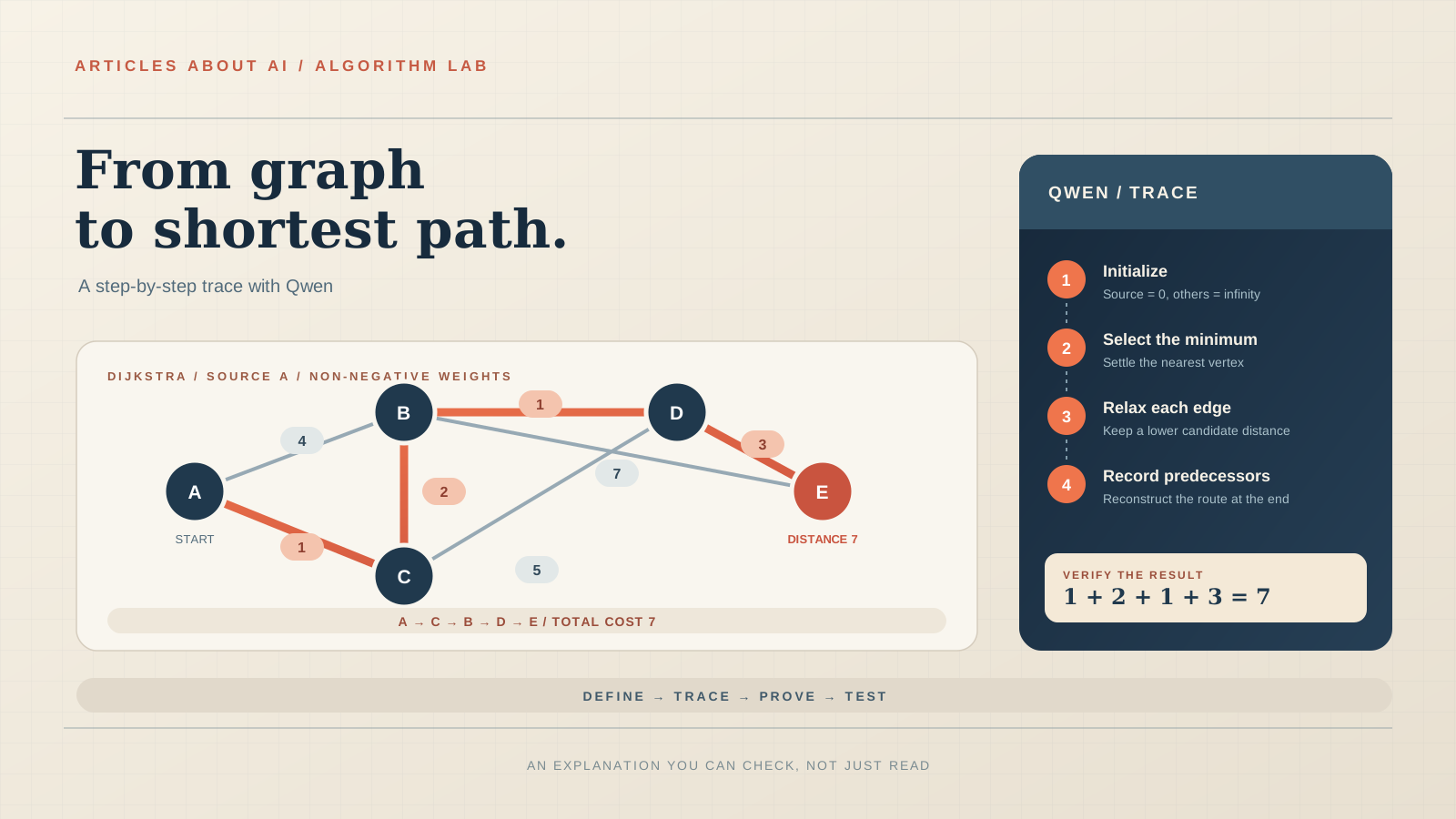
Give Qwen a small graph rather than asking it to explain an abstract one. Use this undirected example:
| Edge | Weight |
|---|---|
| A–B | 4 |
| A–C | 1 |
| C–B | 2 |
| C–D | 5 |
| B–D | 1 |
| B–E | 7 |
| D–E | 3 |
Set A as the source. Ask Qwen:
Explain Dijkstra’s algorithm using the graph above, starting at A. Use a min-priority queue. Show the initial tentative distances, the vertex selected at every iteration, every successful relaxation, and the predecessor of each updated vertex. Do not skip an iteration. At the end, give the shortest distance from A to every vertex and reconstruct the shortest path from A to E. Then explain why the algorithm requires non-negative edge weights.
Step 1: Initialize the distances
The source vertex has distance zero because no travel is needed to reach it from itself. Every other vertex begins with an unknown distance, represented by infinity.
| Vertex | Initial distance | Predecessor |
|---|---|---|
| A | 0 | None |
| B | ∞ | None |
| C | ∞ | None |
| D | ∞ | None |
| E | ∞ | None |
Qwen should explain that these are tentative distances, not necessarily the final answers. The algorithm will improve them whenever it discovers a shorter route.
Step 2: Process the source vertex A
A has the smallest tentative distance, so it is removed from the priority queue first. Its connections provide the first candidate routes:
- A to B costs 4, so B becomes 4.
- A to C costs 1, so C becomes 1.
The current distances are A = 0, B = 4, C = 1, D = ∞, and E = ∞. C is now the smallest unsettled vertex.
Step 3: Process C and improve B
The next vertex is C, with tentative distance 1. From C, the algorithm examines its edges:
- Reaching B through C costs 1 + 2 = 3. This improves B from 4 to 3.
- Reaching D through C costs 1 + 5 = 6. This gives D a tentative distance of 6.
The route A → C → B is shorter than the direct edge A → B. This is why the algorithm must compare a new candidate with the distance already recorded rather than simply accepting the first route it encounters.
Step 4: Process B and improve D
B is now the unsettled vertex with the smallest distance, 3. Its connections produce two useful comparisons:
- Reaching D through B costs 3 + 1 = 4. This improves D from 6 to 4.
- Reaching E through B costs 3 + 7 = 10. E receives a tentative distance of 10.
The predecessor of D becomes B, and the predecessor of E becomes B. The tentative distance to D is now 4.
Step 5: Process D and improve E
D has the smallest remaining tentative distance, 4. Reaching E through D costs 4 + 3 = 7. This improves E from 10 to 7.
The predecessor of E changes from B to D. The best route currently recorded is A → C → B → D → E.
Step 6: Process E and finish
E is selected with distance 7. No further improvement is possible. The algorithm has now settled every vertex in this example.
The complete trace is:
| Settled vertex | Successful updates | Tentative distances B, C, D, E |
|---|---|---|
| Start | A = 0 | ∞, ∞, ∞, ∞ |
| A | B = 4, C = 1 | 4, 1, ∞, ∞ |
| C | B = 3, D = 6 | 3, 1, 6, ∞ |
| B | D = 4, E = 10 | 3, 1, 4, 10 |
| D | E = 7 | 3, 1, 4, 7 |
| E | No improvement | 3, 1, 4, 7 |
The final shortest distances from A are A = 0, B = 3, C = 1, D = 4, and E = 7. The shortest route to E is A → C → B → D → E, with total weight 1 + 2 + 1 + 3 = 7.
This example gives you several things to check in Qwen’s answer: whether it selects vertices in the correct order, whether it updates B and D when shorter routes appear, whether it records predecessors consistently, and whether the final path adds up to the stated distance.
Ask Qwen to explain the invariant, not just repeat the steps
A trace shows what happens. A correctness argument explains why the result can be trusted under the algorithm’s assumptions.
For Dijkstra’s algorithm, the key idea is that when the unsettled vertex with the smallest tentative distance is selected, that distance is final, provided all edge weights are non-negative. A later route cannot reach that vertex with a lower cost without first passing through another unsettled vertex whose tentative distance would have been smaller. That would contradict the selection of the current minimum.
Ask Qwen:
State the main correctness invariant of Dijkstra’s algorithm. Explain why a vertex selected with the smallest tentative distance can be treated as settled when all edge weights are non-negative. Use the graph example to illustrate the argument. Then explain exactly which part of the reasoning can fail if a negative edge is allowed.
A good answer should distinguish a tentative distance from a settled distance. It should also explain that the proof depends on non-negative edge weights. If a negative edge is introduced, a route discovered later can reduce a distance that the algorithm has already treated as final.
Challenge the explanation with a counterexample. Ask Qwen to construct a small graph containing a negative edge where Dijkstra’s greedy selection gives an incorrect result. Then check the graph and arithmetic yourself. The goal is not to accept a convincing story; it is to see whether the stated assumption is genuinely necessary.
For a formal reference, MIT OpenCourseWare’s Lecture 13 on Dijkstra’s algorithm introduces non-negative edge weights and works through the algorithm. Princeton’s DijkstraSP reference implementation also documents the non-negative-weight requirement and a binary-heap implementation.
Ask for pseudocode before asking for Python
Once the trace and invariant are clear, ask Qwen to express the algorithm in pseudocode. This separates the logic from language-specific details such as imports, syntax, and library behavior.
A standard outline is:
DIJKSTRA(graph, source):
    for each vertex v:
        distance[v] = infinity
        predecessor[v] = none

    distance[source] = 0
    priority_queue = [(0, source)]

    while priority_queue is not empty:
        (current_distance, u) = remove smallest item

        if current_distance is not distance[u]:
            continue

        for each edge (u, v) with weight w:
            candidate = current_distance + w

            if candidate < distance[v]:
                distance[v] = candidate
                predecessor[v] = u
                insert (candidate, v) into priority_queue

    return distance, predecessor
The stale-entry check is important in implementations that insert a new queue entry whenever a distance improves instead of modifying an existing priority in place. An older entry may remain in the heap. When it is later removed, the algorithm skips it if its distance no longer matches the best recorded distance.
Ask Qwen to explain that detail separately. It is a common source of confusion when moving from textbook pseudocode to a practical implementation.
Request a Python implementation and inspect its assumptions
After the pseudocode is correct, ask for code. Python’s standard-library heapq module provides a min-heap: its smallest item is at the root, and heappop removes that smallest item. That makes it suitable for the priority-queue implementation shown below.
import heapq
from math import inf

def dijkstra(graph, source):
    if source not in graph:
        raise KeyError(f"Unknown source: {source}")

    for vertex, edges in graph.items():
        for neighbor, weight in edges:
            if neighbor not in graph:
                raise ValueError(f"Unknown neighbor: {neighbor}")
            if weight < 0:
                raise ValueError("Dijkstra requires non-negative weights")

    distance = {vertex: inf for vertex in graph}
    predecessor = {vertex: None for vertex in graph}
    distance[source] = 0
    queue = [(0, source)]

    while queue:
        current_distance, vertex = heapq.heappop(queue)
        if current_distance != distance[vertex]:
            continue

        for neighbor, weight in graph[vertex]:
            candidate = current_distance + weight
            if candidate < distance[neighbor]:
                distance[neighbor] = candidate
                predecessor[neighbor] = vertex
                heapq.heappush(queue, (candidate, neighbor))

    return distance, predecessor


def reconstruct_path(predecessor, target):
    if target not in predecessor:
        raise KeyError(f"Unknown target: {target}")

    path = []
    current = target
    while current is not None:
        path.append(current)
        current = predecessor[current]

    return list(reversed(path))
The code expects an adjacency-list dictionary in which every vertex appears as a key and each edge is represented by a neighbor and a weight. For an undirected graph, include each edge in both directions. For a directed graph, include only the direction that actually exists.
You can ask Qwen to fill the graph dictionary from the table and explain each line. Then ask it to show the returned distance and predecessor dictionaries. The expected distances for the example are A = 0, B = 3, C = 1, D = 4, and E = 7. The predecessor chain for E is E ← D ← B ← C ← A, which reconstructs A → C → B → D → E.
Do not treat a generated code block as proof that the algorithm is correct. Run it in your own environment, compare its output with the worked trace, and test cases that are not represented by the example.
The official Python heapq documentation explains the min-heap invariant and the behavior of heappush and heappop. It is the appropriate reference for the queue operations, rather than relying on Qwen’s description of a library function.
Use follow-up prompts to test the explanation
A useful algorithm explanation should survive changes to the input. Ask Qwen to examine edge cases and explain what changes.
For Dijkstra, useful tests include an isolated vertex, two equal-cost routes, a direct edge that is more expensive than a multi-edge route, a zero-weight edge, a negative edge, an unknown source, and a graph with one vertex and no edges.
Use this follow-up prompt:
Review the Dijkstra implementation against these cases: unreachable vertex, equal-cost paths, zero-weight edge, negative edge, unknown source, and a single-vertex graph. For each case, state the expected behavior and identify which part of the code handles it. If the implementation does not handle a case, propose a correction and explain why it is needed.
Then ask Qwen to produce a test table with input, expected output, and the property being checked. Run the tests locally. If the code fails, provide the exact error and ask for a diagnosis without asking it to rewrite the entire program immediately.
For a broader debugging workflow, the site’s guide on using DeepSeek to explain a Python traceback describes how to inspect stack frames and verify a diagnosis before changing code.
Ask for time and space complexity as a derivation
A model may give a familiar Big-O expression without explaining which operations produce it. Ask Qwen to derive the complexity from the implementation you are actually using.
For Dijkstra with an adjacency list and a binary min-heap, a common bound is O((V + E) log V) for a simple graph, where V is the number of vertices and E is the number of edges. Each vertex is processed through the priority queue, and edge relaxations can cause queue insertions. The exact expression depends on the graph representation and priority-queue implementation.
Ask:
Derive the time complexity of this exact implementation. Define V and E. Count the vertex and edge processing work, explain the cost of heap operations, and state the assumptions behind the final bound. Then explain the extra memory used by the distance dictionary, predecessor dictionary, and priority queue.
A useful answer should not confuse the cost of a single heap operation with the total cost of all operations. It should also distinguish the graph’s storage from the additional memory used by the algorithm.
The same method works for other algorithms. For merge sort, ask Qwen to derive the recurrence and explain why each level of the recursion tree processes the input. For binary search, ask it to show how the search interval changes. For dynamic programming, ask it to count states and transitions rather than simply quoting a complexity expression.
Use Qwen’s structured output when you need a repeatable trace
If you are using Qwen through Alibaba Cloud Model Studio’s API and need to process explanations in software, structured output can make the result easier to parse. The current documentation distinguishes JSON Object mode from JSON Schema mode.
JSON Object mode produces valid JSON but does not guarantee that every response follows a fixed structure. JSON Schema mode is designed to enforce a specified structure, but it is available only for selected models. The documentation also notes that models labelled as non-thinking support structured output only in non-thinking mode. Check the supported-model table before designing an application around a particular combination.
For example, you could request a trace with fields for the iteration number, selected vertex, distance updates, predecessor changes, and remaining queue entries. A schema illustration might look like this:
{
  "type": "object",
  "properties": {
    "iteration": {"type": "integer"},
    "selected_vertex": {"type": "string"},
    "updates": {
      "type": "array",
      "items": {
        "type": "object",
        "properties": {
          "vertex": {"type": "string"},
          "new_distance": {"type": "number"},
          "predecessor": {"type": "string"}
        },
        "required": ["vertex", "new_distance", "predecessor"],
        "additionalProperties": false
      }
    }
  },
  "required": ["iteration", "selected_vertex", "updates"],
  "additionalProperties": false
}
This is a schema illustration, not a guarantee that every Qwen model accepts it. Use the current Qwen structured-output documentation to check the exact API parameter, model support, and restrictions.
Structured output helps with format validation. It does not prove that the algorithm trace is mathematically correct. Your application should still check that the reported distances, predecessor links, and iteration order are consistent with the graph.
Understand the difference between an explanation and tool execution
Qwen can also participate in a tool-calling workflow when an application provides external functions. This can be useful if you want a program to calculate a shortest-path result, execute a test suite, or retrieve data for an explanation.
However, function calling is not the same as the model independently executing arbitrary code. Alibaba Cloud’s documentation describes a multi-step process: the application sends the available tool definitions, Qwen may return a function name and arguments, the application runs the selected function, and the result is sent back to the model for a final response. The application is responsible for execution and for deciding which operations are permitted.
For a learning exercise, keep the roles clear: ask Qwen to explain the algorithm and propose a trace; use a local program or an approved tool to calculate the result; compare the program’s output with the explanation; and ask Qwen to interpret any discrepancy using the actual output.
The official Qwen function-calling guide explains the application-side workflow and supported models. A model can request a tool call, but the surrounding application must execute it.
Common mistakes when using Qwen to learn algorithms
Asking for code before defining the problem. If the input, output, or constraints are unclear, the code may solve a different problem. Start with a precise statement.
Accepting a trace with skipped iterations. Ask for every selected item and every successful update. A table makes omissions easier to detect.
Confusing a tentative value with a final value. In Dijkstra, a distance can improve several times before the corresponding vertex is settled. Ask Qwen to label both states.
Ignoring the algorithm’s assumptions. Dijkstra requires non-negative edge weights. Binary search requires an ordered search space. A greedy strategy needs a reason why its local choice is safe. Make assumptions explicit.
Treating a complexity expression as self-explanatory. Ask for the cost of the loops, data-structure operations, and stored state. The bound must match the implementation.
Using one example as the only test. A small example can demonstrate the main idea, but it may not reveal edge cases. Ask for counterexamples and test the implementation independently.
Assuming a thinking mode guarantees correctness. A reasoning-oriented mode can be useful for complex tasks, but its answer still needs verification. More detailed output is not the same as a proof.
Mixing model explanation with application execution. If you use function calling, remember that your application runs the function and returns its result. Validate the arguments and control the permissions given to tools.
A final checklist for a reliable algorithm explanation
Before using a Qwen-generated explanation in coursework, documentation, or production code, check that:
- The algorithm variant matches the problem.
- Inputs, outputs, constraints, and assumptions are explicit.
- Every variable and data structure is defined.
- The pseudocode follows the stated algorithm.
- The worked trace shows every relevant state change.
- The invariant or correctness argument is explained.
- The time and space analysis matches the implementation.
- Edge cases and counterexamples have been considered.
- Generated code has been run and compared with expected results.
- External tool calls are executed and validated by the application, not assumed to have happened automatically.
Frequently asked questions
Can Qwen explain algorithms step by step?
Yes. Qwen can be prompted to explain an algorithm’s purpose, inputs, data structures, pseudocode, worked trace, correctness conditions, and complexity. The result should be checked against a textbook, official course material, or a reference implementation when accuracy matters.
Which Qwen mode should I use for a complex algorithm?
Use a supported thinking mode when the problem requires multi-step mathematical or logical reasoning and the interface or API offers that control. Qwen3 introduced hybrid thinking and non-thinking modes, while current Model Studio documentation lists model-specific controls. Availability and defaults vary by model and product.
Can Qwen explain Dijkstra’s algorithm with an example?
Yes. Provide a small weighted graph, name the starting vertex, and ask for the priority-queue order, tentative distances, successful relaxations, predecessor updates, and final path. Include the non-negative edge-weight requirement in the prompt.
Can Qwen generate Python code for an algorithm?
It can generate a Python implementation and explain its functions, data structures, and complexity. Run the code yourself, test edge cases, and compare the output with an independently checked example before relying on it.
Can Qwen return an algorithm trace as JSON?
Through Alibaba Cloud Model Studio, supported models can use structured-output settings. JSON Object mode guarantees valid JSON but not a fixed schema; JSON Schema mode provides stricter structure for selected models. These are API capabilities, not a promise that every chat interface exposes the same controls.
Does Qwen automatically run code or external tools?
Not merely because it explains an algorithm. With function calling, Qwen can return a tool request, but the application must execute the function and send the result back. A normal explanatory response should not be treated as evidence that code was run.
Official resources and further reading
- Qwen3: Think Deeper, Act Faster — Qwen Team, April 29, 2025
- Deep Thinking — Alibaba Cloud Model Studio
- Structured Output — Alibaba Cloud Model Studio, updated November 12, 2026
- Function Calling — Alibaba Cloud Model Studio, updated November 11, 2026
- Lecture 13: Dijkstra — MIT OpenCourseWare, 6.006, Spring 2020
- DijkstraSP — Princeton Algorithms, 4th Edition
- heapq — Python Standard Library Documentation
The best way to use Qwen for a complex algorithm is to make the explanation inspectable. Ask for the assumptions, state changes, invariant, complexity, and edge cases; then compare the result with a trusted reference and a program you can run. That turns an AI-generated explanation from a plausible narrative into a learning aid that can be tested.