
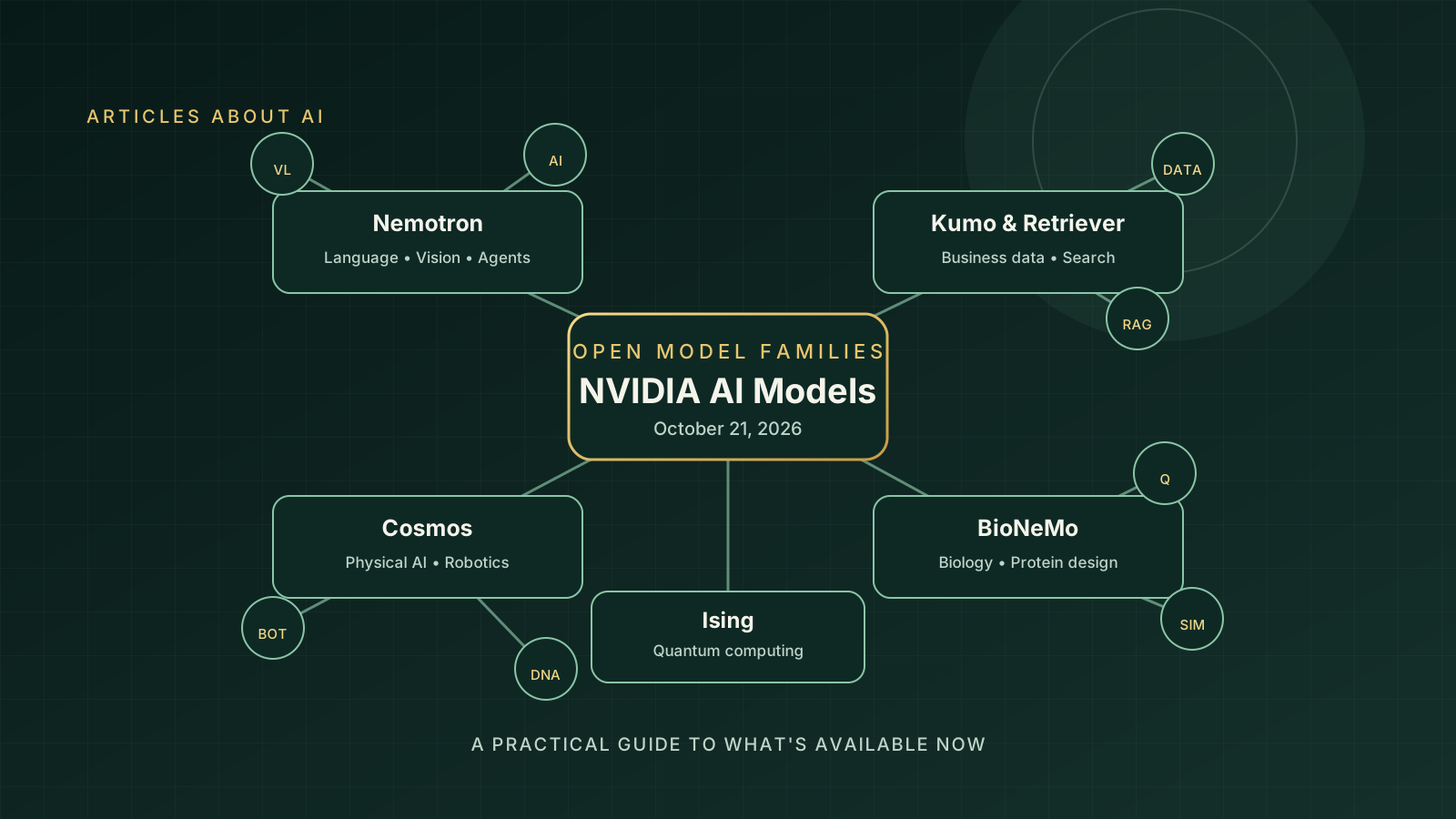
NVIDIA’s October 21, 2026 update brings together a broad set of open-model families for language and vision, information retrieval, structured business data, robotics, biology, and quantum computing. The announcement is useful for developers because it shows that NVIDIA’s model strategy is not limited to one general-purpose chatbot: the company is building models and tools for specific workloads that can be adapted to different industries.
The important distinction is availability. Some models in the expanded portfolio can be explored now, while other releases have a stated future date or a more limited access path. A model appearing in an announcement does not automatically mean that every checkpoint, hosted endpoint, or commercial-use permission is available to every developer.
This guide summarizes the families NVIDIA highlighted, explains where each may fit, and lists the checks to make before building a production workflow. It is based on NVIDIA’s official October 21 announcement and linked documentation, rather than independent benchmark testing.
What NVIDIA announced on October 21, 2026?
In its official post, NVIDIA Open Models Advance Europe’s Sovereign Intelligence Across Industries, NVIDIA described an expanded portfolio spanning vision and language, retrieval, tabular data, biology, robotics, and quantum computing. The company’s GTC Berlin announcements also emphasized models that can be customized and deployed closer to an organization’s data and infrastructure.
The announcement is best understood as a portfolio update, not a single model launch. Several components had been introduced earlier, while the October 21 post placed them within a broader set of tools for developers and organizations.
NVIDIA’s main open-model families
1. Nemotron: language, vision, and AI agents
The Nemotron family targets language and multimodal reasoning, including workflows in which an AI agent must interpret information and use tools. NVIDIA’s Nemotron 3.5 Super VL is described as a 120-billion-parameter model with 12 billion active parameters per token, designed for multimodal and agentic tasks.
NVIDIA published Super VL and Bolt 74B-A9B as available, while the smaller Nemotron 3.5 Bolt E4B 4GB was listed for October 23. Check the official Nemotron announcement and model documentation for the latest checkpoints, hardware requirements, and download routes before choosing a deployment.
Potential use cases: document understanding, visual question answering, specialized agents, and local or server-based inference. Actual throughput depends on the model, GPU, quantization, context length, and workload; published benchmark claims should be compared using the same test conditions.
2. Nemotron Retriever: finding and ranking relevant information
Retrieval models help applications locate useful passages or documents before a language model generates an answer. NVIDIA’s announcement includes Nemotron Retriever models for embedding, reranking, and document parsing.
These components can support retrieval-augmented generation (RAG), enterprise search, and document-heavy assistants. An embedding model helps represent queries and content for search; a reranker can reorder candidate results to put more relevant material near the top. Document parsing is a separate step that helps turn source files into usable text and structure.
For a real deployment, evaluate retrieval quality on your own documents and queries. Also test multilingual content, tables, scanned PDFs, access permissions, and the cost of indexing and re-indexing. The presence of a retriever does not by itself guarantee that a RAG system will cite the correct source or avoid unsupported answers.
3. NVIDIA Kumo: structured business data
Kumo focuses on structured data rather than only free-form text. That makes it relevant to organizations working with tables and business records, where the task may involve predicting an outcome or identifying patterns across connected entities.
Potential applications include forecasting, risk analysis, customer or operational insights, and decision support. These are use cases to evaluate—not guaranteed results. Teams should verify the supported data formats, model and library requirements, evaluation method, and licensing for the exact release they plan to use.
4. Cosmos: physical AI and robotics
NVIDIA Cosmos is positioned around world models and physical AI, with relevance to robotics, simulation, and systems that need to interpret or reason about physical environments. In these settings, models may support the creation or analysis of training data and simulated scenarios.
A robotics team should not treat a world model as a replacement for safety engineering. Any model-assisted system still needs realistic testing, hardware-in-the-loop validation where appropriate, safeguards, and clear limits on what the model is permitted to control.
5. BioNeMo and RFD4-Proteina: scientific discovery
NVIDIA’s October 21 healthcare announcement highlighted RFD4-Proteina, an open model for programmable protein design and search, developed with the University of Washington’s Institute for Protein Design. The wider BioNeMo platform supports AI workflows in biology and drug discovery.
These tools are aimed at researchers and scientific development teams, not general-purpose consumer image or chat tasks. A generated protein design is a computational proposal, not proof that a molecule is safe, effective, stable, or experimentally validated. Researchers need appropriate biological evaluation and laboratory validation.
Read the official NVIDIA healthcare and life-sciences announcement for the company’s description of the release and its research collaborations.
6. NVIDIA Ising: quantum-computing research
The Ising family is part of NVIDIA’s work around quantum computing. It belongs to a specialized research and engineering area, so most general web developers will not need it for a standard chatbot or website assistant.
Researchers considering it should start with the official documentation, supported workflows, dependencies, and intended evaluation tasks. Avoid assuming that a model or library described as quantum-related means it can run on a quantum computer by itself.
7. Alpamayo 2 Edge: autonomous-vehicle reasoning
NVIDIA also highlighted Alpamayo 2 Edge for autonomous-vehicle applications. The announcement described this as a later release rather than something every user could immediately download. Verify the current status from NVIDIA before planning a build around it.
Autonomous driving is safety-critical. Public model access or a demonstration is not evidence that a system is ready for deployment on public roads; validation, regulatory requirements, and vehicle-level safety systems remain essential.
Which model should a developer investigate first?
The right starting point depends on the data and task—not on which model name is most prominent in the announcement.
| Your task | Family to investigate | What to verify |
|---|---|---|
| Multimodal assistants and agents | Nemotron | Checkpoint access, GPU memory, latency, tool-use reliability |
| Search over internal documents | Nemotron Retriever | Retrieval recall, reranking quality, document parsing |
| Structured business records | Kumo | Supported tables, target tasks, evaluation data |
| Robotics and simulated environments | Cosmos | Intended workflow, data requirements, safety controls |
| Protein design and scientific workflows | BioNeMo / RFD4-Proteina | Research documentation, validation protocol, permitted use |
| Quantum-computing research | Ising | Supported algorithms, dependencies, target hardware |
| Autonomous-vehicle research | Alpamayo 2 Edge | Release status, hardware, safety and testing requirements |
Treat this table as a shortlist for investigation, not as a ranking. NVIDIA’s portfolio spans different tasks, so comparing all of these families using a single “best AI model” score would be misleading.
How to check access, hardware, and licensing
Before investing engineering time, follow this checklist:
- Open the exact official model page. Confirm the model identifier, checkpoint, release date, and whether the weights are downloadable or access-controlled.
- Separate weights from hosted services. A downloadable model and a managed inference endpoint are different ways to use a model; availability and costs can differ.
- Check hardware and software requirements. Review GPU memory, supported runtimes, quantization options, dependencies, and any required NVIDIA software.
- Read the license for that specific release. “Open” or “open-weight” does not automatically mean public-domain or unrestricted commercial use. Review the model license and any separate terms for datasets, code, or services.
- Benchmark your real workload. Use representative prompts, documents, languages, and expected concurrency. Track quality, latency, throughput, memory use, and cost.
- Plan deployment controls. For enterprise use, define access permissions, logging, privacy controls, monitoring, rollback procedures, and human review for consequential decisions.
For teams comparing deployment routes, our guide to OpenAI models on Google Cloud and Model Garden explains why model access, preview status, and cloud integration should be checked separately. For AI-assisted engineering projects, see how to validate AI-generated code with regression tests.
How NVIDIA’s model strategy fits the wider AI ecosystem
The practical trend is specialization. A single general-purpose assistant may be convenient, but production applications often need several components: a model that interprets images, a retriever that finds relevant documents, a model that works with structured data, and separate controls that determine what an agent can do.
This does not mean every project should deploy a large collection of models. Each additional component adds operational complexity. A smaller, well-tested system may be easier to maintain than a multi-model architecture. Start with the simplest setup that meets the quality, latency, privacy, and cost requirements, then add specialized models only when evaluation shows a meaningful benefit.
NVIDIA’s open-model portfolio is worth monitoring because it gives developers more options to inspect, customize, and potentially run models within their own infrastructure. But “open” alone is not enough to select a model. The decisive factors are the exact release, license, performance on your data, total deployment cost, and the maturity of the surrounding tooling.
Bottom line
NVIDIA’s October 21, 2026 announcement brings multiple specialized model families into one view: Nemotron for language, vision, and agent workflows; Nemotron Retriever for search; Kumo for structured data; Cosmos for physical AI; BioNeMo for scientific discovery; Ising for quantum-computing research; and Alpamayo 2 Edge for autonomous-vehicle work.
For developers, the best next step is to choose the family that matches a concrete task, confirm the current release and licensing terms on its official page, and run a small benchmark before committing to production. Do not assume that every announced model is immediately available or that results reported by a vendor will transfer unchanged to your workload.