
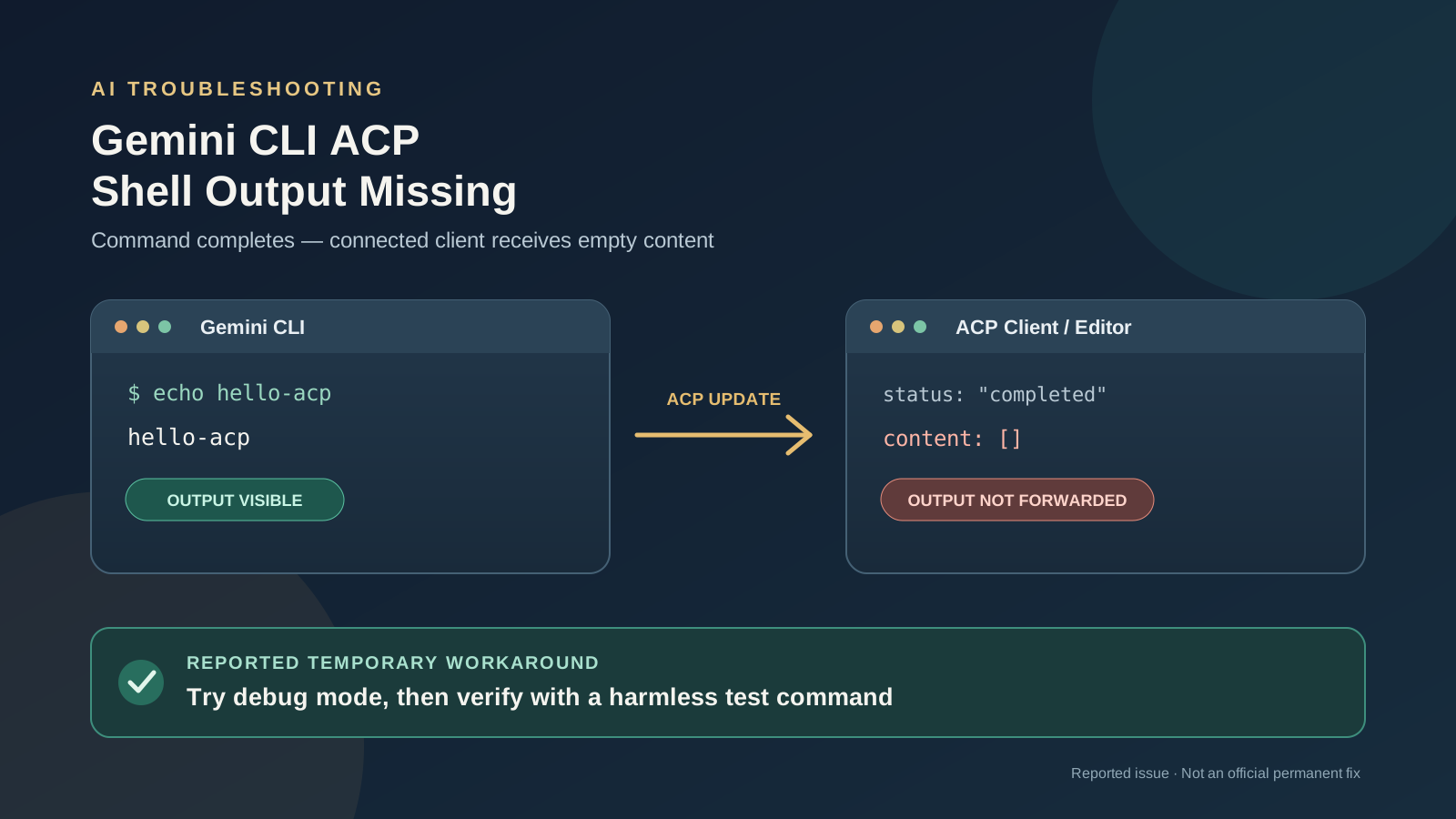
When Gemini CLI runs as an Agent Client Protocol (ACP) agent, a shell command can finish successfully while the connected editor or ACP client receives no command output. The terminal interface may display the result, but the final ACP update can contain an empty content array. That leaves the client unable to show output that the agent appears to have produced.
A new report opened on October 25, 2026, describes this behavior in Gemini CLI 0.65.0 on Windows 11 and Linux CI runners. The report includes a minimal reproduction using a local mock endpoint, so the reproduction does not require a live Google model request. The issue remains a reported implementation bug, not an official Google incident or a confirmed fix announcement.
This guide explains the symptom, the code path identified by the reporter, a temporary workaround described in the report, and the information to collect before changing your editor integration.
What is the Gemini CLI ACP output bug?
The issue is tracked in Gemini CLI issue #29930, titled “ACP: run_shell_command output is dropped (empty tool_call_update content) when the shell returns AnsiOutput.”
The reported sequence is specific:
- An ACP client asks Gemini CLI to run a shell command such as
echo hello-acp. - Gemini CLI executes the command and its own interface can display the result.
- The command’s display result is represented as an
AnsiOutputobject rather than a plain string. - The ACP conversion helper does not convert that object into protocol text content.
- The completed
tool_call_updateis sent withcontent: [], so the connected client receives no shell output.
The reporter says the behavior was observed with Gemini CLI 0.65.0 on Windows 11 and Linux CI runners. The reproduction used a local mock that served the Gemini REST API shape; the report explicitly says no Google service was called during that reproduction. This distinction matters: the evidence points to the CLI’s ACP output-conversion path, not to a Gemini API outage, authentication failure, or quota problem.
What causes the missing shell output?
The issue report identifies a mismatch between the value produced by the shell tool and the types accepted by the ACP conversion helper.
In packages/core/src/tools/shell.ts, the shell tool can set returnDisplay to result.ansiOutput when formatted output is present. In packages/cli/src/acp/acpUtils.ts, toToolCallContent handles string content and file diffs, but the reported code path returns null for other object types, including AnsiOutput. The ACP session then emits an empty list when it has no converted content to send.
The reporter says the same relevant behavior was present in the inspected main-branch code at commit cd1b45c. The underlying issue is therefore described as a conversion/serialization mismatch: a display object is available, but the ACP adapter does not turn it into plain text for the client.
You can inspect the implementation directly:
These source links support the reported explanation, but they should not be interpreted as confirmation that every ACP client or every Gemini CLI version is affected.
Workaround: try debug mode
The issue reporter states that with debug mode enabled, returnDisplay becomes llmContent, which is a string. That string follows the conversion path the ACP helper already handles, allowing the shell output to reach the client in the reported reproduction.
If you are affected, try enabling Gemini CLI’s debug mode through the launch configuration or the method supported by your installed version, then repeat a harmless test command in a non-sensitive project. For example, use a simple command that prints a short line rather than a command that changes or deletes files.
Important: this is a workaround reported with the issue, not an official fix and not a guarantee for every editor or version. Debug settings and launch options can differ by version and integration. Consult the Gemini CLI ACP mode documentation for the current launch configuration supported by your installation. Do not assume that enabling debug mode repairs unrelated failures or that it should be left enabled permanently.
If the workaround does not help, avoid repeatedly rerunning commands that modify your project. First verify whether the command actually ran, whether output appears in Gemini CLI itself, and whether the ACP client’s final update is empty.
How to diagnose the problem safely
Use this checklist to distinguish the reported bug from other causes of missing output.
1. Confirm that Gemini CLI is running through ACP
The report concerns gemini --acp and a custom ACP client. If you are using only Gemini CLI’s interactive terminal interface, this exact failure path may not explain your symptoms. Check how your editor starts the process and record the Gemini CLI version.
2. Reproduce with a harmless command
Try a short read-only or output-only command, such as:
echo hello-acp
If the command is completed, compare what Gemini CLI displays with what the connected client shows. Do not use destructive commands as a test.
3. Check the final ACP update
If your integration exposes protocol logs, look for a completed tool_call_update whose content is empty. That is the distinctive symptom in issue #29930. An empty result alone is not proof of this bug: a command can legitimately produce no output, and a different integration problem may produce similar symptoms.
4. Record versions and redact sensitive logs
Before reporting the problem, collect the Gemini CLI version, operating system, editor or ACP client and version, the harmless reproduction command, and whether debug mode changes the result. Remove API keys, OAuth tokens, private paths, source code, and confidential prompt content from logs before sharing them publicly.
5. Check whether a fix has been released
The original report is the best place to check for maintainer responses and status changes: follow issue #29930 on GitHub. Do not assume the bug is fixed just because a newer version exists; look for a release note, merged fix, or maintainer confirmation that specifically addresses conversion of AnsiOutput into ACP content.
Is this the same as Gemini CLI ACP hanging on a 429 error?
No. Both issues affect Gemini CLI integrations that use ACP, but they describe different failure modes.
In the output-loss issue, the shell command can complete while the client receives an empty result. In the separate Gemini CLI ACP 429 quota-hang guide, a request can appear stuck while the CLI waits through a long retry delay after a quota or capacity response. The diagnostic signals and potential workarounds are different, so do not apply a 429 troubleshooting procedure to an empty shell-output update unless the logs actually show a 429 or RESOURCE_EXHAUSTED.
For broader context on command-line AI coding tools, see our comparison of Claude Code, Codex, and Gemini CLI. If your symptom is instead a request that never receives an API response, use the separate Claude Code no-response troubleshooting guide only when that product and error match your situation.
What would count as a real fix?
A durable fix would ensure that ACP output conversion can handle the shell tool’s formatted output type. The issue reporter suggests converting AnsiOutput to plain text inside toToolCallContent, or passing the shell tool’s plain-text result.output to ACP clients. These are proposed implementation approaches from the report, not merged changes or official maintainer guidance.
Until a fix is confirmed, the practical approach is to verify the symptom with a harmless command, try debug mode as a temporary workaround, and check the upstream issue for a maintainer response or release that specifically addresses it. If you maintain an ACP integration, include the empty final content and a minimal reproduction in your report; avoid claiming the shell command failed when the available evidence only shows that its output was not forwarded.
Frequently asked questions
Why does Gemini CLI show output but my editor does not?
The reported bug occurs when formatted shell output is represented as an AnsiOutput object that the ACP conversion helper does not serialize into client-readable content. The terminal UI and ACP client can therefore show different results.
Does this mean the Gemini API is down?
No. The reported reproduction used a local mock endpoint and did not call a Google service. The evidence points to the Gemini CLI ACP integration path rather than a general Gemini API outage.
Is there a confirmed permanent fix?
The issue was open when this article was prepared. Treat debug mode as a reported workaround, and check the upstream issue for a verified fix or release note before relying on a permanent solution.
Which keyword should I search for?
The most specific query is Gemini CLI ACP output missing. Related searches include Gemini CLI shell command output missing, ACP tool_call_update empty content, Gemini CLI run_shell_command output, and Gemini CLI AnsiOutput bug.
Sources and further reading
- Original report: Gemini CLI issue #29930 — created October 25, 2026, at 12:29:04 UTC.
- Gemini CLI ACP content conversion source.
- Gemini CLI shell tool source.
- Gemini CLI ACP mode documentation.
- Related guide: Gemini CLI ACP hanging on 429 quota errors.
Editorial note: This article describes a newly reported bug and a workaround from the reporter. It does not claim that Google has acknowledged a service incident or released a permanent fix.