
AI agents can fail in ways that are difficult to diagnose from a final answer alone. An agent may select the wrong tool, call the right tool with incorrect arguments, repeat a request, lose context during a handoff, exceed a latency budget, or return a plausible answer after an earlier step failed. A simple application log that records only the user’s prompt and the final response hides most of the evidence needed to understand what happened.
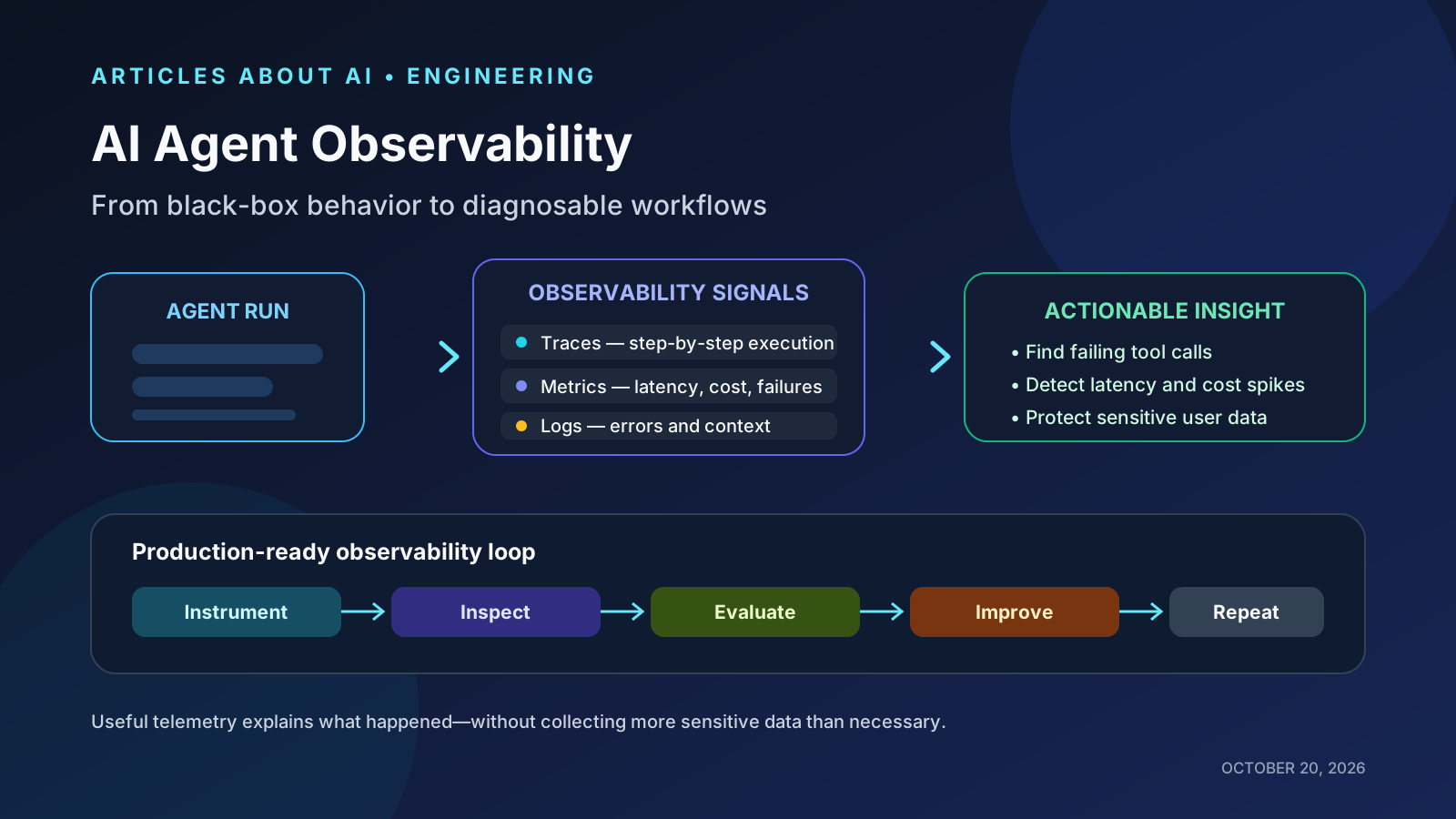
Production AI agent observability is the practice of collecting enough structured evidence to explain a workflow’s behavior, quality, latency, and cost—while protecting user data. It connects three complementary signals (traces, metrics, and logs) with repeatable evaluations and operational controls.
This article is an engineering guide based on vendor documentation and OpenTelemetry’s evolving conventions. It is not a claim that one observability product is universally best.
The short answer
A production AI agent should be observable at both the workflow level and the individual-step level.
- Traces show the order of model calls, tool calls, handoffs, guardrails, and other steps in a single run.
- Metrics reveal patterns across many runs, such as latency percentiles, failure rates, token usage, and cost.
- Logs and events preserve selected diagnostic details for specific failures.
- Evaluations measure whether the workflow met its acceptance criteria, not merely whether it completed without an exception.
- Privacy controls determine which inputs, outputs, tool arguments, and identifiers may be recorded and retained.
OpenAI’s agent documentation describes traces containing model responses, tool calls, and delegated work, while its evaluation guidance recommends trace grading for workflow-level problems and datasets for repeatable evaluation. Anthropic’s agent-evaluation guidance similarly explains why multi-step behavior requires evaluations suited to the complexity of the system.
Sources: OpenAI agent tracing, OpenAI agent evaluations, and Anthropic: Demystifying evals for AI agents.
1. Trace the whole run, not just the model response
A trace should represent one meaningful unit of work, such as answering a support question or completing a research task. Within that trace, record spans for the steps that matter: model generation, retrieval, external API calls, tool execution, policy checks, and handoffs to other agents.
For example, a support agent may execute this sequence:
- Receive a user’s question.
- Retrieve the relevant account record.
- Call a policy or eligibility tool.
- Ask the model to interpret the retrieved facts.
- Produce a response or escalate to a human.
If the final answer is wrong, a step-level trace can help distinguish a retrieval failure from an incorrect tool result, a reasoning error, or a response-generation problem. Without that sequence, engineers may only see the final text and guess at the cause.
Useful trace fields include a run or trace identifier, parent-child span relationships, operation name, start and end times, status, model identifier, tool name, and relevant usage counters. Capture the minimum payload detail needed to debug a class of failures; do not assume that storing every prompt and tool argument is always appropriate.
OpenAI’s tracing guide documents session, turn, and span views, including recorded inputs, outputs, duration, status, and usage where available.
2. Use metrics to see system-wide patterns
Traces explain an individual run. Metrics show whether a problem is widespread and whether the system is getting better or worse.
A useful initial dashboard can include:
| Metric | Why it matters |
|---|---|
| End-to-end success rate | Measures completed tasks against explicit acceptance criteria |
| Tool-call failure rate | Surfaces broken integrations, invalid arguments, and permission errors |
| p50 and p95 latency | Shows typical response time and slow-tail behavior |
| Input and output tokens per successful task | Helps explain usage and cost changes |
| Cost per accepted task | Connects spend to useful outcomes rather than raw requests |
| Retry and handoff rate | Can reveal unstable tools, unclear routing, or excessive agent loops |
| Escalation rate | Helps determine whether the agent is handling the intended share of work |
| Evaluation pass rate | Tracks quality against a stable regression dataset |
Define each metric carefully. “Success rate” should not mean only that the API returned HTTP 200. A technically successful request can still produce an incorrect answer or an invalid action. For workflows that modify data or call external services, include task-specific acceptance checks and, where appropriate, human review.
Use percentiles rather than averages alone: a good average latency can hide a small number of very slow runs. Break metrics down by workflow, model version, tool, deployment, and task category where sample sizes and privacy rules permit.
3. Keep logs useful, structured, and limited
Logs are best for discrete events and diagnostic context: a tool timeout, a validation failure, a retry decision, a policy block, or a fallback to another route. Use structured fields rather than relying only on free-form text. Correlate each log event with the trace or run identifier so an engineer can move from a dashboard alert to the relevant execution timeline.
Do not automatically log every piece of model context. Prompts and tool outputs may contain personal information, credentials, confidential business data, or customer records. A safer design classifies fields before collection, redacts secrets, restricts access, defines retention periods, and separates operational metadata from content that requires stronger controls.
OpenTelemetry’s GenAI event conventions explicitly identify privacy concerns around capturing model inputs and outputs; the conventions describe collection as dependent on whether an application has enabled it. The GenAI semantic conventions are still evolving, so teams should check the status and implementation support for the instrumentation they choose.
References: OpenTelemetry semantic conventions and OpenTelemetry GenAI events.
4. Observability is not the same as evaluation
Observability helps explain what a system did. Evaluation determines whether what it did was good enough.
A trace may show that an agent used a search tool, called a database, and returned an answer without errors. It cannot, by itself, prove that the answer was accurate, complete, appropriately grounded, or compliant with your product’s policy.
Create a small, representative evaluation dataset from real task categories and known failure cases. Define expected outcomes, acceptable alternatives, and unacceptable behavior. Run the same dataset when changing prompts, models, tool descriptions, routing logic, retrieval settings, or guardrails. Combine deterministic checks—such as schema validation or exact expected state—with human review or model-based graders where subjective criteria are involved.
OpenAI recommends using trace grading to identify workflow-level problems and moving to datasets and evaluation runs when repeatable comparisons are needed. Anthropic also emphasizes that agent evaluations must account for multi-step behavior, tool use, and the complexity of the system being tested.
References: OpenAI agent evaluation workflow and Anthropic’s agent-evaluation guide.
For a broader test plan, see our guide to evaluating AI agents for reliability. For usage limits and cost control, see AI agent API budgets and rate limits.
5. Standardize instrumentation where possible
When teams use several models, frameworks, or monitoring backends, provider-specific field names can make it harder to compare runs. OpenTelemetry provides common semantic conventions for telemetry so different systems can use consistent names and attributes. Its GenAI conventions cover model-related telemetry and are being developed further for agent and framework spans.
A practical approach is to keep a stable application-level schema for concepts such as:
- workflow name and version;
- model provider and model identifier;
- tool name and tool outcome;
- input/output token counts where supplied;
- latency and retry count;
- evaluation result and failure category;
- deployment environment and release version.
Adopt the conventions supported by your chosen instrumentation and avoid inventing incompatible duplicate fields. Because GenAI conventions continue to evolve, pin or document the version used by your instrumentation and verify compatibility before making schema changes.
Reference: OpenTelemetry semantic conventions.
6. Set alert thresholds around user impact
An alert for every individual model failure quickly becomes noisy. Instead, alert on sustained changes that affect users or budgets, and use traces to diagnose the cause.
Examples include:
- the accepted-task rate falls below a defined service objective;
- p95 latency exceeds the product’s response-time budget for a sustained period;
- tool failures or retry rates rise sharply after a deployment;
- cost per accepted task exceeds a budget;
- a policy block or escalation rate changes unexpectedly;
- a new model or prompt version regresses on a critical evaluation set.
Set thresholds from a measured baseline and the consequences of failure. A low-volume workflow may need a longer observation window than a high-volume endpoint. For high-impact actions, such as modifying records or initiating transactions, use explicit authorization, validation, and approval controls rather than relying on monitoring to catch every mistake after it occurs.
7. A staged implementation plan
You do not need a large telemetry platform on day one. Build observability in stages:
- Establish a run identifier. Make it possible to connect the user’s request, internal steps, logs, and final outcome.
- Instrument critical steps. Start with model calls, retrieval, tool calls, external APIs, and handoffs.
- Track a small set of metrics. Choose latency, accepted-task rate, tool failures, usage, and cost.
- Define privacy boundaries. Decide which payloads may be captured, how redaction works, who can access telemetry, and how long it is retained.
- Create a regression dataset. Include common tasks and known failure cases, then run it before releasing prompt or model changes.
- Add alerts based on impact. Alert on sustained quality, latency, reliability, or cost regressions.
- Review incidents and improve the system. Use traces to identify root causes and add regression cases so the same failure is less likely to return.
If your agent uses long-term memory, instrument memory reads and writes as explicit steps, and evaluate whether retrieved information is current and relevant. Our guide to AI agent memory reliability covers that separate failure surface.
Common mistakes to avoid
- Recording only final answers: hides tool errors, bad retrieval, and broken handoffs.
- Treating a successful API response as a successful task: confuses transport reliability with answer quality.
- Collecting all prompts and outputs indefinitely: increases privacy and security exposure without guaranteeing better diagnosis.
- Using averages alone: conceals slow-tail latency and intermittent failures.
- Changing the model without rerunning evaluations: makes regressions harder to attribute.
- Building dashboards without incident workflows: metrics matter only when someone knows what to inspect and how to respond.
Conclusion
Reliable AI agent observability requires more than logging model text. Trace the workflow, measure system-wide outcomes, retain focused diagnostic events, evaluate task quality repeatedly, and set clear limits on sensitive telemetry. These practices make failures easier to reproduce, releases easier to compare, and production behavior easier to explain.
The strongest observability setup is not the one that stores the most data. It is the one that helps a team answer four questions quickly: What happened? Why did it happen? Did the task meet its acceptance criteria? What should change next?