
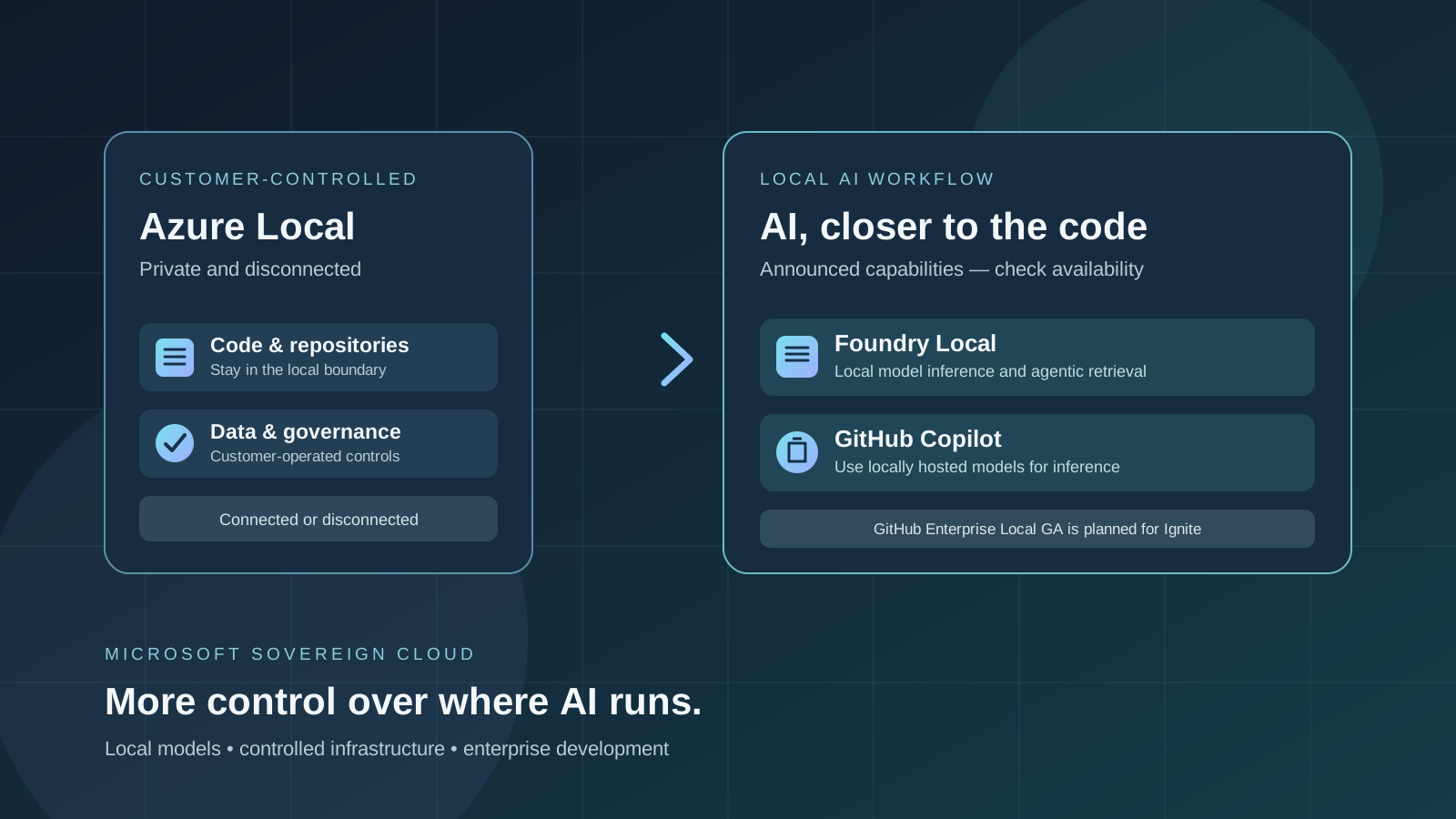
Microsoft’s October 20, 2026 update to Microsoft Sovereign Cloud puts local AI inference and customer-controlled development environments at the center of its enterprise strategy. The announcement covers Azure Local, Foundry Local, GitHub Enterprise Local, and the ability for developers to use GitHub Copilot with locally hosted models in environments they control.
The practical idea is straightforward: organizations with strict requirements for data residency, operational control, or disconnected operations need more than a cloud service with a regional data center. They may also need source code, development tools, AI inference, and sensitive business data to remain within an environment operated by the organization itself.
There is an important availability distinction, however. Microsoft’s announcement combines features that are already generally available with capabilities entering preview and products planned to become generally available at Microsoft Ignite. This article explains the announced direction without treating every capability as available to every customer today.
What did Microsoft announce on October 20, 2026?
In its official digital sovereignty announcement, Microsoft described additions across public cloud, private cloud, and partner-operated environments. For developers and AI teams, the most relevant details are:
- GitHub Enterprise Local: Microsoft says this validated GitHub Enterprise Server appliance on Azure Local will become generally available at Microsoft Ignite. It is designed to keep repositories, code, and development workflows in a customer-operated environment.
- GitHub Copilot with locally hosted models: Developers will be able to use Copilot with local models for inference, bringing AI-assisted development closer to code and data inside environments they control. The announcement does not mean that every existing Copilot subscription can immediately select any local model.
- Foundry Local on Azure Local: Microsoft says Foundry Local will become generally available at Ignite for connected and disconnected operations on Azure Local, with an expanded model catalog that includes Microsoft, partner, open-weight, and open-source models.
- Local inference and agentic retrieval: Microsoft describes using natural language to interact with local enterprise data and receive responses grounded in that data.
- Additional local data services: DocumentDB and Blob Storage on Azure Local are entering public preview, expanding the data services that can run within customer-operated environments.
These are distinct announcements with different rollout stages. For the authoritative wording and latest dates, refer to Microsoft’s official blog post and its GitHub Enterprise Local update.
What is GitHub Enterprise Local?
GitHub Enterprise Local is intended to bring the GitHub Enterprise Server development experience to infrastructure that an organization operates and controls, using Azure Local as the foundation. It is aimed at environments where teams need to keep source code and development workflows close to their business operations or continue working with limited or no internet connectivity.
This is not the same thing as simply installing the standard GitHub website on a laptop. It is an enterprise deployment model with infrastructure, administration, and operational requirements. Organizations should confirm supported hardware, deployment prerequisites, update procedures, identity integration, backup and recovery, and the exact feature set before planning a rollout.
The AI angle is the option to combine local development infrastructure with locally hosted models. Microsoft says Copilot can be used with local models for inference in these controlled environments, while Foundry Local provides the local model runtime and catalog. Exact model support, deployment prerequisites, licensing, and customer eligibility must be checked against the current product documentation and availability announcement.
For developers who already use Copilot, our guide to GitHub Copilot model routing in CLI and VS Code explains how model choice affects quality, latency, and cost. The local deployment scenario adds another decision: where inference takes place and what environment the code and prompts are allowed to leave.
What is Foundry Local on Azure Local?
Foundry Local is Microsoft’s local AI capability for running supported models within an environment controlled by the customer. In the October 20 announcement, Microsoft says the Azure Local offering is planned to become generally available at Ignite for both connected and disconnected operations.
The announced model catalog is intended to include Microsoft models as well as partner, open-weight, and open-source options. Microsoft also describes local inference and agentic retrieval, which can let users ask natural-language questions about enterprise information and receive responses grounded in data held in the local environment.
That does not mean every model can run on every server. Model selection depends on supported hardware, memory, accelerator capacity, runtime requirements, licensing, and the product’s current model catalog. Organizations should benchmark candidate models using their own workload rather than assume that a model available in a cloud API will behave identically when hosted locally.
Local retrieval also needs its own security design. Teams should confirm which data sources are indexed or queried, how permissions are enforced, how retrieved passages are passed to a model, how results are logged, and whether an agent can call external tools. Keeping inference local is useful, but it does not automatically make every data access or agent action safe.
What does “GitHub Copilot with local models” mean?
In a conventional cloud-assisted coding workflow, some processing may happen through cloud-hosted models according to the product’s architecture and settings. Microsoft’s announcement describes an additional option for environments where AI inference needs to remain closer to the organization’s own code and data.
The potential advantages include:
- Data-boundary control: organizations can design a workflow that keeps supported inference within their managed environment.
- Disconnected operation: eligible deployments can be designed for locations that cannot rely on continuous public-cloud connectivity.
- Reduced external dependency: teams may be able to perform supported AI tasks without sending every inference request to a public model endpoint.
- Governance choices: infrastructure, access, model selection, and operational policies can be managed according to the organization’s security requirements.
These are potential benefits of the deployment architecture, not blanket guarantees about every Copilot feature. The supported tasks, model choices, authentication flow, telemetry, extension behavior, and any remaining external connections must be validated for the actual product configuration.
If you are evaluating Copilot in an existing development workflow, see our guides to GitHub Copilot HydraFusion Max and GitHub Copilot model deprecation and replacement choices. They cover model selection and workflow considerations that remain relevant when planning a controlled deployment.
Availability: what is generally available, in preview, or still planned?
The announcement covers several product components. Do not treat them as one release with a single availability date.
| Capability | Status in Microsoft’s October 20 announcement | What to verify |
|---|---|---|
| External key management through Azure Managed HSM | Generally available | Supported regions, configuration, and key-management requirements |
| Confidential VMs on Azure Local | Generally available | Hardware prerequisites, attestation, and workload support |
| DocumentDB on Azure Local | Entering public preview | Preview eligibility, supported configurations, and limitations |
| Blob Storage on Azure Local | Entering public preview | Deployment requirements and current preview scope |
| GitHub Enterprise Local | Planned general availability at Microsoft Ignite | Exact launch date, supported hardware, and licensing |
| Foundry Local on Azure Local | Planned general availability at Microsoft Ignite | Model catalog, hardware support, disconnected deployment requirements |
| GitHub Copilot with locally hosted models | Announced for customer-controlled environments; exact support depends on the deployment | Eligible customers, supported models, product prerequisites, and connectivity requirements |
| Sovereign Control Panel | Entering public preview at Microsoft Ignite | Preview registration and supported Azure environments |
The status above reflects Microsoft’s announcement dated October 20, 2026. Product availability can change, and preview features may have restricted eligibility or incomplete functionality. Check the official product page before making purchasing or deployment decisions.
How should an organization evaluate local AI deployment?
A local AI project should start with a workload and threat model, not a model download. Use this checklist to determine whether a customer-controlled environment is appropriate.
1. Define the data boundary
List the source code, prompts, repository metadata, logs, retrieved documents, credentials, and outputs that the workflow handles. Decide which data must remain inside the environment and which services are allowed to communicate externally. Include telemetry, update channels, package registries, identity systems, and monitoring tools in the review.
2. Confirm the operating mode
Determine whether the environment will be connected, intermittently connected, or fully disconnected. A disconnected design has different requirements for updates, model distribution, identity, backups, vulnerability scanning, and incident response. Do not assume that a system can be disconnected merely because its inference model is local.
3. Check hardware and model compatibility
Validate the current Foundry Local catalog and the hardware required for each candidate model. Test coding tasks that reflect your real repositories: code explanation, test generation, refactoring, debugging, and multi-file changes. Measure quality, latency, resource consumption, and failure modes under realistic load.
4. Review access controls and agent permissions
A local coding assistant can still make mistakes or perform risky actions if it has broad filesystem, shell, repository, or network access. Apply least privilege, isolate agent execution where supported, and require review for consequential changes. Our article on Microsoft’s AI agent security controls covers the broader governance issues around agent permissions and risk monitoring.
5. Plan updates, support, and recovery
Document how the platform, model files, runtime, and development tools will be patched. Define who approves model changes, how model versions are pinned, how logs are retained, and how the team restores service if a local model or host fails. Disconnected deployments need a tested process for securely importing updates and responding to newly disclosed vulnerabilities.
6. Measure the full operating cost
Local AI does not automatically cost less than cloud inference. Include servers, GPUs, power, cooling, storage, maintenance, model evaluation, security operations, and staff time. Compare the cost per successful task—not just the cost of running a model—with the existing cloud workflow.
How this differs from Copilot model selection and sandboxing
Model selection, agent sandboxing, and local inference address different problems:
- Model selection determines which model handles a task and can affect quality, latency, and usage cost.
- Sandboxing limits what an agent can access or execute in its runtime.
- Local inference determines where supported model processing occurs.
- Sovereign infrastructure adds controls over the environment, operations, data boundary, and connectivity.
These controls can complement each other, but none replaces the others. Running a model locally does not, by itself, sandbox its tools or enforce least privilege. Likewise, a sandbox does not prove that every prompt or telemetry event stays local.
For more background, read our practical guides to Copilot model routing, Copilot local sandboxing and developer security, and Copilot for JetBrains administration. These cover related but separate controls for choosing models, restricting agent actions, and managing enterprise settings.
Official sources and further reading
- Microsoft: Advancing digital sovereignty with greater control and choice — October 20, 2026
- Microsoft: GitHub Enterprise Local — bringing modern development to environments you control
- Microsoft Learn: Sovereign Private Cloud use cases and configurations
- Microsoft: Sovereign Private Cloud and disconnected AI — February 24, 2026
Bottom line
Microsoft’s October 20 announcement points toward a more locally controlled enterprise AI stack: Azure Local for customer-operated infrastructure, Foundry Local for supported model inference, and GitHub Enterprise Local with an announced path to Copilot using locally hosted models. This is relevant for organizations that must keep code and sensitive data inside defined operational boundaries or support disconnected environments.
The release stages matter. GitHub Enterprise Local and Foundry Local on Azure Local were described as becoming generally available at Microsoft Ignite, while other capabilities have different preview or general-availability statuses. Before adopting the approach, verify the latest documentation, supported hardware and models, customer eligibility, licensing, and actual network behavior.
For readers searching for Microsoft Sovereign Cloud, GitHub Copilot local models, GitHub Enterprise Local, Foundry Local, Azure Local AI, private AI deployment, disconnected AI, on-premises AI, enterprise AI security, local model inference, and AI data sovereignty, the key takeaway is that local inference is one part of a larger deployment and governance design—not an automatic guarantee of privacy, compliance, or offline compatibility.