
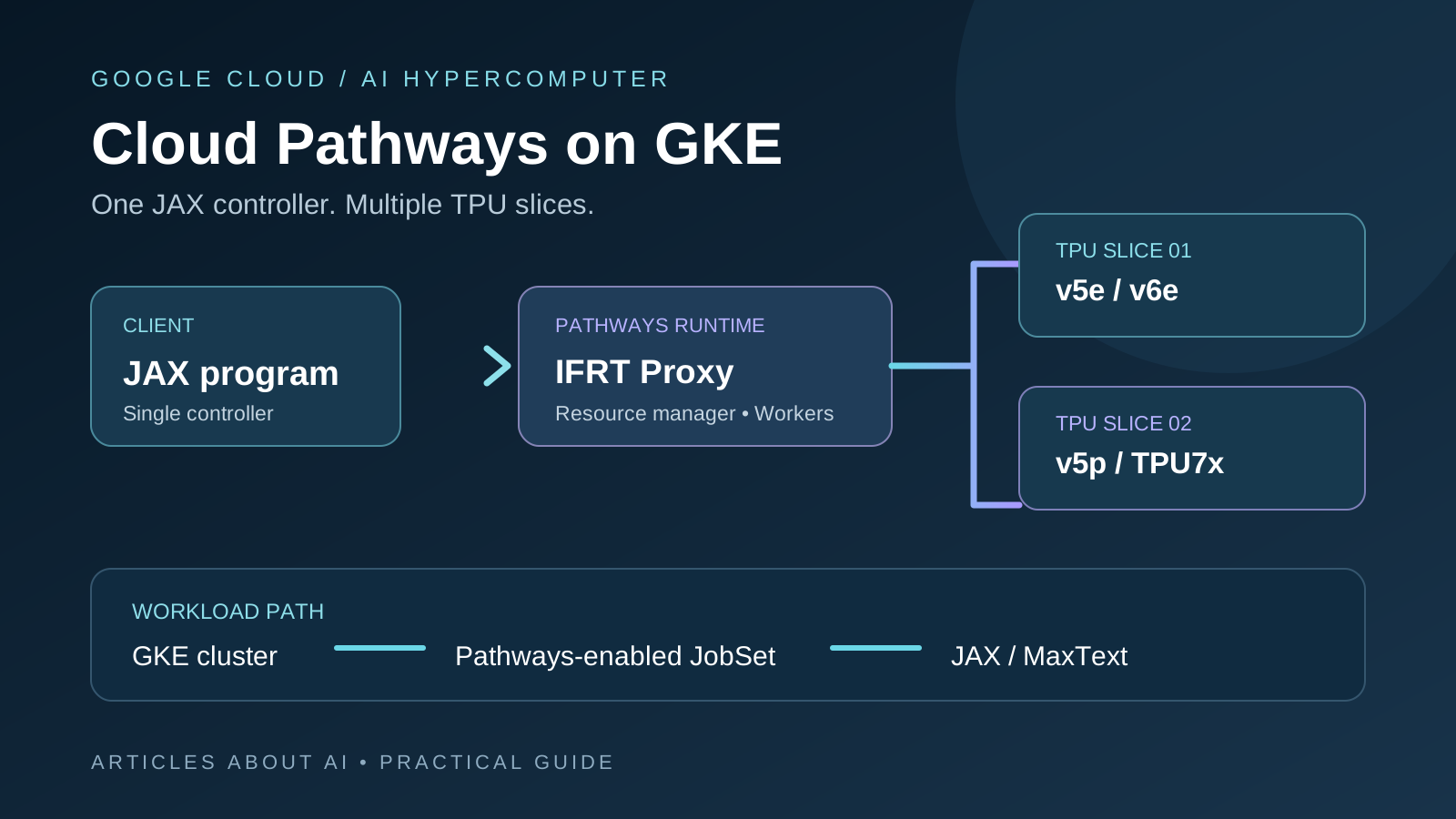
Google Cloud announced the general availability (GA) of Cloud Pathways on Google Kubernetes Engine (GKE) on November 9, 2026. The release gives Google Cloud customers access to the same single-controller distributed runtime that Google says it uses for large-scale workloads, including Gemini training and serving. For JAX engineers, the practical change is that one JAX client can coordinate work across multiple Cloud TPU slices through Pathways, rather than requiring each TPU host to run an independently managed Python controller.
This tutorial walks through the supported GKE route: checking prerequisites, preparing a Pathways-enabled cluster, submitting a JAX batch workload with Cluster Toolkit, monitoring the job, and cleaning up billable resources. It focuses on a reproducible multi-slice JAX training workflow rather than treating Pathways as a generic Kubernetes add-on.
The November 9 announcement also introduced a Preview integration with Cluster Director for Slurm. That Slurm path is not GA; this guide concentrates on the GA GKE deployment. See Google’s Cloud Pathways GA announcement for the release details.
What is Cloud Pathways?
Pathways is a distributed machine-learning runtime designed for large, heterogeneous accelerator fleets. It can coordinate multiple tasks and allocate different amounts of compute as workloads require. On Cloud TPU, a single JAX client can orchestrate computation across large TPU slices, potentially spanning thousands of chips.
Traditional multi-controller JAX generally runs a separate Python process on each TPU host. Each process sees a local view of its devices and commonly executes the same Single Program, Multiple Data (SPMD) program. That model works well for many training jobs, but can become harder to manage for workloads involving multiple TPU slices, asymmetric pipeline stages, reinforcement-learning loops, or disaggregated inference.
Pathways uses a single-controller architecture. One client describes the computation, while the Pathways runtime places work across the allocated TPU slices and coordinates execution. Google documents this approach as supporting workflows beyond uniform SPMD, including asymmetric pipeline parallelism and computational sparsity.
What changed in the November 9, 2026 GA release?
Google announced that Cloud Pathways is generally available on GKE in Google Cloud regions that support Cloud TPU v5e, v5p, Trillium (v6e), and Ironwood (TPU7x). The release provides versioned container images under:
us-docker.pkg.dev/cloud-tpu-v2-images/cloud-pathways
Google’s announcement specifies support for JAX 0.10.1 and later with the versioned images. Confirm the exact image tag and regional TPU availability for your own deployment before creating resources.
The GA announcement highlights four operational capabilities:
- Single-controller orchestration: one JAX client coordinates graph execution and dispatch across TPU slices.
- Colocated Python sidecars: Python work such as data loading and checkpointing can run close to TPU workers.
- Elastic training: Pathways utilities can use host-memory snapshots to reshard work across the remaining slices when a slice is interrupted.
- Interactive and shared execution: engineers can inspect and debug workloads interactively, or share long-running pools of TPU slices across jobs and users.
Google also announced a Preview integration with Cluster Director for Slurm clusters. Keep that separate from the GKE GA feature when selecting a deployment path.
Architecture: the components behind a Pathways job
A GKE deployment typically includes several cooperating components:
| Component | Role |
|---|---|
| Pathways resource manager | Coordinates accelerator allocation, worker health, scheduling, pausing, and resuming |
| Pathways client | Receives high-level operations from the JAX program and coordinates placement |
| IFRT proxy client | Connects the JAX process to the remote Pathways runtime |
| IFRT proxy server | Receives client requests and forwards them to the Pathways client |
| Pathways workers | Run on TPU machines and execute compiled programs |
| Sidecar server | Runs user-specified Python code close to TPU workers, reducing data-transfer overhead |
The resource manager and client-side components can run on CPU resources, while Pathways workers require the accelerator machines. Google’s documentation lists the container image locations and describes how the components map to GKE Pods.
Requirements before deploying Cloud Pathways on GKE
Prepare the following before running the tutorial:
- A Google Cloud project with billing enabled.
- Access to a supported Cloud TPU type and sufficient TPU quota or a reservation.
- A GKE cluster configured for Pathways, or permission to create one.
- Google Cloud CLI (
gcloud). - Kubernetes command-line tools (
kubectl) and thegke-gcloud-auth-plugin. - Cluster Toolkit if you plan to use the
gclusterworkflow. - A Cloud Storage bucket for Pathways scratch data, compilation cache, checkpoints, and workload artifacts.
- IAM permissions for the identity that provisions the cluster and for the service account used by Pathways Pods.
The official cluster creation guide uses a TPU v6e example and requires a TPU reservation or sufficient quota. The exact machine type, slice topology, region, and supported GKE version depend on the TPU generation and deployment method. Do not copy the sample topology blindly into a different TPU environment.
Cost warning: creating the cluster, CPU node pools, TPU slice node pools, storage, and running jobs can incur Google Cloud charges. The setup guide explicitly warns that its sample deployment creates billable resources.
Step 1: Install and authenticate the Google Cloud tools
Install the Google Cloud CLI and Kubernetes tools using Google’s current installation instructions. Then authenticate:
gcloud auth login
gcloud auth application-default login
The second command creates Application Default Credentials (ADC), which are used by tools such as Terraform in the Cluster Toolkit deployment flow.
Enable the Kubernetes Engine API for the project if it is not already enabled:
gcloud services enable container.googleapis.com --project=PROJECT_ID
Replace PROJECT_ID with your actual Google Cloud project ID. Ensure that your identity has the permissions required to create GKE clusters, node pools, TPU resources, and storage access.
Step 2: Create a Pathways-enabled GKE cluster
Google documents two supported setup approaches: Cluster Toolkit (gcluster) and the Google Cloud CLI. Cluster Toolkit is the more convenient route when you want its deployment blueprint to configure Pathways-related infrastructure.
Option A: Use Cluster Toolkit
Start with the official GKE TPU v6e cluster deployment guide and its current TPU blueprint. In the deployment configuration, verify these settings:
- Set
enable_pathways_for_tpustotrue. The official Pathways cluster guide says this is enabled by default in its TPU blueprints. - Set
num_slicesto the number of TPU slice node pools required by the workload. - Set
tpu_topologyto a topology supported by the selected TPU type, such as2x4or4x4in the documented v6e example. - Set
reservation_affinityto the reservation you intend to consume, if using a specific reservation. - Review the CPU node pool and Kueue configuration used by the Pathways controller.
The Pathways-enabled blueprint provisions a CPU node pool for the controller and the required Kueue configuration unless you supply a custom Kueue configuration.
After deployment, check that the cluster nodes are ready:
kubectl get nodes
Do not proceed while the required CPU and TPU nodes are pending or unhealthy.
Option B: Create the cluster with gcloud
Google’s manual example uses TPU v6e and shows how to create a GKE cluster, TPU slice node pools, and the CPU node pool for the Pathways head. The sample values below are illustrative v6e settings, not universal defaults:
CLUSTER="GKE_CLUSTER_NAME"
PROJECT="PROJECT_ID"
ZONE="ZONE"
PW_CPU_MACHINE_TYPE="n2-standard-64"
TPU_MACHINE_TYPE="ct6e-standard-4t"
CLUSTER_NODEPOOL_COUNT=3
WORKERS_PER_SLICE=2
TOPOLOGY="2x4"
NUM_CPU_NODES=1
Create the cluster:
gcloud container clusters create "$CLUSTER" \
  --project="$PROJECT" \
  --zone="$ZONE" \
  --machine-type="$PW_CPU_MACHINE_TYPE" \
  --scopes=storage-full,gke-default,cloud-platform
Create TPU slice node pools:
for i in $(seq 1 "$CLUSTER_NODEPOOL_COUNT"); do
  gcloud container node-pools create "tpu-np-$i" \
    --project="$PROJECT" \
    --zone="$ZONE" \
    --cluster="$CLUSTER" \
    --machine-type="$TPU_MACHINE_TYPE" \
    --num-nodes="$WORKERS_PER_SLICE" \
    --placement-type=COMPACT \
    --tpu-topology="$TOPOLOGY" \
    --scopes=storage-full,gke-default,cloud-platform \
    --workload-metadata=GCE_METADATA
done
Create the CPU node pool for the Pathways controller:
gcloud container node-pools create cpu-np \
  --project="$PROJECT" \
  --zone="$ZONE" \
  --cluster="$CLUSTER" \
  --machine-type="$PW_CPU_MACHINE_TYPE" \
  --num-nodes="$NUM_CPU_NODES" \
  --scopes=storage-full,gke-default,cloud-platform \
  --workload-metadata=GCE_METADATA
These commands follow Google’s documented v6e example. Adapt the machine type, topology, zone, node counts, and reservation settings to the actual TPU capacity available in your project. The number of workers per slice must match the selected topology and the number of chips per TPU VM.
Configure Cloud Storage access
Pathways uses a Cloud Storage bucket for temporary files and cached compiled code. In Google’s documented GKE example, the node service account accesses the bucket because the node pools use the GCE metadata workload setting.
Grant the service account used by the Pathways Pods the Storage Object Admin role on the dedicated bucket, or apply a narrower custom role if it satisfies the required operations. Avoid granting broad storage permissions across unrelated buckets.
Step 3: Get cluster credentials and install JobSet
Configure kubectl to use the new cluster:
gcloud container clusters get-credentials "$CLUSTER" \
  --zone="$ZONE" \
  --project="$PROJECT" \
  && kubectl config set-context --current --namespace=default
Install the JobSet API using the versioned manifest specified in Google’s current cluster guide:
kubectl apply --server-side -f \
  https://github.com/kubernetes-sigs/jobset/releases/download/v0.12.0/manifests.yaml
Verify that the nodes are ready and the JobSet controller is running:
kubectl get nodes
kubectl get pods --namespace=jobset-system
The official guide shows the JobSet controller reaching the Running state before workload submission. If the controller or TPU nodes are not ready, resolve the cluster issue before launching training.
Step 4: Prepare a JAX training image with MaxText
For its batch workload walkthrough, Google uses MaxText, an open-source large-language-model project written in JAX and designed to run efficiently on Google Cloud TPUs and GPUs.
Clone the repository and select your project:
git clone https://github.com/AI-Hypercomputer/maxtext
cd maxtext
gcloud config set project PROJECT_ID
Build the dependency image using the stable JAX mode documented in the Pathways batch guide:
bash src/dependencies/scripts/docker_build_dependency_image.sh MODE=stable
Authenticate Docker with Google Cloud and upload the runner image:
gcloud auth configure-docker
bash src/dependencies/scripts/docker_upload_runner.sh \
  CLOUD_IMAGE_NAME=USER_runner
Replace PROJECT_ID and USER with your project and user identifier. The script publishes the image to your project’s Container Registry path. Confirm the image exists and is accessible to the GKE workload before submitting the job.
Step 5: Submit a multi-slice JAX batch workload
Add the Cluster Toolkit binary to your shell path if it is not already available:
export PATH="$PATH:/path/to/cluster-toolkit"
Then submit the MaxText workload through Pathways:
gcluster job submit \
  --pathways \
  --pathways-gcs-location="gs://BUCKET_NAME/pathways-artifacts" \
  --name=WORKLOAD \
  --cluster=CLUSTER \
  --project=PROJECT_ID \
  --location=LOCATION \
  --num-slices=WORKLOAD_NODEPOOL_COUNT \
  --compute-type=COMPUTE_TYPE \
  --topology=TOPOLOGY \
  --image="gcr.io/PROJECT_ID/USER_runner" \
  --command="python3 -m maxtext.trainers.pre_train.train /deps/src/maxtext/configs/base.yml base_output_directory=gs://BUCKET_NAME per_device_batch_size=1 enable_checkpointing=false remat_policy=full global_parameter_scale=1 steps=20 max_target_length=2048 use_iota_embed=true reuse_example_batch=1 dataset_type=synthetic attention=flash gcs_metrics=True enable_single_controller=True run_name=RUN_NAME-pathways-job"
Replace every placeholder with a value from your cluster:
BUCKET_NAME: Cloud Storage bucket for Pathways artifacts and training output.WORKLOAD: unique workload name; Google notes a 22-character limit due to DNS label restrictions.CLUSTER: GKE cluster name.PROJECT_ID: Google Cloud project ID.LOCATION: cluster region or zone.WORKLOAD_NODEPOOL_COUNT: number of TPU slice node pools used by the workload.COMPUTE_TYPE: TPU machine type, for examplect6e-standard-4tin the documented v6e example.TOPOLOGY: topology for each TPU slice, for example2x4in the example.USER: image namespace or user identifier used when uploading the runner.RUN_NAME: a name for this experiment.
This is Google’s documented synthetic-data MaxText batch example. It is a starting point for validating the Pathways deployment, not a production training recipe. Before using real model data, configure the dataset, checkpointing, batch size, model configuration, and storage paths appropriate to your workload.
Step 6: Monitor the Pathways job
Follow the workload logs:
gcluster job logs WORKLOAD \
  --cluster=CLUSTER \
  --project=PROJECT_ID \
  --location=LOCATION \
  --main-only \
  --follow
Review the output for completed training steps, errors, and performance measurements. The official sample prints step timing, throughput-related metrics, and loss values. Treat those as example output from Google’s sample, not as a performance promise for your TPU topology.
For a production workload, also monitor TPU utilization, memory, job health, checkpoint completion, and Cloud Storage activity. Record the model configuration and exact TPU topology when comparing runs; otherwise, performance comparisons can be misleading.
Step 7: Explore interactive mode, inference, and elastic training
After the batch workflow is working, Cloud Pathways supports other operating modes:
- Interactive mode: connect from a notebook or terminal to inspect and debug a running Pathways environment.
- Multihost inference: deploy inference workloads across multiple TPU hosts or slices.
- Resilient training: use Pathways elasticity and host snapshots to recover from supported slice interruptions.
- JAX workload porting: adapt an existing JAX program to the single-controller Pathways runtime.
These workflows have their own setup and code requirements. Do not assume that a batch-training manifest is sufficient for interactive notebooks or production inference. Follow the dedicated Google guides for each workload type.
Step 8: Clean up resources to avoid charges
When you finish testing, delete the GKE cluster and its node pools if you no longer need them:
gcloud container clusters delete "$CLUSTER" \
  --project="$PROJECT" \
  --zone="$ZONE"
If you deployed with Cluster Toolkit, use its destroy command from the deployment directory:
./gcluster destroy DEPLOYMENT_FOLDER_NAME
Also review any separately created Cloud Storage buckets, images, reservations, and other resources. Deleting the cluster does not necessarily delete every resource created outside it.
Common Cloud Pathways deployment problems
The TPU node pools remain pending
Check TPU quota, reservations, region availability, machine type, topology, and node-pool capacity. A valid GKE cluster does not guarantee that TPU capacity is available in the selected zone.
The Pathways job cannot access Cloud Storage
Check the service account attached to the nodes or Pods, bucket IAM policy, and the path passed to --pathways-gcs-location. The Pathways runtime needs access to its scratch and compilation-cache location.
The JobSet controller is not running
Verify that the JobSet manifest was applied successfully and inspect the controller Pod events:
kubectl get pods -n jobset-system
kubectl describe pods -n jobset-system
JAX and the Pathways image are incompatible
Use a versioned Pathways container image compatible with the JAX version required by your workload. Google’s November 9 GA announcement specifies JAX 0.10.1 or later for the versioned Cloud Pathways images. Avoid mixing arbitrary nightly JAX packages with a production image.
A workload starts but does not use all TPU slices
Check --num-slices, --compute-type, --topology, the node-pool count, and the workload’s JAX configuration. The allocated hardware topology and the topology expected by the workload must agree.
Cloud Pathways vs standard multi-controller JAX
| Area | Cloud Pathways | Standard multi-controller JAX |
|---|---|---|
| Control model | Single JAX client coordinates the system | Multiple Python controller processes |
| Device view | Unified view across allocated slices | Each process has a localized device view |
| Programming model | Supports heterogeneous and multi-program patterns | Commonly uses SPMD execution |
| Cross-slice orchestration | Managed by Pathways runtime | Requires application and infrastructure coordination |
| Best fit | Large multi-slice, heterogeneous, or elastic workloads | Conventional distributed JAX jobs with uniform execution |
Pathways is not automatically faster for every JAX program. Its value is the orchestration model and support for complex, multi-slice execution. Benchmark your own workload and compare equivalent hardware, model settings, and data pipelines.
FAQ
Is Cloud Pathways generally available?
Yes. Google announced GA for Cloud Pathways on GKE on November 9, 2026. The Cluster Director integration for Slurm was announced as Preview, not GA.
Which TPU generations are supported?
The GA announcement lists TPU v5e, TPU v5p, Trillium (TPU v6e), and Ironwood (TPU7x) in Google Cloud regions that support those TPUs on GKE. Availability depends on region, quota, and capacity.
Which JAX version does Cloud Pathways support?
Google’s GA announcement specifies versioned Cloud Pathways container images supporting JAX 0.10.1 and later. Check the exact image tag and compatibility instructions for your environment.
Can I use Cloud Pathways without GKE?
The November 9 GA announcement covers GKE. Google also announced a Preview integration with Cluster Director for Slurm TPU clusters. The two deployment statuses are different.
Does Cloud Pathways require a TPU reservation?
You need sufficient TPU quota or a reservation for the slices you plan to create. The cluster guide’s sample uses a specific reservation by default, but other consumption options are documented.
Does deploying Cloud Pathways cost money?
Yes. GKE clusters, CPU and TPU node pools, TPU reservations or usage, Cloud Storage, and network activity can incur charges. Delete resources when finished and check current Google Cloud pricing for your region and machine types.
Official documentation and sources
- Google Cloud: Cloud Pathways is now generally available (November 9, 2026)
- Google Developers Blog: What is Pathways? Single-controller training for large models
- Google Cloud documentation: Introduction to Pathways on Cloud
- Google Cloud documentation: Create a GKE cluster with Pathways
- Google Cloud documentation: Run a batch workload with Pathways
- Google Cloud documentation: Resilient training with Pathways
- Google Cloud documentation: Port JAX workloads to Pathways
- Google Cloud documentation: Deploy TPU workloads in GKE Standard
- Google AI Hypercomputer: Cloud Pathways
Final checklist
Before calling a Pathways deployment successful, confirm that the GKE nodes are Ready, the JobSet controller is Running, the Pathways workload can access its Cloud Storage bucket, the requested TPU slices are allocated, and the JAX job completes with logs and artifacts. Start with the documented synthetic MaxText example, then move to a real model after the infrastructure path is verified.
For related developer workflows, see our Google TPU Agent Suite installation guide and Microsoft Copilot Harness in Foundry guide.