
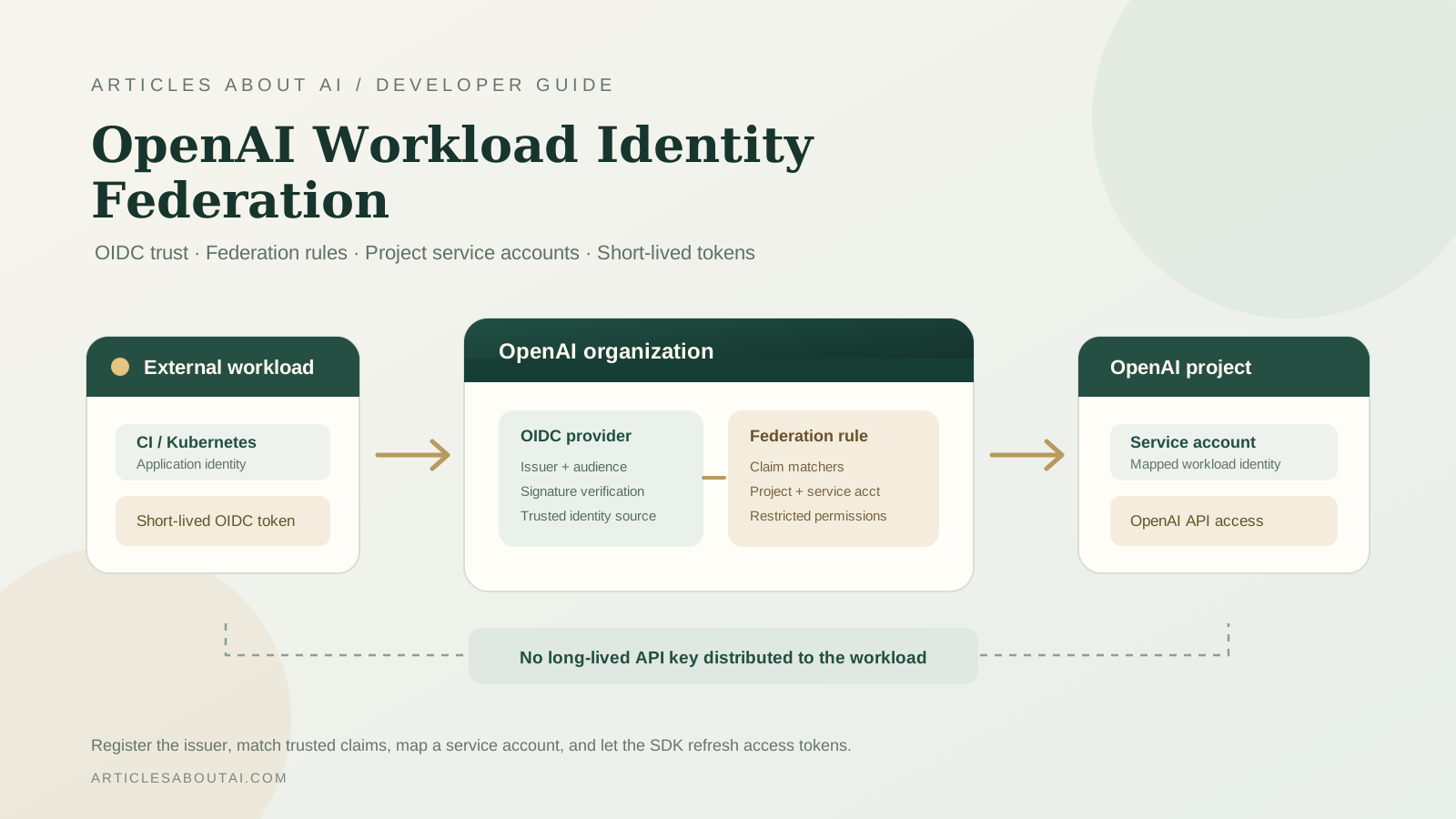
OpenAI’s Python and Node.js SDKs now include administrative resources for managing workload identity providers and federation rules. The addition gives organization administrators a programmatic way to register an external OpenID Connect (OIDC) identity provider, define which external workload claims are trusted, and bind matching identities to an existing OpenAI project service account.
This matters when applications run in environments such as CI/CD, Kubernetes, or cloud infrastructure. Instead of distributing a long-lived OpenAI API key to every workload, a supported workload-identity flow can exchange a short-lived external identity token for an OpenAI access token. The SDKs also provide authentication helpers for supported workload identity providers. This guide covers administrative setup in Python and Node.js, explains the trust relationship, and shows how to avoid common configuration mistakes.
The provider and federation-rule management resources were introduced in OpenAI Python SDK 3.44.0 and OpenAI Node.js SDK 7.49.0. Newer releases are available, so install a current compatible SDK rather than pinning an older version just to obtain the feature. Check the Python SDK release history and Node.js SDK release history before upgrading.
What is OpenAI workload identity federation?
Workload identity federation lets a workload prove its identity through an external identity system instead of relying on a static API key stored in its environment. In the OIDC subject-token flow, an external provider issues a signed token. OpenAI validates that token against the provider configuration and federation rule, then associates the matching workload with an OpenAI project service account.
The main components are:
- OIDC identity provider: The external issuer trusted by your OpenAI organization. Its configuration includes an issuer, an audience, and a verification method.
- Federation rule: A rule that matches attributes in a verified token and binds the matching identity to an existing project service account.
- Project service account: The OpenAI identity to which the workload is mapped.
- Workload token provider: The runtime component that supplies a fresh subject token when the SDK needs to authenticate.
- OpenAI access token: A short-lived token obtained through the exchange and used for API requests.
Federation is not simply a renamed API key or a shorter-lived static key. It establishes a trust relationship between an external identity issuer and an OpenAI service account. Your issuer, audience, token claims, and federation matchers must agree.
For protocol and configuration details, start with the OpenAI Node.js SDK authentication guide and the OpenAI Admin API reference.
What changed in the OpenAI SDKs?
The new SDK resources expose organization-level operations for workload identity providers and their federation rules.
| SDK | First release with provider and rule management |
|---|---|
| Python | openai 3.44.0 |
| Node.js | openai 7.49.0 |
The current SDK release may be newer than those introduction versions. Use a current release compatible with your application, then confirm that the generated client exposes the workload identity resources.
The administrative API supports creating, retrieving, listing, updating, and deleting OIDC workload identity providers. Federation rules can also be created, retrieved, listed, updated, and deleted. These are organization administration operations; they are separate from the runtime code that obtains a token and calls the Responses API.
Before you begin: permissions and prerequisites
Prepare the following before changing an organization’s identity configuration:
- An OpenAI organization with Admin API access. Creating or managing organization workload identity providers requires an admin API credential.
- A project service account. A federation rule binds matching external claims to an existing service account in a project. Create or identify that service account first.
- An OIDC issuer. This is the identity provider that issues the workload token, such as the identity system used by your CI/CD platform or cloud environment.
- A consistent audience. The audience configured at the issuer, in the OpenAI provider, and in the token must match the intended trust configuration.
- A claim-matching plan. Decide which verified token attributes should be allowed to assume the project service account. Prefer narrow conditions, such as a specific repository, branch, workload, or deployment environment, where those claims are available.
- A current SDK. Install a current version of the Python or Node.js SDK.
The admin credential is powerful. Store it in a secure administrative environment, never in a public repository, client-side application, or ordinary workload image. Do not confuse the organization admin key used to configure federation with the external subject token used by a workload at runtime.
Install the OpenAI Python or Node.js SDK
For Python, install or upgrade the SDK:
python -m pip install --upgrade openai
For Node.js:
npm install openai@latest
Set the organization admin credential in the environment used for administrative setup:
export OPENAI_ADMIN_KEY="your-admin-api-key"
Keep this credential separate from runtime workload credentials. In production, use your platform’s secret manager rather than committing a real value to a shell script or source file.
Create an OIDC workload identity provider with Python
The Python SDK exposes provider management under the organization workload identity providers resource. A provider registration requires an audience, issuer, name, and provider type. The supported provider type in the SDK schema is OIDC. A discovery-based verification configuration can be supplied when it matches the issuer’s published OIDC discovery metadata.
import os
from openai import OpenAI

client = OpenAI(admin_api_key=os.environ["OPENAI_ADMIN_KEY"])

provider = client.admin.organization.workload_identity_providers.create(
    name="ci-workload-oidc",
    type="oidc",
    issuer="https://YOUR-OIDC-ISSUER",
    audience="YOUR-EXPECTED-AUDIENCE",
    verification={
        "type": "discovery",
        "discovery_url": "https://YOUR-OIDC-ISSUER/.well-known/openid-configuration",
    },
)

print(provider.id)
Replace the issuer and audience placeholders with the exact values from your identity platform. Do not copy the example values literally. If your identity provider requires uploaded JWKS verification instead of discovery, use the verification mode supported by the API and follow the issuer’s key-rotation guidance.
The provider creation schema also supports optional fields such as a description, enabled state, and attribute transformations. Use transformations only when you understand how the resulting attributes will be used by federation rules.
Create a federation rule with Python
A federation rule connects verified token attributes to an existing OpenAI project service account. The required fields in the SDK schema are attribute matchers, project ID, and service account ID.
rule = client.admin.organization.workload_identity_providers.federation_rules.create(
    workload_identity_provider_id=provider.id,
    name="trusted-ci-workload",
    project_id="YOUR_OPENAI_PROJECT_ID",
    service_account_id="YOUR_SERVICE_ACCOUNT_ID",
    attribute_matchers={
        "YOUR_TOKEN_CLAIM": "YOUR_EXPECTED_CLAIM_VALUE"
    },
    enabled=True,
    permissions={
        "type": "restricted",
        "scopes": ["YOUR_REQUIRED_SCOPE"]
    },
)

print(rule.id)
The claim key and expected value above are placeholders, not universal OIDC claim names. Select claims that your issuer actually places in the signed token, and use the exact matcher structure accepted by your identity configuration. The example uses restricted permissions; choose only scopes that the workload needs. If you intentionally use the service account’s default permissions, review that choice before enabling the rule.
A rule should be as narrow as practical. A condition that trusts every repository or every branch from an issuer is usually broader than a condition that identifies one controlled workload.
Manage workload identity providers with Node.js
The Node.js SDK exposes the corresponding resources using camelCase property names. Create a provider:
import OpenAI from "openai";

const client = new OpenAI({
  adminAPIKey: process.env.OPENAI_ADMIN_KEY,
});

const provider =
  await client.admin.organization.workloadIdentityProviders.create({
    name: "ci-workload-oidc",
    type: "oidc",
    issuer: "https://YOUR-OIDC-ISSUER",
    audience: "YOUR-EXPECTED-AUDIENCE",
    verification: {
      type: "discovery",
      discovery_url:
        "https://YOUR-OIDC-ISSUER/.well-known/openid-configuration",
    },
  });

console.log(provider.id);
Create a federation rule:
const rule =
  await client.admin.organization.workloadIdentityProviders.federationRules.create(
    provider.id,
    {
      name: "trusted-ci-workload",
      project_id: "YOUR_OPENAI_PROJECT_ID",
      service_account_id: "YOUR_SERVICE_ACCOUNT_ID",
      attribute_matchers: {
        YOUR_TOKEN_CLAIM: "YOUR_EXPECTED_CLAIM_VALUE",
      },
      enabled: true,
      permissions: {
        type: "restricted",
        scopes: ["YOUR_REQUIRED_SCOPE"],
      },
    },
  );

console.log(rule.id);
The Node.js SDK uses adminAPIKey, while the Python SDK uses admin_api_key. Both clients can also read the admin credential from OPENAI_ADMIN_KEY when the corresponding constructor option is omitted. Keep the administrative key on a trusted server or in a protected automation environment.
Authenticate a workload with a short-lived identity token
Registering a provider and creating a federation rule are administrative steps. A workload also needs a runtime identity configuration so the SDK can obtain a subject token from its environment and exchange it for an OpenAI access token.
The Node.js SDK authentication guide documents workload identity configuration with an identity provider ID, service account ID, and a token provider. For example, a Kubernetes workload can use the SDK’s service-account token provider:
import OpenAI from "openai";
import { k8sServiceAccountTokenProvider } from "openai/auth";

const client = new OpenAI({
  apiKey: null,
  workloadIdentity: {
    identityProviderId: "YOUR_IDENTITY_PROVIDER_ID",
    serviceAccountId: "YOUR_SERVICE_ACCOUNT_ID",
    provider: k8sServiceAccountTokenProvider(),
  },
});

const response = await client.responses.create({
  model: "gpt-5.5",
  input: "Return a short confirmation that workload identity is configured.",
});

console.log(response.output_text);
This example assumes the workload is running in Kubernetes with a mounted service-account token and that the issuer, audience, claims, provider, and federation rule have already been configured to match. The default Kubernetes token path documented by the SDK is /var/run/secrets/kubernetes.io/serviceaccount/token; a custom or projected token path can be passed to the provider helper.
The SDK authentication guide also documents providers for Azure managed identity and Google Cloud identity tokens, as well as custom subject-token providers. Check the current Node.js authentication guide for exact environment-specific requirements.
Important: workloadIdentity and apiKey are mutually exclusive. If OPENAI_API_KEY is already set in the environment, explicitly set apiKey to null when configuring workload identity so the automatically loaded API key does not conflict with the workload identity option.
Understand token exchange, caching, and refresh
In the documented Node.js SDK flow, the SDK exchanges the external subject token at:
https://auth.openai.com/oauth/token
The resulting OpenAI access token is cached and refreshed before expiration. The documented default refresh buffer is 1,200 seconds (20 minutes). Concurrent refreshes are shared, and a replayable request that receives a 401 can trigger token invalidation and one retry with a fresh token.
Do not build your own refresh loop on top of the SDK without first checking its built-in behavior. Also note that a request body that cannot be replayed, such as a streamed upload, cannot necessarily be retried automatically.
For X.509 client certificate authentication, the Node.js SDK documents a separate enrolled-certificate flow. Its transport restrictions differ from the subject-token flow; consult the authentication guide before selecting it.
Test the federation setup safely
Use a non-production project and a narrowly scoped service account for initial validation.
- Verify the provider. Retrieve the provider by ID and confirm the issuer, audience, verification mode, and enabled state.
- Verify the federation rule. Retrieve the rule and confirm the project, service account, matchers, permissions, and enabled state.
- Check the external token. Confirm that the token issuer and audience match the registered provider and that the claims used by the rule are present.
- Run a minimal API request. Use the workload identity configuration from the environment where the workload actually runs.
- Test a non-matching identity. A token that does not satisfy the federation rule should not be treated as the trusted workload.
- Review logs. Avoid logging raw subject tokens, access tokens, private keys, or administrative credentials.
Do not treat a successful provider-creation response as proof that runtime authentication works. The complete trust chain includes the issuer, token signature, audience, claim matchers, service account, permissions, and runtime token provider.
Security best practices and common mistakes
Use least privilege. Prefer restricted scopes for the federation rule when they meet the workload’s needs. Avoid granting broad service-account permissions by default without a documented reason.
Match claims narrowly. Validate the exact claim names and values issued by your identity provider. For CI/CD, restrict trust to the intended organization, repository, branch, workflow, or deployment environment when those claims are available and reliable.
Separate administration from runtime. Use the admin API key only to manage organization identity configuration. Runtime workloads should use their external subject token and configured service-account mapping.
Protect issuer configuration. Ensure that the OIDC issuer and verification metadata are controlled by the expected identity provider. Understand how signing keys rotate and how discovery or JWKS verification is maintained.
Avoid credential leakage. Never print tokens in CI logs, commit them to Git, or expose them in browser code. Keep the admin key in a secret manager and restrict who can change federation providers and rules.
Plan for failure. A disabled provider, changed issuer, incorrect audience, missing claim, expired external token, or disabled service account can prevent authentication. Monitor these conditions and document a safe recovery procedure.
For related operational guidance, see our guides to AI agent observability in production and evaluating AI agent reliability.
Python and Node.js method reference
The SDKs expose equivalent administration capabilities, but their naming conventions differ.
| Operation | Python SDK | Node.js SDK |
|---|---|---|
| Provider collection | workload_identity_providers | workloadIdentityProviders |
| Create provider | .create(…) | .create({…}) |
| Retrieve provider | .retrieve(id) | .retrieve(id) |
| List providers | .list(…) | .list(…) |
| Update provider | .update(id, …) | .update(id, {…}) |
| Delete provider | .delete(id) | .delete(id) |
| Federation rules | .federation_rules | .federationRules |
The Python SDK uses snake_case for resource and parameter names. The Node.js SDK uses camelCase for resource properties while retaining the API’s snake_case parameter keys in request objects. Refer to the generated SDK API documentation for exact signatures and optional fields.
Frequently asked questions
Does workload identity federation eliminate every OpenAI API key?
It can remove the need to distribute a long-lived standard API key to supported workloads using the documented federation flow. Organization administration still requires an admin credential to configure providers and rules.
Can I use GitHub Actions with OpenAI workload identity?
The general OIDC pattern can be used when the external issuer and token claims are supported and configured to match the OpenAI provider and federation rule. Do not assume a working configuration from a generic YAML snippet: verify the issuer, audience, and claims emitted by your actual workflow before enabling the rule.
Is workload identity the same as an OpenAI service account?
No. The service account is the OpenAI identity that receives the federated workload mapping. The external workload proves its identity through an OIDC token or another supported credential flow.
Can one identity provider have multiple federation rules?
The SDK exposes a collection of federation rules beneath each workload identity provider. Use separate, narrowly scoped rules when different workloads need different project service accounts or permission sets.
Does the Python SDK support the same workload identity runtime helpers as Node.js?
The SDK release adds provider and federation-rule administration resources to both SDKs. Runtime authentication helpers and provider integrations are documented separately by each SDK. Check the Python and Node.js authentication documentation for current language-specific support rather than assuming every helper is identical.
Final checklist
Before enabling workload identity federation in production, confirm that:
- The provider issuer and audience match the external identity system.
- The verification configuration is correct and maintained.
- Federation matchers identify only the intended workload.
- The target project service account already exists.
- The rule grants only the required permissions.
- The runtime uses the correct identity provider and service account IDs.
- No conflicting static API key is being loaded by the client.
- Tokens and admin credentials are excluded from logs and source control.
- Both successful and rejected identity cases have been tested.
Workload identity federation provides a more controlled way to connect trusted workloads to OpenAI than distributing long-lived credentials. The new Python and Node.js SDK resources make provider and rule management automatable, while the runtime SDK configuration handles token exchange for supported environments. Treat the issuer, audience, claim matchers, and service-account permissions as one security boundary: a mistake in any of them can either break authentication or grant a workload more access than intended.