
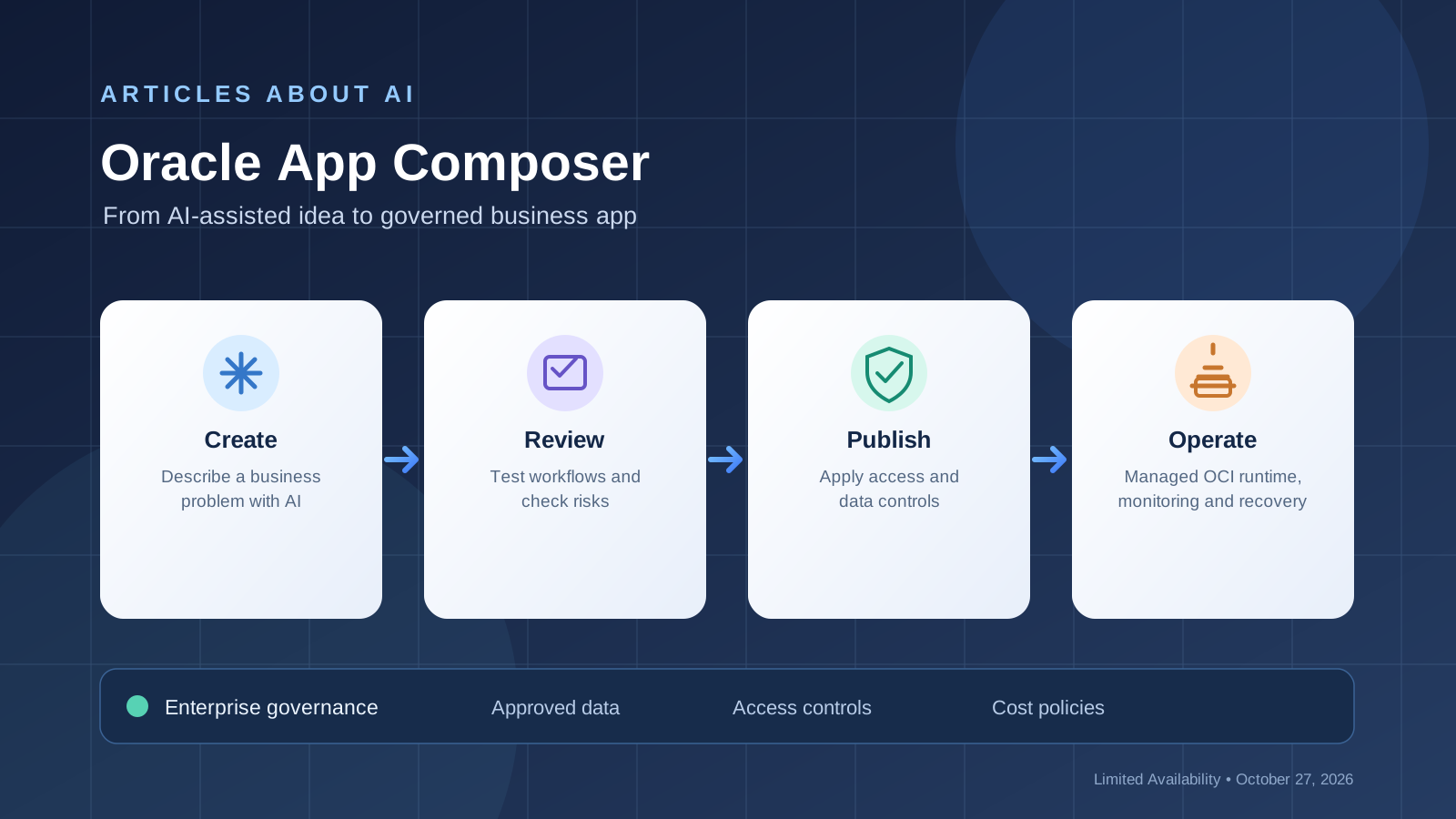
Oracle announced Oracle App Composer on October 27, 2026, introducing a managed Oracle Cloud Infrastructure (OCI) service intended to help employees create, publish, and share applications while keeping enterprise IT controls in place. The announcement addresses a common problem with AI-assisted development: generating a prototype is relatively easy, but sharing it with coworkers requires decisions about infrastructure, data access, security, maintenance, and cost.
Oracle says employees can use an Oracle plugin inside an AI assistant to create a new app or bring in an existing application, including a Java app. When an app is published, Oracle provisions approved resources in the customer’s OCI environment. IT teams control who can use the app, which business systems it can access, and the policies and cost controls that apply. Oracle also says it manages releases, monitoring, and recovery, while integrated Fortinet security checks help identify potential vulnerabilities as apps are built and updated.
Availability note: Oracle says App Composer is currently in Limited Availability. This is not confirmation of public, self-service access for every account. The public announcement does not document every screen or button, so this guide describes the confirmed workflow and clearly flags what prospective users should verify with Oracle.
For the official announcement, read Oracle’s App Composer announcement and OpenAI’s announcement of its expanded Oracle partnership.
What Is Oracle App Composer?
Oracle App Composer is designed to help employees turn useful AI-assisted app experiments into applications that can be published and governed inside an organization. It brings the application lifecycle together with managed cloud deployment and company controls.
The published capabilities described by Oracle include:
- AI-assisted app creation: use an Oracle plugin in an AI assistant to create a new application or bring in an existing one.
- Publishing and sharing: make applications available to colleagues through an approved deployment.
- Controlled data access: specify which business systems an application may access.
- Enterprise governance: IT controls access, policies, and cost controls.
- Managed operations: Oracle manages releases, monitoring, and recovery.
- Security checks: integrated Fortinet checks can help teams spot potential vulnerabilities during development and updates.
- Engineering handoff: source, settings, and history can move to an engineering team when an app requires more advanced development.
These are the capabilities Oracle has described publicly. They should not be read as a guarantee that every integration or workflow is available to every customer at launch.
Who Should Consider Oracle App Composer?
The service is aimed at organizations that want business teams to create useful internal tools without turning every prototype into an unmanaged production system.
Examples of potential use cases include an invoice-exception tracker for a finance team, an operations request and handoff app, or a marketing launch workflow. Oracle specifically describes examples of this kind in its announcement and mentions the use of approved Oracle Fusion or NetSuite data.
It may be relevant to:
- Business teams that can describe a workflow but do not want to manage all the deployment details.
- IT teams that need visibility into application access, data connections, policies, and costs.
- Organizations already using OCI or Oracle business applications.
- Engineering teams that need a path to take over a prototype if it becomes business-critical.
Organizations should assess their own technical needs and existing cloud arrangements before choosing the service. Limited Availability means eligibility and onboarding need to be confirmed directly with Oracle.
How to Get Access
Step 1: Confirm Limited Availability eligibility
Start with Oracle’s official App Composer announcement and use its contact or product links to ask whether your organization can access the service. Do not assume an ordinary personal AI account automatically includes App Composer.
Step 2: Confirm the target OCI environment
Ask your cloud or IT administrator which OCI environment is approved for deployment, which resources may be provisioned, and which identity and access policies apply. Oracle’s public description says the service provisions approved resources in the customer’s OCI environment when an app is published.
Step 3: Verify the supported AI assistant and plugin
Oracle describes employees using an Oracle plugin inside an AI assistant to create or import an application. Confirm the exact assistant, plugin configuration, account entitlements, and supported project types available to your organization. The public announcement does not provide a complete universal setup walkthrough.
Step 4: Agree on a small use case
Before creating an app, define one workflow, its intended users, required information, and the business result it should produce. A narrow use case makes it easier to test the result and apply the appropriate data and access controls.
A Practical Workflow for Building an App
The following workflow combines the capabilities Oracle has confirmed with standard project checks that an organization should perform. The project checks are recommendations, not claims about specific App Composer interface controls.
Step 1: Write down the app requirements
Describe the task the app should help complete, the people who will use it, the information it needs, and the expected output. For example, an invoice-exception tracker might need an invoice identifier, exception type, owner, status, and next action.
Avoid including real confidential data in prompts or prototypes until your organization has approved the relevant environment and data handling.
Step 2: Use the supported AI-assisted creation flow
Within the authorized environment, follow the Oracle plugin workflow to create a new app or bring in an existing application. Oracle’s announcement says this can include a Java app, but it does not publicly enumerate every supported framework or import method.
Give the assistant clear requirements and ask it to identify assumptions or missing information instead of silently filling gaps. Review the resulting application rather than treating generated output as automatically production-ready.
Step 3: Test the important workflows
Check the app against the original requirements. Try normal inputs, missing information, invalid values, and realistic edge cases. Confirm that its outputs are useful and that it handles errors safely.
If the app relies on financial or operational records, reconcile important outputs with the approved source systems. An AI-generated interface or workflow is not evidence that the underlying calculations or business logic are correct.
Step 4: Review data access and security
Before sharing the app, determine exactly which business systems it needs. Apply least-privilege access: the app should not receive broader access simply because broader permissions are convenient.
Oracle says integrated Fortinet security checks help identify potential vulnerabilities as apps are built and updated. Review available findings and arrange for qualified security review where appropriate. Automated checks can reduce risk but cannot guarantee that an application is secure.
How Publishing Works
Oracle says that when an employee publishes an app, the service provisions approved resources in the customer’s OCI environment. IT sets the allowed users, permitted business systems, applicable policies, and cost controls.
For organizations with access, a responsible publishing checklist is:
- Confirm deployment approval. Ensure the application and its required resources are permitted by your organization.
- Verify access rules. Identify who is allowed to use the app and ensure the intended restrictions are in place.
- Review data connections. Confirm that each connected business system and dataset has been approved.
- Check costs and policies. Confirm the applicable resource and spending controls with IT.
- Test the published version. Use authorized accounts to verify that key workflows and permissions behave as intended.
- Assign ownership. Record who is responsible for the app’s business requirements, access reviews, and acceptance testing.
These are operational recommendations based on the governance responsibilities Oracle describes. They are not a step-by-step map of an interface that has not been publicly documented in full.
What Happens After Publishing?
Oracle says it manages releases, monitoring, and recovery. Organizations should nevertheless maintain clear internal ownership of the application and its business use.
A practical maintenance routine should include reviewing access as roles change, reassessing data connections after requirements change, checking security findings after updates, and confirming that critical workflows continue to work.
Oracle also says an application can be transferred to an engineering team with its source, settings, and history if it becomes important enough for more advanced development. That handoff can help prevent a successful prototype from becoming a permanent black box.
For a production app, teams should document the application’s purpose, its data sources, key assumptions, business owner, and the person or team responsible for approving changes.
Oracle App Composer and Existing AI App Builders
Oracle App Composer’s distinguishing emphasis is on sharing, managed deployment, and governance around enterprise apps—not simply generating application code.
A lightweight AI builder may be enough for a personal prototype. An internal enterprise application also needs controlled data connections, defined access, infrastructure, monitoring, and support. Oracle positions App Composer around these additional lifecycle requirements, with deployment and operations managed through OCI.
That does not establish that App Composer is best for every project. Compare availability, supported integrations, costs, data requirements, developer handoff options, and your organization’s existing cloud stack before selecting a platform.
Readers exploring other AI-assisted development workflows may also find our guides to building apps with Microsoft Copilot Code and using Codex with Kimi K3.1 Pro useful comparisons. Those tools have different deployment models and should not be assumed to offer the same enterprise controls.
Limitations and Questions to Confirm
Limited Availability: Oracle has not described App Composer as generally available. Confirm access and eligibility with Oracle before planning around it.
Setup details: Public materials describe the high-level plugin, creation/import, publishing, and governance workflow, but not every setup screen, control, or supported integration. Ask Oracle for current onboarding documentation and verify the exact options available to your account.
OCI environment: Deployment uses approved resources in the customer’s OCI environment. Confirm account, identity, region, resource, and organizational prerequisites with your administrator.
Security: Fortinet checks can help identify vulnerabilities, but they do not guarantee complete security. Human review, appropriate testing, least-privilege access, and business approval remain important.
Pricing and terms: The announcement does not establish universally applicable prices or unrestricted access. Ask Oracle to confirm commercial terms, expected resource charges, eligibility, and any limits for your organization.
Product direction: Oracle includes a forward-looking disclaimer stating that feature development, release timing, and pricing may change. Treat announcement details as current product direction and confirm material procurement decisions directly with the vendor.
Frequently Asked Questions
Is Oracle App Composer available to everyone?
No. Oracle currently describes it as being in Limited Availability. Contact Oracle to confirm whether your organization can access the service.
Can non-developers use Oracle App Composer?
Oracle says employees can use an Oracle plugin within an AI assistant to create or import apps. The service is intended to let business users create and share applications while IT manages enterprise controls. Exact eligibility and workflow details depend on the available service access.
Can App Composer work with Oracle Fusion or NetSuite data?
Oracle’s announcement gives examples of using approved Fusion or NetSuite data in applications. This does not mean every account, integration, or dataset is automatically connected; the permitted business systems and access rules are controlled by IT.
Does Oracle manage app hosting and operations?
Oracle says it provisions approved resources in the customer’s OCI environment and manages releases, monitoring, and recovery. Confirm the precise service responsibilities and operational limits in the terms applicable to your account.
Does the service make apps secure automatically?
No. Oracle describes integrated Fortinet security checks that help teams spot potential vulnerabilities. These checks are part of a security process, not a guarantee that every vulnerability will be found or that no further testing is required.
Can developers continue working on an app later?
Oracle says the app’s source, settings, and history can move to an engineering team when the app needs more advanced development.
Conclusion
Oracle App Composer is a new enterprise-focused option for moving AI-assisted applications from an individual idea toward a shared, managed workflow. Its announced strengths include publishing through OCI, organizational control of data and access, security checks, managed operations, and a route to engineering handoff.
The key qualification is availability: Oracle describes App Composer as Limited Availability, and public materials do not document every interface step. Confirm eligibility, onboarding, supported integrations, pricing, and security responsibilities directly with Oracle before adopting it for production.
Official Sources
- Oracle: Announcing Oracle App Composer: Go from ideas to governed applications — October 27, 2026.
- OpenAI: OpenAI expands partnership with Oracle to bring its apps to ChatGPT — October 27, 2026.
- Oracle: Oracle and OpenAI: Put frontier AI to work for your business — October 27, 2026.
SEO tags: Oracle App Composer, Oracle AI App Builder, Oracle Cloud Infrastructure, OCI, AI App Development, AI App Builder Tutorial, Enterprise AI, Business App Development, No-Code AI Development, Low-Code AI Development, AI Coding Tools, Codex, Oracle Fusion, Oracle NetSuite, AI Application Publishing, Enterprise App Deployment, AI Governance, AI Security, Fortinet Security, Application Lifecycle Management, Cloud Application Management, Business Workflow Automation, AI Productivity, AI Tools for Business, Oracle AI World 2026, Oracle OpenAI Partnership, AI App Security, Managed Cloud Applications, AI Development Workflow, App Composer Availability, AI Software Development, enterprise data access, AI app monitoring, cloud governance, build apps with AI, AI prototype to production, Oracle app tutorial, Oracle enterprise AI, AI tools for developers.