
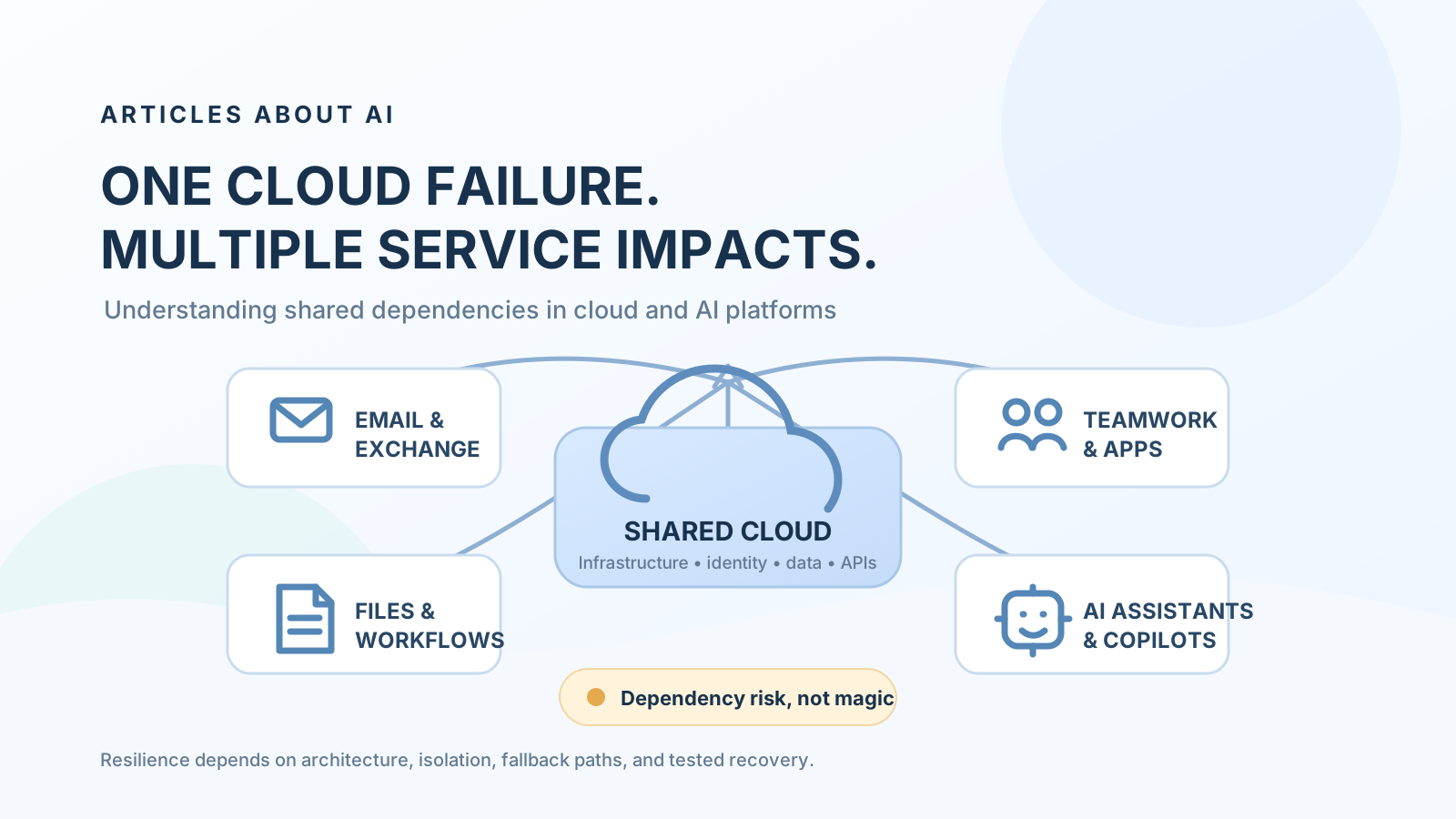
A cloud outage rarely affects only the screen or product where users first notice a problem. Modern workplace platforms are built from interconnected services: identity systems, networks, APIs, data stores, messaging infrastructure, application back ends, and AI features. When a dependency shared by several products becomes unavailable or overloaded, the symptoms can appear across multiple applications at once.
That is the central lesson behind the November 2026 Microsoft disruption. Users reported problems with Outlook, Microsoft Teams, Microsoft 365, and Copilot. Microsoft’s public updates described an issue introduced during an earlier network capacity upgrade that surfaced after a later network change. The company said the incident was not related to a cyberattack or AI agents and reported broad recovery as it restored services progressively. The full post-incident report was still pending when this explainer was prepared. (Associated Press coverage, Microsoft’s recovery statement reported by Sky News, Microsoft service status).
This does not mean that every Microsoft product failed, that every AI model became unavailable, or that one failure automatically takes down the entire internet. It shows how dependencies can connect services—and why organizations should understand those connections before an outage occurs.
What happened in the November 2026 Microsoft outage?
The disruption began on November 12, 2026, and continued into November 13. Microsoft’s incident updates described customers being unable to connect to multiple Microsoft 365 services. The affected service list included Exchange Online, Microsoft Teams, SharePoint Online, Microsoft 365 Copilot, and other workloads.
The reported impact was not identical across products. Some Teams functions that depended on Exchange Online—such as calendar-related scenarios and certain meeting or chat workflows—were affected, while core messaging and online meetings were reported as largely functional in the incident information reproduced by university IT services. Copilot experiences could fail to load or could be unable to retrieve work data such as email, calendar information, and files. (PennO365 incident record reproducing Microsoft updates, The Guardian’s report on Microsoft’s global outage).
Microsoft later said the issue had been introduced during an earlier network capacity upgrade and surfaced following a recent network change. The company described it as a technical issue unrelated to cyber activity or AI agents, apologized to customers, and said it was restoring services gradually while validating stability. That distinction matters: the incident should not be described as an AI model failure or a confirmed cyberattack. (Sky News coverage of Microsoft’s technical explanation, Associated Press).
For ongoing incidents, check the Microsoft cloud status page. Microsoft 365 administrators should also use the tenant-specific Service health page in the Microsoft 365 admin center, because the public status page and an organization’s tenant view serve different purposes. Microsoft’s documentation explains how to review incidents, advisories, mitigation updates, and service-restoration status in How to check Microsoft 365 service health.
Why can one cloud failure affect multiple services?
The short answer is shared dependencies. A user sees separate product names—Outlook, Teams, SharePoint, or Copilot—but the products may rely on overlapping platform capabilities behind the interface.
A simplified workplace workflow might look like this:
- A user signs in through an identity and access service.
- The application sends requests through network and routing infrastructure.
- A back-end service processes the request.
- The application reads or writes data through another service.
- An AI assistant may call additional services to retrieve enterprise data or complete an action.
- The result is returned to the application.
If one important dependency fails, every feature that requires it may become slower, return an error, or stop working. A feature that does not require the failed dependency may continue to work.
This is why a service can be partially available rather than simply “up” or “down.” An application may open successfully while calendar synchronization, file retrieval, message delivery, or an AI-powered feature remains impaired.
Microsoft’s Azure architecture guidance recommends identifying critical dependencies and analyzing how failures affect complete user workflows. It also distinguishes strong dependencies, which an application needs to function, from weaker dependencies whose failure may affect only selected features. See Microsoft’s guidance on failure-mode analysis and dependency planning.
Why did the impact reach Microsoft Copilot?
An AI assistant is not necessarily an isolated model endpoint. An enterprise assistant can depend on several layers:
- The model and inference layer: generates or interprets the response.
- Identity and authorization: determines who is signed in and what data they may access.
- Retrieval and connectors: fetches relevant messages, documents, meetings, and other enterprise content.
- Application services: provide the chat interface, orchestration, conversation state, and user experience.
- External or internal APIs: connect the assistant to business applications and actions.
If the model endpoint is healthy but a required identity, retrieval, application, or data service is unavailable, the user may still be unable to complete the task. For example, an assistant might be able to generate a general answer but fail to summarize a mailbox if it cannot retrieve the user’s email.
The November incident illustrates this distinction. Microsoft incident information listed Microsoft 365 Copilot among affected services and described problems loading Copilot experiences or accessing work data. That is evidence of an impact to Microsoft 365 Copilot workflows—not evidence that the underlying AI models across the industry stopped working.
This distinction also applies to other enterprise AI products. A chatbot that depends on a single identity provider, one retrieval database, one cloud region, or one business API can inherit the availability risks of those dependencies even when its model provider is operating normally.
A simple example: one dependency, several symptoms
Consider a company that uses cloud email, meetings, document storage, and an AI assistant connected to its workplace data.
| User task | Possible dependency | What a dependency failure may look like |
|---|---|---|
| Open a mailbox | Email service and identity | Mailbox unavailable or sign-in errors |
| Schedule a meeting | Calendar and collaboration services | Calendar or scheduling actions fail |
| Find a company document | File storage and access controls | Search or document retrieval is incomplete |
| Ask AI to summarize email | AI interface plus mailbox retrieval | The assistant opens but cannot access email context |
| Automate a workflow | APIs, connectors, and orchestration | The workflow stops at the unavailable step |
This is a conceptual example, not a claim that every product uses the same internal architecture. The exact dependencies vary by service, tenant configuration, region, and feature.
The difference between a cloud outage and an AI outage
The terms are often used interchangeably in headlines, but they describe different failure locations.
Cloud infrastructure outage: A problem in the underlying network, compute, storage, identity, or platform services affects applications that depend on those resources.
Application outage: A specific product or application layer fails even though some underlying infrastructure remains available.
AI service outage: The model endpoint, inference capacity, AI orchestration layer, or a required AI-specific service is unavailable or degraded.
AI workflow outage: The model may still respond, but the complete task fails because a connector, data source, identity check, tool, or downstream application is unavailable.
A useful incident report should identify which layer failed and which user workflows were affected. Saying only “AI was down” can hide the real cause and lead teams to troubleshoot the wrong component.
How to reduce the risk of cascading cloud and AI failures
No organization can eliminate every provider outage. It can, however, reduce the number of workflows that depend on one fragile path and prepare a controlled fallback.
1. Map dependencies for critical workflows
Start with business tasks, not product names. Document what must work for each task to complete: identity, network access, data stores, APIs, AI models, connectors, and human approvals.
Mark each dependency as critical or optional. If an optional AI summarization feature fails, for example, the underlying email workflow might still continue manually.
2. Define recovery targets
Set a Recovery Time Objective (RTO): how long a critical workflow can remain unavailable before the business impact becomes unacceptable.
Set a Recovery Point Objective (RPO): how much data loss, measured in time, the organization can tolerate.
These targets should be defined per workflow. A customer support inbox, a financial approval process, and an experimental AI assistant do not necessarily need the same recovery objectives.
Microsoft’s Azure regions and availability zones guidance explains how deployment choices affect resiliency and recovery. Availability zones can help protect against certain data-center failures, but they do not automatically protect an application from every regional, service-level, configuration, or dependency failure.
3. Keep a usable non-AI fallback
Identify which tasks can continue without an AI assistant. Maintain documented manual procedures, approved templates, and access to essential records through an independent route where appropriate.
A fallback should be practical and safe. Do not create uncontrolled copies of sensitive company data simply to make an offline workflow possible.
4. Avoid unnecessary concentration in one dependency
For high-impact workflows, assess whether the same provider, region, identity system, network route, or data service supports every critical step.
A second AI model alone is not a complete fallback if both assistants depend on the same unavailable identity provider or enterprise data source. Genuine independence requires checking the full path, including authentication, retrieval, APIs, data portability, and operational access.
Multi-cloud or multi-model designs can reduce some concentration risks, but they also introduce complexity, cost, security considerations, and data-governance challenges. Use them where the business impact justifies the trade-off.
5. Design graceful degradation
A resilient application should preserve essential functions when noncritical components fail. For example:
- Allow users to view previously synchronized information when live AI enrichment is unavailable.
- Keep manual approval available if an AI recommendation service fails.
- Separate document access from optional AI summarization.
- Queue safe, repeatable operations when a downstream service is temporarily unavailable.
- Clearly tell users which feature is impaired instead of showing a generic error.
Microsoft’s reliability design principles recommend fault isolation, layered redundancy, and graceful degradation so that a noncritical component does not cause an avoidable end-to-end failure.
6. Monitor the workflow, not just the model
A model endpoint returning HTTP 200 does not prove that a business workflow is healthy. Monitor end-to-end outcomes such as successful sign-in, retrieval completion, tool execution, response delivery, and task completion.
Track error rates and latency for each dependency. Keep logs that help identify the failing layer without exposing confidential prompts, credentials, or personal data.
7. Test recovery before an incident
Run controlled exercises that simulate an unavailable API, a failed connector, a regional service interruption, or an AI provider timeout. Confirm that staff know when to switch to a manual process and how to return to normal operations.
Microsoft’s mission-critical workload design principles emphasize fault isolation and designing for regional resilience. The practical lesson is to validate recovery procedures, not merely document them.
What should IT teams do during a Microsoft 365 or AI-related outage?
Use a consistent incident process:
- Confirm the scope. Check the Microsoft 365 admin center’s Service health page and the public Microsoft status page.
- Identify affected workloads. Determine whether the issue is limited to email, calendar, Teams, SharePoint, Copilot, or a broader set of services.
- Separate provider incidents from local problems. Check whether multiple users, networks, devices, or tenants show the same symptoms before changing local configurations.
- Protect critical work. Pause nonessential automations that could create duplicate or unsafe actions when services recover.
- Communicate clearly. Tell staff which tasks are affected, what workaround is approved, and when the next update will be provided.
- Validate recovery. Test actual workflows—such as sending and receiving email, scheduling meetings, retrieving documents, and using Copilot with permitted work data—instead of relying only on a green status indicator.
- Review the incident. Record the business impact, duration, failed dependencies, workarounds, and improvements needed.
If Microsoft Copilot itself is still failing after a wider incident has been resolved, use our Microsoft Copilot troubleshooting guide to distinguish service-side problems from account, licensing, browser, and connectivity issues.
Does using multiple AI providers guarantee continuity?
No. Using ChatGPT, Claude, Gemini, and Microsoft Copilot can reduce dependence on a single model provider for some tasks, but it does not automatically create a resilient architecture.
A multi-model strategy helps only when the alternatives are genuinely usable during the same incident. Check whether they share:
- The same identity provider or single sign-on dependency.
- The same cloud hosting region or network path.
- The same enterprise search index or document repository.
- The same integration platform or API gateway.
- The same billing, access-control, or administrative bottleneck.
For example, switching from one AI model to another will not restore a workflow if the company cannot access the source documents required by both models. A fallback plan should therefore include alternative ways to reach essential data and complete the task—not simply a list of model subscriptions.
What the Microsoft outage teaches businesses about AI reliability
The November 2026 disruption is a reminder that modern AI experiences are part of larger software systems. Reliability depends on the complete chain: infrastructure, identity, application services, data access, connectors, models, and people.
The right response is not to abandon cloud platforms or assume that every outage will cascade across all products. It is to understand critical dependencies, isolate failure domains where possible, define recovery targets, maintain safe alternatives, and test complete workflows.
For a deeper look at evaluating AI systems beyond benchmark scores, see our guide to evaluating AI agent reliability. For Microsoft 365 Copilot administrators, our guide to managing federated connectors explains why connector access and data dependencies deserve careful governance.
Frequently asked questions
Why can one Microsoft outage affect Outlook, Teams, and Copilot?
Different Microsoft 365 products can rely on shared infrastructure or connected services. If a critical dependency becomes unavailable, the features that require it may fail together, while unrelated functions may continue to work.
Was the November 2026 Microsoft outage caused by AI?
Microsoft said the incident was not related to cyber activity or AI agents. Its public explanation linked the issue to an earlier network capacity upgrade that surfaced following a later network change. The company’s full post-incident report should be consulted for the final technical analysis.
Does a Microsoft 365 outage mean ChatGPT, Claude, or Gemini are also down?
No. A Microsoft 365 incident does not establish that independent AI services are unavailable. However, a business workflow using another model can still fail if it depends on Microsoft identity, Microsoft-hosted data, or an affected Microsoft 365 connector.
What is a shared cloud dependency?
A shared cloud dependency is an underlying service or component used by more than one application or feature. Examples can include identity, networking, storage, APIs, and data retrieval services.
How can a business prepare for an AI service outage?
Map critical workflow dependencies, define RTO and RPO targets, maintain approved manual alternatives, test provider-independent access to essential data, monitor end-to-end task completion, and rehearse recovery procedures.
Is multi-cloud the best way to prevent outages?
Not automatically. Multi-cloud can reduce some provider concentration risks, but it adds operational and security complexity. Organizations should first identify their critical failure modes and choose redundancy that matches the business impact.
Sources and further reading
- Microsoft cloud status
- Microsoft: How to check Microsoft 365 service health
- Microsoft Azure Well-Architected: Failure-mode analysis and dependency planning
- Microsoft Azure Well-Architected: Using availability zones and regions
- Microsoft Azure Well-Architected: Reliability design principles
- Associated Press: Microsoft global outage and recovery updates
- The Guardian: Microsoft scrambles to fix global outage affecting Teams and Outlook
- Sky News: Microsoft explains the underlying technical issue behind the outage
- Reuters: Microsoft outage disrupts Outlook and Teams for businesses and governments