
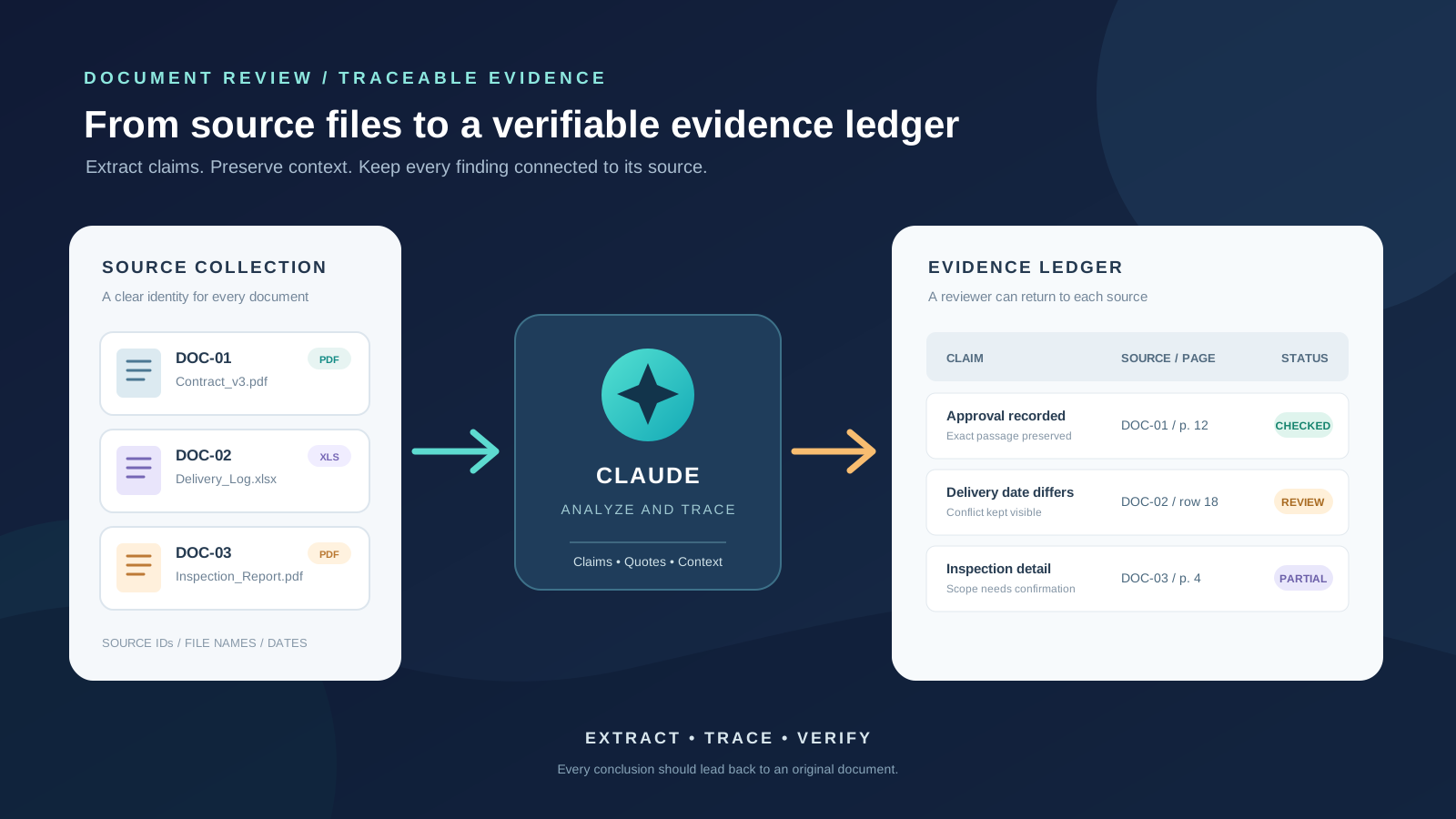
A collection of documents can contain the answer to an important question without presenting it in one convenient place. A policy may define a rule, a contract may qualify it, a technical report may describe what happened, and an email may record a later decision. Reading each file separately is manageable; showing exactly which source supports each conclusion is harder.
Claude can help extract relevant passages, organize claims, compare documents, and prepare an evidence table. The reliable method is not to ask for one sweeping summary and accept it. Instead, define the question, give the collection a clear structure, extract evidence in controlled stages, and check every important quotation and reference against the original file.
This guide explains how to use Claude to extract evidence from multiple documents, organize a traceable evidence matrix, identify contradictions, and reduce the risk of unsupported conclusions. It covers the Claude chat and Projects workflows, current upload considerations, and an optional API approach for developers who need structured document citations.
What does evidence extraction mean?
Evidence extraction is the process of locating information in source material and recording it in a form that can be checked later. It is more specific than summarization.
A summary might say that a supplier missed a delivery deadline. An evidence extraction record should identify the document that states the deadline, the document that records the delivery date, the exact passage supporting each fact, and any qualification that changes the interpretation.
A useful evidence record normally contains:
- Claim or question: the precise point being investigated.
- Source identifier: the filename or document ID, not just a vague description.
- Location: the PDF viewer page, section heading, paragraph, table, or other locator.
- Supporting passage: a short exact quotation copied from the source.
- Interpretation: a separate, clearly labelled explanation of what the passage appears to mean.
- Evidence status: supported, contradicted, partially supported, or not found in the reviewed material.
- Caveat: missing context, ambiguous wording, conflicting dates, or a limitation that affects the conclusion.
Keeping the quotation separate from the interpretation is essential. It lets a reviewer distinguish what the document actually says from what Claude inferred from it.
Choose between a Claude chat and a Project
For a small, self-contained review, attach the files to one Claude conversation. This is convenient when you have a defined question and a limited collection that you will review in one session.
For a continuing investigation, create a Claude Project. Anthropic explains that files added to a Project’s knowledge base are available across chats in that Project, and project instructions can guide the responses in those chats. A Project is useful when you expect to return to the same collection, ask several related questions, or maintain a consistent evidence format. Context from one chat is not automatically shared with another unless the relevant information is added to Project knowledge.
You can find the setup steps in Anthropic’s official guide to creating and managing Projects. For a broader research workspace, see our guide to organizing university research with Claude Projects.
Check the upload limits before preparing a large collection
Anthropic’s help documentation distinguishes ordinary chat uploads from Project files. At the time of review on November 15, 2026, its upload guide lists up to 20 files per chat and a 500 MB maximum per chat-uploaded file. Project files have a 30 MB per-file limit; the number of Project files is not capped in the same way, but the total content still has to fit within Claude’s available knowledge capacity. Additional token limits may apply.
PDF page handling also matters. Anthropic says Claude can analyze text and visual elements in PDFs of 100 pages or fewer. PDFs from 101 to 1,000 pages are processed as text only, and PDFs over 1,000 pages cannot be uploaded through the documented Claude chat workflow. For large collections, check the current Claude file-upload guidance before deciding how to divide the material.
Projects on paid plans can automatically switch to retrieval-augmented generation (RAG) as the knowledge base approaches its context limit. Anthropic describes this as expanding Project capacity by up to 10 times. In RAG mode, Claude retrieves relevant material from the Project knowledge base rather than placing every document in the active context at once. That is useful for larger collections, but it does not mean every page is examined in every answer. Ask for the specific files and topics relevant to each question, and verify the passages returned. See Anthropic’s explanation of RAG for Projects.
Step 1: Define the question before uploading documents
Start with a question that can be answered from the material. “Review these documents” is too broad. A better instruction specifies the issue, time period, people or entities involved, and the kind of evidence required.
For example:
- Which documents record approval of the revised delivery date?
- What evidence supports or contradicts the claim that a safety inspection occurred?
- Which version of the policy was in force when the decision was made?
- What do the reports say about the cause of the outage, and where do their accounts differ?
Define the boundaries as well. Tell Claude whether it should use only the uploaded collection, whether it may consult the web, and whether it should treat later documents as evidence of earlier events or merely as retrospective commentary. For a closed-record review, explicitly prohibit web research and outside assumptions.
Step 2: Create a source register
Before asking Claude to interpret the collection, make the documents identifiable. Use clear filenames and, where practical, a short source ID:
| ID | Example filename | Description |
|---|---|---|
| DOC-01 | Contract_v3_2025-04-12.pdf | Signed contract |
| DOC-02 | Delivery_Log_2025-Q2.xlsx | Operational delivery record |
| DOC-03 | Inspection_Report_2025-05-08.pdf | Inspection findings |
| DOC-04 | Email_Approval_2025-05-10.pdf | Approval correspondence |
The names above are illustrative. Use the real filenames and preserve the original files unchanged. If two documents have similar names, include a date, version, or unique identifier so Claude and the human reviewer can distinguish them.
Keep a separate source register with the filename, author or issuing body, document date, version, file type, and any known limitation. If a date is missing, record it as unknown rather than asking Claude to guess. If a document is a scan, mark that fact because text extraction and citation may behave differently.
Step 3: Add the collection and establish review instructions
In a Claude chat, attach the relevant files with the plus button or by dragging them into the conversation. In a Project, open the Project knowledge area and add the documents there. Group related files together, but avoid mixing unrelated matters simply because they are available.
For a Project, add instructions that define the evidence standard. A practical starting point is:
You are assisting with a source-grounded document review.

Use only the documents supplied in this Project unless I explicitly authorize another source. Do not invent missing facts, dates, quotations, page numbers, or document titles.

For every factual claim:
1. Identify the exact source filename.
2. Give the PDF viewer page number or the most precise available section locator.
3. Provide a short exact quotation where the source contains one.
4. Separate the quotation from your interpretation.
5. Label the evidence as supported, contradicted, partially supported, or not found.
6. State when a document does not contain enough information to answer.

Do not treat absence from the reviewed documents as proof that an event did not happen. Preserve disagreements between sources instead of forcing a single conclusion. If you cannot locate a passage, say so.
These instructions create a consistent review standard, but they do not guarantee that every answer will be correct. Treat them as a process control, not as a substitute for checking the source.
Step 4: Extract evidence one issue at a time
Begin with a document inventory. Ask Claude to list the files it can identify, describe each file’s apparent subject, and flag unreadable, duplicated, incomplete, or ambiguous material. Compare that inventory with your own source register. If a file is missing from the response, do not assume Claude has reviewed it.
Next, extract evidence against one question or issue at a time. A focused prompt is easier to audit than a request to extract every possible fact from a large collection.
Use a prompt such as:
Review the supplied documents for evidence about this issue:

ISSUE: [write the precise question]

Return a table with these columns:
- Source ID and exact filename
- Document date, if stated
- PDF viewer page or section
- Exact supporting quotation
- What the passage establishes
- What it does not establish
- Evidence status: supported, contradicted, partially supported, or not found

Do not paraphrase inside the quotation column. Do not invent a page reference.
If the source does not contain relevant evidence, write "No relevant passage located."
After the table, list any ambiguous terms, missing documents, or unresolved questions.
If the collection is large, work in logical batches: contracts together, correspondence together, technical reports together, for example. Ask Claude to preserve the source IDs in every batch. Once each batch has been reviewed, combine the results into one evidence ledger and check for duplicate records.
Step 5: Build an evidence matrix, not just a summary
An evidence matrix makes it possible to compare the same issue across multiple documents. It should preserve the relationship between each claim and its source.
| Issue | Source | Location | Evidence | Status |
|---|---|---|---|---|
| Approval date | DOC-04 | PDF viewer p. 2 | Exact passage from the approval email | Supports |
| Actual delivery date | DOC-02 | Sheet “Log”, row 18 | Recorded delivery entry | Supports |
| Inspection completion | DOC-03 | Section 4 | Reported inspection date and result | Partial |
The entries above illustrate the format; they are not findings from a real case. Keep one row per distinct piece of evidence. If a single paragraph supports two different claims, create two rows and explain the relationship rather than stretching one quotation to support both.
Ask Claude to distinguish direct evidence from contextual material. A signed approval may directly establish that an approval was recorded. A later report that mentions the approval may only be secondary evidence. Similarly, a document’s failure to mention an event is not proof that the event did not occur.
For complex collections, add columns for the responsible entity, relevant date, document version, evidence type, and reviewer notes. Avoid using a single numerical confidence score as if it were an objective measurement. A clear status and a traceable quotation are more useful to the next reviewer.
Step 6: Compare documents without erasing contradictions
After extraction, ask Claude to compare the records on a defined issue. Do not ask it simply to decide which document is correct. Instead, request a conflict table:
Compare the evidence already extracted about [issue].

Identify:
- Claims on which the documents agree
- Claims on which they disagree
- Different dates, definitions, or scopes that may explain the difference
- Which source is closest to the event being described
- What additional record would help resolve each disagreement

For every comparison, cite the source ID and location already recorded.
Do not choose a winning account unless the documents themselves provide a clear basis.
Keep unresolved conflicts visible.
This approach is especially useful when documents were created at different times or for different purposes. A draft policy, a signed version, and a later implementation memo may appear inconsistent because they describe different stages. A meeting note may record a proposal rather than a final decision. A technical report may describe an observed symptom without establishing its root cause.
Ask Claude to create a timeline only after the source dates have been extracted. Require it to mark dates that are missing, approximate, or inferred. A timeline that silently turns an uncertain date into a precise one can make weak evidence look stronger than it is.
Step 7: Verify quotations and page references
This is the most important quality-control step. Open the original file and check every passage that supports a consequential conclusion. Confirm that:
- The quoted words appear exactly in the cited source.
- The page number matches the PDF viewer, not merely a printed page label.
- The passage has not been shortened in a way that changes its meaning.
- The surrounding paragraph, table heading, footnote, or definition does not qualify the claim.
- The source version and date are the ones relevant to the question.
- A statement presented as a fact is not actually an opinion, forecast, allegation, or unverified report.
Anthropic’s file-upload guidance specifically advises using the PDF page numbers shown in the viewer when referring to pages. That matters because a report’s printed page number can differ from the PDF viewer’s page count.
If Claude cannot provide a usable locator, ask it to search for a short phrase from the passage and then locate that phrase yourself. Do not keep prompting it to guess a page number. If the document is a scan, use OCR or a searchable copy where appropriate, and visually inspect important passages. A scanned page can contain text that extraction tools cannot reliably read.
Anthropic also warns that Claude can produce incorrect or misleading information, including quotations that sound authoritative but are not grounded in fact. Its guidance on inaccurate responses recommends checking the underlying source rather than treating Claude as a singular source of truth.
Step 8: Ask what the collection does not establish
A good evidence review records gaps as carefully as findings. Ask Claude to identify:
- Questions for which no relevant passage was located.
- Claims supported by only one document.
- Statements that appear only in a draft or unsigned record.
- Missing attachments, referenced appendices, or cited policies.
- Conflicting versions or unexplained date changes.
- Conclusions that would require evidence outside the supplied collection.
Then review the gaps yourself. “Not found” means that the requested information was not located in the material reviewed; it does not mean that the event did not happen. Likewise, a document that records an allegation does not independently prove that the allegation is true.
For a final report, ask Claude to organize the results into three sections: established by the reviewed documents, disputed or incomplete, and not established by the available material. Keep the source IDs beside each point so a reviewer can return to the underlying record quickly.
An advanced option: structured citations in the Claude API
The Claude web interface and the Claude API are not identical. Developers building a document-review application can use Anthropic’s Messages API citation feature. The official Citations documentation explains how to enable citations on document content with the citations setting. The response can include the exact cited text and a location in the source: PDF citations use page ranges, while plain-text citations use character positions.
There are important boundaries. The API documentation says citations are currently text-based; image citations are not supported. A scanned PDF without extractable text therefore cannot produce a normal text citation for its image content. The citation feature is also an API implementation detail, not a promise that every ordinary Claude chat response will display the same structured citation object.
For API-based workflows, consult Anthropic’s separate PDF support documentation for request limits and processing behaviour. Do not transfer API page limits to the consumer chat interface; the two environments document different constraints.
Common mistakes when using Claude for document evidence
Asking for a complete answer in one prompt. Large requests encourage broad summaries and make it harder to see which sources were actually used. Break the review into questions and batches.
Accepting a quotation without opening the source. A plausible quotation or page reference is not proof that the passage exists. Verify it in the original file.
Treating every source as equally authoritative. A signed record, draft, email, meeting note, and retrospective summary have different evidentiary roles. Record the type and status of each source.
Allowing the model to resolve disagreements by guesswork. Preserve contradictory accounts and identify what would resolve them. Do not ask Claude to manufacture certainty.
Assuming every file in a Project is present in every answer. Project knowledge and RAG help Claude retrieve relevant material, but a response is still a response to a particular question. Ask which documents were used and check the inventory.
Mixing facts with interpretation. Store exact source wording separately from Claude’s explanation and your final assessment.
Protect the documents you upload
Before uploading a collection, confirm that you are permitted to share it with the service and that the account and workspace settings are appropriate for the material. Remove passwords, access tokens, personal identifiers, and unrelated sensitive information from working copies where possible. For workplace, legal, medical, financial, or regulated records, follow your organization’s approved data-handling process and use only an authorized environment.
A Project’s visibility and sharing settings also matter. Check who can access a shared Project before adding source files. Keep an unchanged copy of the originals in the appropriate records system; the AI workspace should not become the only copy of an important document collection.
A final checklist for a traceable Claude evidence review
Before relying on the result, confirm that:
- Every source file in scope appears in the source register.
- The review question and time period are clearly defined.
- Each extracted claim has a source ID and a precise locator.
- Exact quotations are separated from paraphrases and interpretations.
- Conflicts, gaps, and missing documents remain visible.
- Important page references and quotations have been checked in the originals.
- Drafts, final versions, allegations, and confirmed records are not treated as interchangeable.
- The final summary distinguishes what the documents establish from what remains uncertain.
Claude can make a large document collection easier to search and compare, but the value of the result depends on traceability. A concise answer with verifiable source passages is more useful than a polished narrative whose evidence cannot be found. Use Claude to organize the work; keep the original documents, the review criteria, and the final judgment in human hands.
For related workflows, read our guides to comparing multiple research papers with Claude and analyzing a long technical report with Claude.