
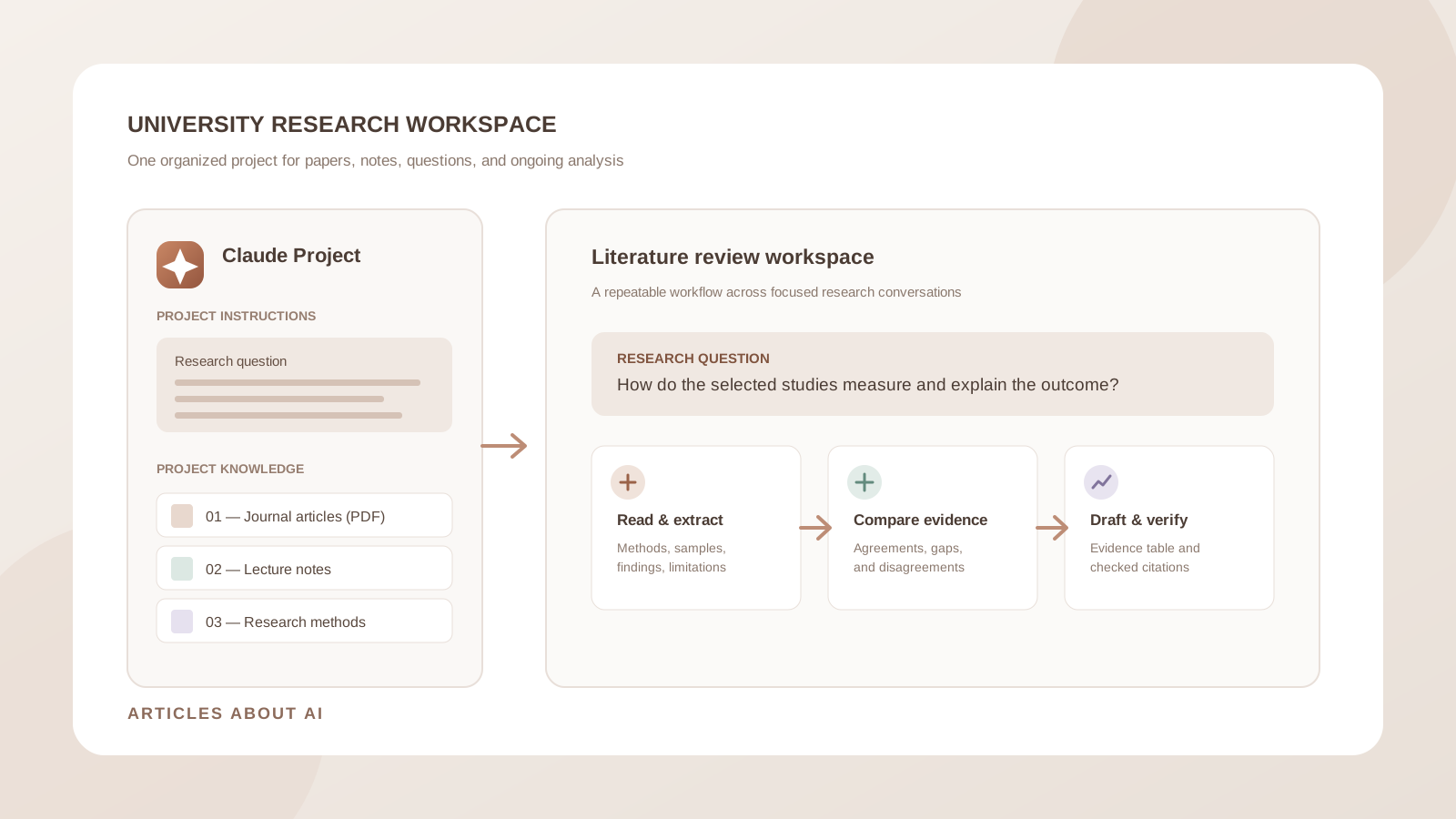
University research rarely happens in one sitting. A literature review may involve dozens of papers, lecture notes, research questions, supervisor feedback, and several rounds of revision. When those materials are scattered across downloads, folders, and separate AI conversations, it becomes harder to remember which source supports a claim or why a particular paper was included.
Claude Projects can provide a more organized workspace for this kind of ongoing work. A Project brings related conversations together with a shared knowledge base and project-level instructions. You can use it to keep research papers and notes available across chats, ask focused questions about the collection, and build a repeatable process for reviewing evidence.
The goal is not to let an AI system conduct your scholarship for you. It is to reduce repetitive organization work while keeping the research question, source quality, interpretation, and final academic decisions under your control.
This guide explains how to set up Claude Projects for university research, organize papers and notes, write useful project instructions, compare studies, and avoid common problems with AI-generated research summaries.
What are Claude Projects?
Claude Projects are dedicated workspaces inside Claude. Each Project has its own chat history and knowledge base, where you can add documents, text, code, and other relevant material. You can also set project instructions that guide Claude’s responses in conversations within that workspace.
For a university student, this means you can create one Project for a dissertation, another for a course research assignment, and a separate one for a group research topic rather than mixing unrelated work in a single chat history.
A Project can help you:
- Keep research papers and supporting documents in one place.
- Give Claude persistent background information about your research question.
- Set consistent instructions for summaries, comparisons, and evidence extraction.
- Open separate chats for different parts of the same research project.
- Return to earlier discussions without rebuilding the entire context from scratch.
- Collaborate on a shared research workspace when your Claude plan and organization settings support project sharing.
Anthropic’s current What are Projects? guide describes Projects as self-contained workspaces with their own chat histories and knowledge bases. The available features and limits depend on the account and plan.
Are Claude Projects available on the free plan?
Yes. Anthropic’s current Help Center says Projects are available to users with free Claude accounts, and free users can create up to five Projects. Paid plans offer additional capabilities, including enhanced project knowledge through retrieval-augmented generation (RAG).
Do not rely on older tutorials that say Projects are exclusively a paid feature. Anthropic’s updated documentation is the better source for current availability:
- What are Projects?
- How to create and manage Projects
- Retrieval augmented generation (RAG) for Projects
Feature availability, usage limits, and plan entitlements can change. Check the current Help Center and the options shown in your own account before planning a large research workflow around a particular limit.
Step 1: Create a separate Project for each major research topic
Start by separating substantial research tasks. A dissertation, a literature review for one course, and a research methods assignment should not automatically share the same knowledge base. Mixing unrelated papers can cause confusion when Claude retrieves or summarizes information.
To create a Project:
- Sign in to Claude.
- Open Projects from the left sidebar.
- Select New Project.
- Enter a clear project name.
- Add a short description that explains the research topic and scope.
- Open the new Project to access its knowledge area and project instructions.
Anthropic notes that the project name and description help you organize the workspace, but Claude does not use those fields as research context. Put essential information in the project instructions or knowledge base instead.
Use names that identify the research question or academic task. For example:
- Dissertation — AI Feedback in Higher Education
- Literature Review — Renewable Energy Adoption
- Research Methods — Qualitative Interviews
- Course Project — Public Health Policy
Avoid vague names such as “University Work” or “Research 1”. A descriptive title makes it easier to select the correct Project when your list grows.
Step 2: Organize the Project knowledge base
The Project knowledge base is the shared collection of material Claude can use across chats in that Project. Add the documents that provide essential background for the research.
For a typical university project, the collection might include:
| Material | Why to include it |
|---|---|
| Research proposal | Preserves the question, scope, and objectives |
| Academic papers | Provides the studies to analyze and compare |
| Course syllabus | Clarifies assignment requirements and learning outcomes |
| Lecture notes | Adds course-specific definitions and context |
| Research methodology guide | Provides criteria for evaluating study design |
| Supervisor feedback | Records agreed revisions and open questions |
| Your research notes | Keeps your own observations and reading decisions available |
Upload files using the + control in the Project knowledge area. Claude’s supported file types and limits can vary by feature and account, so consult Anthropic’s file upload guide if a document is rejected or processed unexpectedly.
Use descriptive filenames
Good filenames make it easier to identify the source you want Claude to discuss. Rename files before uploading them when necessary.
Prefer:
- 2024_Smith_AI_Feedback_University_Students.pdf
- 2023_Research_Methods_Interview_Study.pdf
- Dissertation_Research_Question_v03.docx
- Supervisor_Feedback_2026-10-28.docx
Avoid filenames such as paper-final.pdf, download(7).pdf, or document-new.docx. Keep a separate record of the full citation for each paper; a filename is not a bibliographic reference.
Separate source documents from your own notes
Keep original papers intact. If you annotate a study or write a summary, save that as a separate file with a clear name. This helps you distinguish the authors’ claims from your interpretation.
For example, keep Smith_2024_Original_Paper.pdf separate from Smith_2024_Reading_Notes.docx. Ask Claude to identify which file supports a claim rather than allowing an AI-generated note to become an apparent primary source.
Step 3: Write project instructions that define the research rules
Project instructions are one of the most useful parts of a research workspace. Instead of repeating your requirements in every conversation, define how Claude should handle sources, uncertainty, citations, and academic writing.
Open the Project, select Set project instructions, add your instructions, and save them. Anthropic explains that these instructions apply to chats within that Project. See its official project management guide for the current interface.
You can adapt this template:
University Research Project Instructions
You are assisting with an academic research project about [insert research topic].
Research question: [insert the exact question].
Scope: [insert discipline, population, location, time period, and other boundaries].
Follow these rules in every research conversation:
- Treat uploaded academic papers and approved project documents as the primary evidence for claims about this research.
- Do not invent authors, publication dates, journal names, quotations, statistics, page numbers, or references.
- Distinguish clearly between information explicitly stated in a source, reasonable interpretation, and information that is not available.
- When summarizing a paper, identify its research question, method, sample or dataset, findings, and stated limitations.
- When possible, identify the source filename, section heading, and PDF page number for important claims.
- If sources disagree, explain the differences instead of forcing a single conclusion.
- Do not describe correlation as causation unless the study design and evidence justify that interpretation.
- If information is missing or unclear, say so and ask me to inspect the original document.
- Use formal, clear academic English. Preserve technical terms and avoid overstating results.
- Do not write a complete assignment for submission as if it were my own work. Help me understand evidence, plan sections, critique my reasoning, and improve my own drafts.
At the end of substantial analysis, include a short section called “Verification needed” listing claims, references, or interpretations I should check in the original sources.
This instruction set creates a consistent working standard. It does not guarantee that Claude will never make a mistake, so you must still inspect the evidence and correct inaccurate outputs.
Step 4: Start with a research map before writing
Do not begin by asking Claude to write your literature review. First ask it to map the research material and identify what is already available.
Use this prompt inside the Project:
Prompt: Map my research materials
Review the documents available in this Project. Do not write the literature review yet.
Create an inventory with these columns:
- Document or paper title
- Authors and publication year, if stated
- Source type
- Main research topic
- Research question or objective
- Method or study design
- Main contribution
- Limitations stated by the authors
- Relevance to my research question
Use only information that can be found in the documents. Mark missing or uncertain information as “not stated” or “needs verification.” Do not guess bibliographic details from filenames.
Finish by identifying duplicate files, documents that appear unrelated to the research question, and important areas for which the Project has no evidence.
Check the inventory against your own reference manager or bibliography. Correct any title, author, or year that Claude has misread before moving to synthesis.
Step 5: Compare research papers in separate, traceable stages
A literature review requires more than a collection of summaries. You need to understand how studies relate to one another and whether their methods make their findings comparable.
Use a staged workflow:
A. Extract each paper’s research design
Analyze [exact paper title or filename]. Identify the research question, theoretical framework if stated, study design, sample or dataset, data collection method, variables or themes, analysis method, main findings, and limitations. For every important item, identify the section and PDF page where it appears. Do not infer information that the paper does not report.
B. Compare methods across selected studies
Compare the methods used in [Paper A], [Paper B], and [Paper C]. Explain differences in population, sample size, research design, measurement, data collection, and analysis. Identify which differences may affect whether the results can be compared directly. Do not rank a study as better merely because its sample is larger; explain the relevance of the design and research question.
C. Identify agreements and disagreements
Compare the findings of these papers in relation to my research question. Organize the results into: findings that agree, findings that differ, findings that are not directly comparable, and questions that remain unanswered. For each point, name the source paper and provide a location to verify it. Separate the authors’ conclusions from your interpretation.
D. Build a literature review matrix
Create a literature review matrix using one row per paper and these columns: citation details, research objective, theoretical framework, methodology, sample or data, key findings, limitations, relevance to my research question, and verification notes. Do not merge studies or omit conflicting findings. If a field is not reported, write “not stated.”
For a more detailed comparison workflow, see How to Use Claude to Compare Multiple Research Papers. That guide focuses specifically on paper-by-paper comparison, extraction, and evidence matrices.
Step 6: Use separate chats for different research tasks
A Project can contain multiple conversations. Use that structure to keep each stage of the work focused while retaining the shared project knowledge.
A practical chat structure might look like this:
| Chat name | Main task |
|---|---|
| Research question and scope | Refine the question and define boundaries |
| Paper screening | Assess relevance and inclusion criteria |
| Literature review matrix | Extract comparable information from papers |
| Methodology analysis | Compare research designs and limitations |
| Theoretical framework | Map concepts and competing explanations |
| Draft feedback | Review sections you have written |
| Supervisor feedback | Convert comments into a revision checklist |
| Final source audit | Check claims, citations, and unresolved gaps |
You can move a relevant standalone chat into a Project using the chat menu and Add to project, where that option is available. Anthropic’s project management documentation explains how to move chats and manage Project content.
One important distinction: a Project’s shared knowledge base is the place for information that should be available across its chats. Do not assume that every detail from one conversation automatically becomes part of every other conversation. Save important research notes and decisions in the Project knowledge base when they need to persist.
Step 7: Use RAG when the research collection becomes large
A large dissertation or literature review may contain more documents than can fit comfortably into a single active context. Anthropic documents retrieval-augmented generation (RAG) for Projects as a way to expand the amount of project knowledge Claude can work with.
In a RAG-enabled Project, Claude can retrieve relevant information from the uploaded knowledge base rather than relying only on keeping every document in the active context at once. Anthropic says enhanced project knowledge with RAG is available on paid plans, and that it can expand project capacity by up to 10 times. The system handles activation automatically when needed; users do not need to configure a separate retrieval process.
Read Anthropic’s RAG for Projects documentation for current details.
RAG does not mean Claude has read every page of every paper with equal attention. It may retrieve only the passages relevant to a particular question. For a critical claim, name the paper, request the relevant section, and open the original PDF to verify the passage.
Step 8: Turn research notes into an outline without losing your own argument
Once you have reviewed the papers and checked the evidence matrix, ask Claude to help organize your own findings into a possible chapter or literature review structure.
Try this prompt:
Based on the research question, my verified literature review matrix, and the notes in this Project, suggest a logical outline for a literature review.
Organize it by themes and debates rather than simply summarizing one paper after another. For each proposed section, list:
- The central issue or theme
- Which papers are relevant
- Where the studies agree or disagree
- The methodological differences that matter
- The evidence gaps that should be discussed
Do not invent a conclusion or claim that the sources do not support. Explain why the proposed sequence would help a reader understand the research problem.
Use the outline as a planning aid. Decide which themes matter, read the original papers, and write the argument in your own words. Claude can then critique a section you have drafted for unclear reasoning, unsupported statements, repetition, or missing qualifications.
For broader tool choices, see ChatGPT vs Claude vs Gemini for Academic Writing.
Step 9: Keep a record of decisions and unresolved questions
Research projects change as you read more. A paper may be excluded, a research question may be narrowed, or a supervisor may ask you to reconsider a method.
At the end of each major research conversation, ask Claude to prepare a short project update:
Summarize the decisions made in this conversation. Include the research question or scope changes, papers reviewed, findings that were verified, unresolved questions, and next actions. Separate confirmed information from suggestions. Format this as a dated research progress note that I can save to the Project knowledge base. Do not add details that were not discussed.
Review the note, correct it, and add it to the knowledge base if it contains decisions that should inform future chats. Keep your own research log as the authoritative record of your academic decisions.
Common mistakes when using Claude Projects for university research
Uploading too many unrelated documents
A Project works best when its knowledge base has a clear subject and purpose. Mixing papers from unrelated assignments can make it harder to retrieve the right evidence. Create separate Projects for substantially different research questions.
Assuming Claude remembers every chat detail
The knowledge base is the shared reference point across conversations. Save important research decisions and notes there instead of assuming that a detail mentioned once in another chat will always be available.
Asking for a complete literature review too early
A polished essay can hide missing evidence, incorrect comparisons, and unsupported generalizations. Build the inventory and evidence matrix first. Draft only after you have reviewed the original studies and decided how they relate to your question.
Accepting citations without checking them
An AI-generated citation may contain an incorrect title, author, year, page, or interpretation. Verify each reference using the publisher’s page, DOI record, university library, or original paper. Do not cite Claude as the source of a scholarly finding.
Treating every paper as equally reliable
A peer-reviewed article, preprint, conference paper, government report, and opinion piece are different kinds of sources. Assess the publication status, research design, limitations, and relevance before treating them as equivalent evidence.
Uploading confidential or sensitive research material without approval
Before uploading unpublished research, interview transcripts, participant information, student records, or institution-owned documents, check your university’s research ethics requirements, data protection rules, and approved AI tools. Remove identifying information where appropriate. Do not assume that a personal Claude account is approved for confidential institutional research.
Ignoring academic integrity rules
Universities differ in what they permit students to do with generative AI. Some allow brainstorming and language feedback but restrict generated text; others require disclosure or prohibit AI assistance for particular assessments. Follow the rules for your course and research programme. Keep your own analysis, writing, and scholarly judgment central.
Claude Projects vs NotebookLM for university research
Claude Projects and Google’s NotebookLM can both help organize source-based work, but they serve somewhat different workflows.
| Research need | Claude Projects | NotebookLM |
|---|---|---|
| Ongoing workspace with multiple chats | Project chat history and shared knowledge | Notebook organized around its source collection |
| Persistent custom instructions | Project-level instructions | Notebook interaction is source-oriented |
| Analyze a collection of papers | Yes, using project knowledge and chat prompts | Yes, with answers grounded in notebook sources |
| Draft and critique research sections | Flexible conversational writing and revision | Useful for source-based notes and reports |
| Source-linked answers | Ask for file and page references, then verify | Provides citations to passages in notebook sources |
| Large knowledge collections | Paid-plan RAG can expand project knowledge | Notebook source and account limits apply |
Choose Claude Projects when you want an ongoing conversational workspace with reusable instructions, separate chats, and iterative drafting. Consider NotebookLM when your priority is asking questions about a defined collection of sources and following citations to passages in those materials.
For a dedicated workflow, read How to Use NotebookLM for Research: A Practical Workflow.
Frequently asked questions
Can I use Claude Projects for a university dissertation?
Yes. You can create a Project for a dissertation, add relevant research papers and notes to its knowledge base, and use separate chats for screening, methodology, literature synthesis, and draft feedback. Keep your own research log and verify every important claim against the original sources.
How many Claude Projects can free users create?
Anthropic’s current Help Center says free users can create up to five Projects. Plan features and limits can change, so check the current Projects overview.
Do all chats in a Claude Project share the same context?
Project knowledge and project instructions are available across chats in that Project. However, you should not assume that every detail from one conversation is automatically shared with another. Add important research notes and decisions to the Project knowledge base.
Does Claude Projects support PDFs?
Claude supports PDF uploads. The precise upload limits and document-processing behavior depend on the current feature and account. Check Anthropic’s file upload guide, and verify extracted quotations, tables, and page references against the original PDF.
Is RAG available on the free Claude plan?
Anthropic currently describes enhanced project knowledge with RAG as a paid-plan feature. Free users can create Projects, but should not assume that every paid knowledge-capacity feature is included.
Can Claude write my literature review?
Claude can help organize evidence, suggest a structure, explain difficult passages, and provide feedback on a draft. You remain responsible for reading the sources, deciding what the evidence means, writing your own scholarly argument, and following your university’s AI policy.
Is Claude Projects better than NotebookLM for research?
Neither is universally better. Claude Projects is useful for ongoing conversations, reusable instructions, and iterative analysis. NotebookLM is useful for asking questions about a defined source collection and following source citations. Choose according to the research task and verify outputs from either tool.
Final thoughts
Claude Projects can make university research easier to manage by bringing related papers, notes, instructions, and conversations into one workspace. The most effective setup begins with a clearly defined research question, a carefully selected knowledge base, and project instructions that require source-grounded analysis.
Use separate chats for distinct research tasks, build a paper inventory before comparing studies, and save important decisions in the knowledge base. Most importantly, treat Claude as an assistant for organizing and interrogating evidence—not as a replacement for scholarly reading, critical thinking, or your university’s research standards.
Official sources
- Anthropic — What are Projects?. Project workspaces, knowledge bases, availability, and RAG overview.
- Anthropic — How can I create and manage Projects?. Creating Projects, adding knowledge, setting instructions, and moving chats.
- Anthropic — Retrieval augmented generation (RAG) for Projects. How retrieval works with larger project knowledge collections.
- Anthropic — Uploading files to Claude. Supported file formats and upload guidance.
Related guides on Articles About AI
- How to Use Claude to Compare Multiple Research Papers
- How to Use NotebookLM for Research: A Practical Workflow
- ChatGPT vs Claude vs Gemini for Academic Writing
- How to Use Perplexity to Find Original Research Papers
- The Best AI Tools for Students in 2026
This article is for educational purposes. Product features, account eligibility, file limits, and academic AI policies can change. Always consult current Anthropic documentation and your university’s research and academic-integrity requirements.