
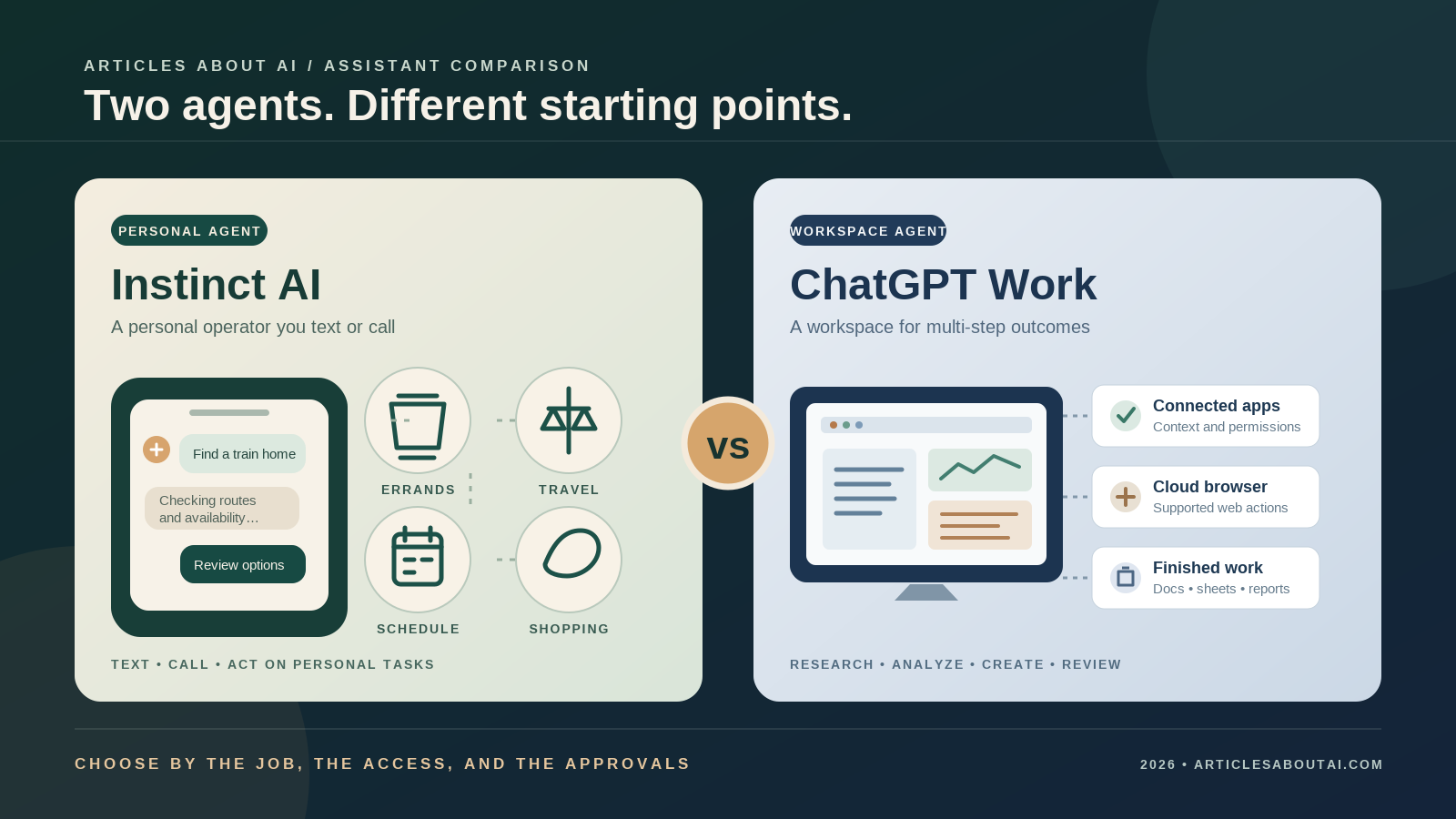
The comparison between Instinct AI and ChatGPT is no longer simply a choice between a personal assistant and a chatbot. Both products now have agentic capabilities: they can work with connected services, use websites, and move beyond answering a question toward completing a task. The important difference is the way each product is organized, the work it is designed to handle, and the controls available when an action affects a real account or transaction.
There is also a naming change that matters. OpenAI’s current Help Center says the former ChatGPT agent is no longer available and directs users to ChatGPT Work for longer, multi-step tasks and finished deliverables. This article therefore compares Instinct with the current ChatGPT Work experience—not with an older description of ChatGPT agent mode that no longer reflects the product users are being directed to use.
The short answer: Instinct is built around a communication-first personal assistant that you can text or call to handle practical life tasks. ChatGPT Work is a broader work environment for research, analysis, connected apps, files, supported browser actions, and finished deliverables. There is overlap, but they are not interchangeable.
Instinct AI vs ChatGPT: the core difference
Instinct’s official homepage describes the service as a personal assistant that understands what you are working on and what matters to you. It says users can text or call it, and that it can use a phone and computer in a similar way to a person. Its examples include ordering groceries or recipe ingredients, booking a train, sending flowers, and finding a sports court.
ChatGPT now separates quick conversational assistance from a more involved agentic experience. OpenAI describes ChatGPT Work as an agent for longer tasks that can gather information across apps and workflows, work with files, and create finished documents, spreadsheets, presentations, reports, and Sites. It can break a complex goal into smaller steps and continue working for an extended period.
That distinction is more useful than asking which product has the “smarter AI.” A model can reason well and still be a poor fit for a particular task if it lacks the right account connection, browser support, permission, or interaction channel.
Quick comparison
| Area | Instinct AI | ChatGPT Work |
|---|---|---|
| Product orientation | Personal assistant for practical, everyday tasks | Agentic workspace for complex tasks and finished work |
| Main interaction | Texting and calls, alongside its web and account features | ChatGPT Work on web and mobile; desktop capabilities depend on plan and workspace |
| Web actions | Its Terms describe interaction with connected and other third-party platforms | Cloud browser can read pages, click, enter information, and work on supported sites |
| Connected information | Its Privacy Policy documents Google Workspace access when a user connects it | Connected apps and files can provide context, subject to app and workspace permissions |
| Typical strengths | Errands, bookings, travel, shopping, appointments, and personal follow-ups | Research, analysis, documents, spreadsheets, presentations, reports, and multi-step workflows |
| Human control | Users direct tasks and must maintain meaningful oversight | Tasks pause for input, sign-in, or confirmation when required |
| Pricing model | Terms say Instinct is currently available without charge; fees may be introduced with notice | Work usage follows the plan’s Codex-style usage structure; complex tasks can use more allowance or credits |
| Best fit | A communication-first assistant for personal logistics | A general-purpose agent for research and substantial work across tools |
The table describes product positioning, not a guarantee that every feature is enabled for every account. Website support, connected-app permissions, geographic availability, and staged rollouts can change what either assistant can complete.
1. Everyday errands: where Instinct has a natural advantage
Instinct’s interface is designed around sending an instruction to an assistant rather than opening a project and assembling a workflow. The official homepage presents examples such as ordering groceries, buying ingredients for a recipe, booking a train, sending flowers, and finding a court. Its Privacy Policy also lists scheduling appointments, researching and booking travel, and managing subscriptions as examples of everyday tasks.
That makes Instinct a natural option when the request is concrete and personal:
- “Find a train that gets me home on Friday evening and compare the options.”
- “Order the ingredients I need for this recipe, but show me the basket before checkout.”
- “Find three nearby repair services and ask each for an estimate.”
- “Review the renewal notices I have shared and list subscriptions that need attention.”
The advantage is not that every errand is guaranteed to finish automatically. Instinct’s own Terms say actions depend on the instructions and context supplied, can contain errors, and may not be reversible. They also require users to maintain meaningful human oversight, especially where actions create financial obligations, affect other people, disclose sensitive information, or are difficult to undo.
ChatGPT Work can handle many similar web tasks when the site and action are supported. OpenAI’s Cloud Browser documentation gives examples including checking restaurant availability, requesting business quotes, finding flights, comparing product availability, tracking packages using connected email information, and preparing an appointment booking for user approval. The difference is that these tasks sit within a broader Work environment rather than a service presented primarily as a personal assistant you text or call.
Practical verdict: Instinct has the clearer personal-errand identity. ChatGPT Work is also capable of supported errands, but it becomes especially useful when the task needs research, comparison, files, or a substantial written result as part of the same workflow.
2. Email and calendar: both depend on permissions
Email and calendar access can make an assistant substantially more useful, but neither product should be treated as having automatic access to every account.
Instinct’s Privacy Policy, last revised November 17, 2026, says that connecting Google Workspace can give the service access to products such as the user’s calendar and email inbox, along with related message metadata, calendar-event details, and other content provided through Google Workspace APIs. The policy says this information is used to provide the service and personalize the experience. It also states that data received directly from Google Workspace APIs is not used to evaluate, fine-tune, train, or improve AI models, or for advertising.
ChatGPT Work can use connected apps and files, subject to the permissions available to the user and the workspace. OpenAI’s Work documentation explains that connected apps, browser use, and workspace controls determine what an agent can access. In a supported browser workflow, ChatGPT can pause for a separate sign-in rather than silently inheriting the sessions already open in a user’s personal browser.
For either assistant, check the exact connection before delegating a task. Confirm which calendar or inbox is connected, whether the assistant can read or change information, and whether an action such as sending an email or moving an appointment requires a final approval. A successful summary does not prove that a calendar event was saved, and a drafted reply is not the same as a sent message.
For more detail, see How to Use Instinct AI to Manage Emails and Follow-Ups and How to Use Instinct AI to Organize Your Calendar and Appointments.
3. Shopping, bookings, and transactions
Instinct’s public examples and recent integrations show a strong focus on consumer transactions. The company describes shopping, travel, reservations, and other everyday tasks as part of its personal-assistant model. Its Terms explain that it can interact with third-party platforms on a user’s behalf, including services the user has connected and other third-party websites or applications.
However, the merchant or service provider remains central to the transaction. Instinct’s Terms say the user—not Instinct—is the buyer when a purchase is made through a third-party service. The third party’s own prices, fees, shipping, cancellation, and refund rules apply. Users must review the action and maintain appropriate oversight.
ChatGPT Work can also research products, compare availability, navigate supported websites, and enter information into forms through its Cloud Browser. OpenAI explicitly warns that support varies by site and action: a site may block automated access, a transaction step may not be supported, or the user may need to take over and complete the final step.
For both assistants, use a clear approval boundary:
- Ask for research and comparable options first.
- Require the assistant to identify the seller, exact product or service, price, fees, and cancellation terms.
- Ask it to prepare the transaction without submitting it.
- Review the final details yourself.
- Approve the purchase or booking only after the provider’s confirmation screen matches your request.
See How to Use Instinct AI for Online Shopping and Product Research, How to Use Instinct AI to Book Restaurants and Make Reservations, and How to Use Instinct AI to Compare Prices Before Buying for task-specific guidance.
4. Research and finished work: ChatGPT Work is broader
This is where ChatGPT Work has a clear product-level distinction. OpenAI describes Work as an environment for gathering information across apps and workflows, analyzing material, and producing finished deliverables such as documents, spreadsheets, presentations, reports, and Sites. It can carry context through a multi-step project and let the user follow progress, answer questions, change direction, and approve important actions.
For example, a user could ask Work to review a folder of source material, compare several vendors, prepare a decision report, and turn the findings into a spreadsheet and presentation. The connected apps and files provide context, while the browser can be used for supported web steps.
Instinct can research and act across third-party services, but its official product description is centered more on a personal assistant handling everyday needs. Its public documentation does not position it as a full document-production workspace in the same way OpenAI positions ChatGPT Work.
If the outcome is a polished report, spreadsheet, presentation, or a multi-stage research project, ChatGPT Work is the more directly aligned product. If the outcome is a practical personal task—such as arranging a booking or following up with a service provider—Instinct’s communication-first model may feel more natural.
5. Interface and availability
Instinct’s homepage says users can text or call the assistant and that it can use a phone and computer. The service also supports interaction through third-party messaging platforms, according to its Terms. The homepage currently presents login and an invite-a-friend route. The Terms do not guarantee that every feature is available in every country or on every device, and they describe some capabilities as early-access offerings.
ChatGPT Work is available through ChatGPT on web and mobile for eligible paid plans. Desktop availability and access to local files or desktop apps depend on the plan and workspace. OpenAI’s Cloud Browser documentation says cloud browsing is available in Work on paid ChatGPT plans in supported regions, excluding Free and Go, and that workspace permissions may also affect availability.
One important distinction: the old ChatGPT agent Help Center page now says that ChatGPT agent is no longer available and points users to ChatGPT Work. Older tutorials that describe the former agent mode, its menus, or its usage limits should not be treated as a current setup guide for Work.
6. Pricing: do not compare an unknown future price with a subscription allowance
Instinct’s Terms, last revised November 17, 2026, say the service is currently available without charge. The same section reserves the right to introduce fees for access or particular features and says users will receive notice before applicable fees become payable. This is a current terms-based statement, not a promise that Instinct will remain free.
ChatGPT Work does not have a single separate price listed in the cited product documentation. OpenAI says Work follows the same usage structure as Codex: usage varies with the amount of work required, and more complex tasks may consume more of a plan’s included usage. Additional credits and workspace spend controls may apply in relevant plans. Cloud Browser access has its own plan and regional eligibility conditions.
The practical comparison is therefore:
- Instinct: no charge under the current Terms, but future fees are possible; ordinary mobile, text, or data charges from a carrier may still apply.
- ChatGPT Work: access is tied to an eligible ChatGPT plan and workspace, while agentic usage follows the applicable plan allowance and credit structure.
Check the current terms and plan details before making a buying decision. Do not rely on an old review that quotes a price or access limit without a publication date.
7. Privacy, safety, and human oversight
Both products can work with sensitive information, so permissions matter more than broad claims that an assistant is “private” or “secure.”
Instinct’s Privacy Policy gives a specific commitment for Google Workspace API data: it says that data is not used for model training, evaluation, fine-tuning, or advertising. That protection should not be generalized to every message or file supplied through every channel. The same policy says other information may be used to develop and improve the service, subject to the user’s ability to opt out of model training in settings; it also describes separate treatment for material placed in the Vault.
Instinct’s Terms require users to review actions, verify that they were performed correctly, and maintain meaningful oversight. The company also states that actions can be incorrect or irreversible and that safeguards cannot guarantee the prevention of unintended actions.
ChatGPT Work’s Cloud Browser uses its own remote browser sessions, separate from the user’s personal browser. OpenAI says it does not use the device’s existing tabs, cookies, saved passwords, extensions, or sign-ins. Users sign in separately when prompted. The browser can pause for input, authentication, or confirmation, and its stored site data can be cleared in Settings. Connected-app access and data handling remain subject to ChatGPT data controls and workspace permissions.
For either assistant, a sensible baseline is to connect only the services required for a task, avoid sharing passwords in ordinary prompts, inspect the destination website before signing in, and require confirmation before sending sensitive messages or making purchases. Neither system should be given open-ended authority to “handle everything” in an email, banking, or shopping account.
Which assistant should you choose?
Choose Instinct AI if you want a personal assistant whose central interaction is texting or calling and whose product identity is built around practical tasks such as errands, bookings, travel, shopping, appointments, and follow-ups. Its fit depends on whether you can access the service and whether the required connection or feature is available to your account.
Choose ChatGPT Work if you want an agentic environment for longer research and analysis, connected apps and files, supported browser workflows, and deliverables such as documents, spreadsheets, presentations, and reports. It is the stronger fit when a task has several stages and the final output matters as much as the web actions.
Choose neither on the assumption that it can complete every transaction. A site can block automation, a connector may not have write access, a feature may be unavailable in your region, and an agent can misunderstand an instruction. For consequential actions, keep a human approval step.
Final verdict
Instinct and ChatGPT Work solve overlapping problems from different starting points. Instinct starts with the idea of a personal operator you can contact to get everyday things done. ChatGPT Work starts with a broad workspace that can reason across tools, files, and supported websites to produce substantial work. For personal logistics, Instinct may feel more direct. For research-heavy, document-heavy, or multi-stage professional tasks, ChatGPT Work is the more comprehensive environment.
The best choice is the one that supports the specific service you need, exposes the right permissions, fits your budget, and lets you verify every important action.
Frequently asked questions
Is Instinct AI better than ChatGPT?
Neither is universally better. Instinct is oriented toward a communication-first personal assistant for everyday tasks. ChatGPT Work is designed for longer, multi-step work across apps, files, and supported websites, including finished documents and reports.
Is ChatGPT agent mode the same as ChatGPT Work?
No. OpenAI’s current Help Center says the former ChatGPT agent is no longer available and directs users to ChatGPT Work for longer, multi-step tasks. Older agent-mode tutorials may describe a previous interface.
Can ChatGPT Work do the same tasks as Instinct?
There is overlap. ChatGPT Work’s Cloud Browser supports tasks such as checking restaurant availability, requesting business quotes, finding flights, comparing product availability, tracking packages, and preparing appointments. Completion depends on the website, account permissions, and whether the final step is supported.
Is Instinct AI free?
Instinct’s Terms of Service, revised November 17, 2026, say it is currently available without charge. They also reserve the right to introduce fees with notice, so users should check the current Terms before relying on that status.
Can either assistant send emails or make purchases without supervision?
Capabilities and confirmation requirements vary by service and task. Instinct’s Terms require meaningful human oversight. ChatGPT Work pauses when it needs input, sign-in, or confirmation, and supported browser actions vary by site. Users should review messages and transaction details before authorizing consequential actions.
Sources and further reading
- Instinct — Official website
- Instinct — Privacy Policy, revised November 17, 2026
- Instinct — Terms of Service, revised November 17, 2026
- OpenAI — ChatGPT Work and Codex Help Center
- OpenAI — Using Cloud Browser in ChatGPT
- OpenAI — ChatGPT agent Help Center notice
- OpenAI — ChatGPT is now a partner for your most ambitious work, July 9, 2026