
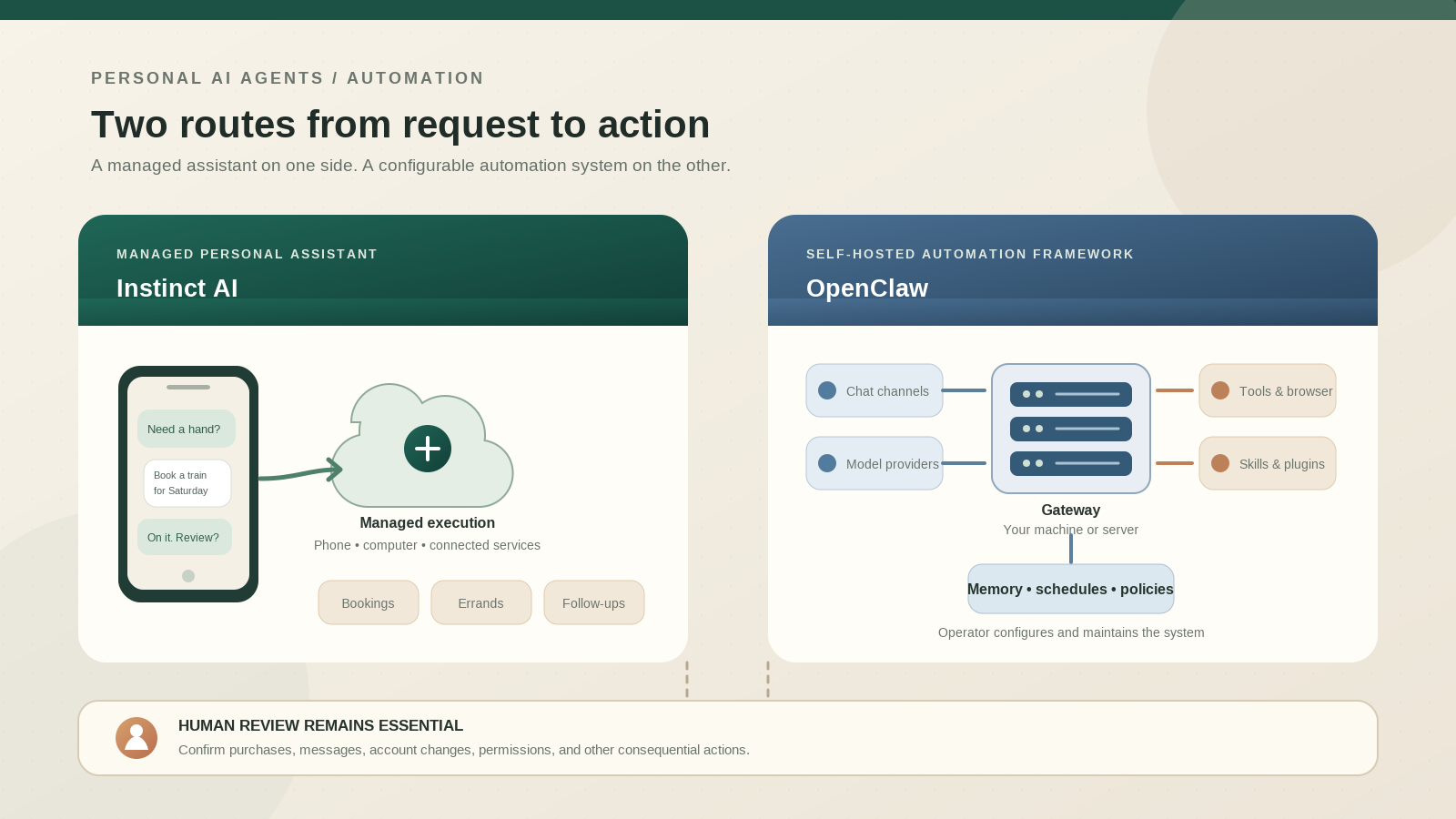
Instinct AI and OpenClaw are both designed to do more than answer questions, but they approach personal automation from almost opposite directions. Instinct is a managed personal assistant that you can text or call. OpenClaw is an open-source assistant framework that you run on infrastructure you control, then connect to messaging channels, models, tools, and skills.
That distinction matters more than a feature checklist. Instinct aims to remove the setup work: describe a real-world task and let the assistant use a phone, computer, connected services, or websites to work on it. OpenClaw gives the operator a configurable automation environment: choose the model, connect the channels, define tool permissions, add skills, and decide where the Gateway and its data should run.
The short answer is that Instinct is the simpler choice for people who want a managed assistant for everyday errands, while OpenClaw is the more flexible choice for technically confident users who want to build and operate their own agent system. Neither is universally better, and neither should be given unrestricted access to important accounts.
This comparison reflects public product information available on November 26, 2026. Capabilities, releases, access, and third-party integrations can change, so check the official documentation before deploying either agent.
Instinct AI vs OpenClaw: quick comparison
| Area | Instinct AI | OpenClaw |
|---|---|---|
| Product model | Managed personal assistant from Spear Street Technology | Open-source assistant and automation framework maintained by the OpenClaw Foundation |
| Main interaction | Text messages and phone calls | Messaging channels, WebChat, desktop and mobile companion surfaces, and the Control UI |
| Setup | Account access and connected services; no personal Gateway to install | Install and configure a Gateway, model provider, channels, tools, and permissions |
| Everyday tasks | Designed for errands such as groceries, travel bookings, flowers, reservations, and finding services | Can coordinate research, email summaries, follow-ups, browser tasks, files, reminders, and custom workflows |
| Browser and computer actions | Official site says it can use a phone and computer like a person | Browser automation and device nodes are available, with capabilities depending on configuration |
| Integrations | Connected services plus browser interaction with third-party websites | A broad channel and plugin ecosystem, model providers, skills, and custom integrations |
| Model choice | Public product materials do not expose a user-managed model-provider matrix | Supports multiple hosted providers and local or self-hosted model endpoints |
| Hosting and data control | Managed service; users rely on Instinct’s published controls and policies | Gateway can run on a personal machine, server, or VPS; data handling depends on the chosen models and connected services |
| Customization | Primarily configured through user instructions, connected accounts, and available controls | Extensive configuration of agents, tools, channels, policies, skills, and sandboxing |
| Current software cost | Terms say Instinct is currently available without charge; fees may be introduced with notice | Software is MIT-licensed; the Foundation says there is no paid tier, hosted service, or token |
| Other operating costs | Purchases and any future paid features are separate from the current no-charge access statement | Hosted model usage, server hosting, electricity, and maintenance may cost money; local models can change the cost profile |
| Best fit | People who want a ready-to-use personal task delegate | Developers, power users, and teams that want control over their own automation environment |
This is a comparison of documented product design and capabilities, not a benchmark of task-completion accuracy. A connector, website action, or skill may require setup and may not be available in every account or region.
1. Two different ideas of a personal AI agent
Instinct starts with a consumer-oriented promise: there should be no new interface to learn. Its official website says users can text or call the assistant, which can use a phone and computer in the same way a person does. The examples are concrete: ordering ingredients or groceries, booking a train, sending flowers, and finding a place to play sport.
That makes Instinct a communication-first, managed assistant. The user describes the outcome, supplies relevant context, and lets the service work through the digital steps needed to pursue it. The public product materials focus on the experience and the tasks rather than exposing a self-hosted runtime or a configurable model stack.
OpenClaw begins with a different premise. Its official documentation describes an assistant that runs on the user’s own infrastructure and responds through messaging surfaces such as WhatsApp, Telegram, Discord, Slack, Signal, iMessage, Google Chat, and WebChat. A long-running Gateway connects those channels to the agent runtime, tools, memory, and configured model providers.
OpenClaw is therefore not simply an app that a user signs into. It is a system the operator installs, configures, updates, and secures. The OpenClaw FAQ calls this a local-first control plane: the Gateway and workspace can run on a Mac, Linux machine, or VPS, while the user chooses which models and external services to connect.
For a broader explanation of the Instinct product model, see What Is Instinct AI? How the Personal AI Agent Works and How Instinct AI Works: Understanding Personal AI Agents.
2. Everyday automation: errands versus an extensible toolkit
Instinct’s clearest strength is the kind of work it is designed to delegate. Its public examples include ordering groceries, arranging travel, sending flowers, and finding local activities. Its privacy policy also describes tasks such as scheduling appointments, researching and booking travel, and managing subscriptions. The assistant can interact with connected services and, through its browser functionality, with third-party websites that have not been separately connected.
This is useful when the desired outcome is easy to describe but involves several small steps. A user might ask Instinct to find a suitable train, check the timing, and prepare the booking. The important question is not whether the assistant can produce a convincing answer; it is whether the requested action is supported for that account and whether the user has approved the consequential step.
OpenClaw is broader in a different way. Its official feature documentation lists browser automation, command execution, file operations, scheduling through cron and heartbeat, skills, plugins, and workflow pipelines. The FAQ gives examples such as organizing files, connecting Gmail for summaries and follow-ups, automating browser forms, and coordinating work across devices.
That flexibility can support personal errands, but the result depends on what the operator has installed and authorized. A fresh OpenClaw setup does not automatically know how to complete every retail purchase, book every service, or use every private account. A task may need a suitable browser workflow, a connector, an API, or a carefully reviewed skill.
The practical difference is this:
- Instinct packages the task-delegation experience for the user. The service manages the underlying execution environment.
- OpenClaw supplies the components for an automation system. The operator decides which capabilities to assemble and how much authority to grant them.
For examples of Instinct’s everyday workflows, see How to Use Instinct AI to Manage Everyday Tasks, How to Use Instinct AI to Manage Emails and Follow-Ups, and How to Use Instinct AI to Organize Your Calendar and Appointments.
3. Messaging and interfaces
Instinct deliberately keeps the interaction simple. The official website presents text and phone calls as the primary way to reach the assistant. The user does not need to operate a Gateway dashboard or choose a model provider before asking for an everyday task.
OpenClaw is designed to meet users in the messaging channels they already use, but those channels are part of the system configuration. The current documentation lists Telegram and WebChat in the core install, with other channels—including WhatsApp, Discord, iMessage, Slack, Signal, and Google Chat—available through official plugins or channel-specific setup. It also offers desktop and mobile companion surfaces and a browser-based Control UI.
This gives OpenClaw more options for routing messages and creating separate workflows. A user can, for example, configure one agent for private messages and another for a project channel, subject to the Gateway’s trust and session policies. But each added channel creates another integration to configure, test, and secure.
Instinct is easier to approach if the goal is simply to send a request. OpenClaw is more adaptable if the goal is to build a consistent assistant across several devices and communication systems.
4. Models, tools, and customization
One of OpenClaw’s most important differences is model flexibility. Its feature list names providers including Anthropic, OpenAI, and Google, along with custom and self-hosted endpoints such as vLLM, SGLang, Ollama, llama.cpp, and LM Studio. Operators can configure model routing and failover rather than being limited to a single provider choice exposed by the product.
OpenClaw also separates the agent from its extensions. Skills can add instructions and workflows; plugins add capabilities or connect services; tools provide actions such as browser control, file access, or command execution. The operator can decide which tools an agent may use and can create separate agents for different channels or tasks.
Instinct’s public materials are less focused on this kind of configuration. The company describes an assistant that uses a phone, computer, connected services, and websites to complete tasks. Its public site and policies do not provide a comparable user-facing directory of model providers, plugin development interfaces, or self-hosting instructions. That does not mean the service lacks internal tools; it means users should not assume they can swap the underlying model or extend the runtime in the way OpenClaw allows.
For a technically capable user, this is a major distinction. OpenClaw can be shaped around a preferred model, a local inference server, a custom skill, or a particular workflow. Instinct asks the user to describe the desired result and rely on the managed product’s available capabilities.
5. Setup, maintenance, and availability
Instinct’s simpler interface also means less infrastructure for an individual user to maintain. The official website provides login and an invite-a-friend route. Its Terms of Service refer to waitlist-status messages, but the public documentation does not provide a complete country-by-country availability table or a guaranteed access time. The Terms say Instinct is operated in the United States and that people accessing it from outside the United States do so on their own initiative and are responsible for complying with local laws.
OpenClaw is software that users can install on supported systems and run locally or on a server. That gives the operator more choice over where the Gateway lives, but also creates operational responsibilities: installation, updates, backups, provider credentials, channel pairing, network exposure, and troubleshooting.
As of November 26, 2026, the latest stable release shown on the official GitHub releases page is OpenClaw 2026.11.10, published on November 25. The current installation documentation requires Node 24.16.0 or later on the 24.x line, or Node 26.1.0 or later with the required SQLite safety support; Node 26 is the recommended runtime. Docker is also documented as an optional deployment path.
OpenClaw’s broad platform support should not be confused with a one-click managed service. A user who installs it on a VPS must still secure remote access, keep the software updated, and monitor the host. A user who runs it on a personal computer must account for uptime, power, backups, and the machine’s availability.
6. Privacy and data control
The privacy comparison is not simply “cloud versus local.” It is about which systems receive information and who is responsible for configuring them.
Instinct is a managed service. Its Privacy Policy, revised November 17, 2026, says it may process prompts, files, messages, emails, connected-service data, and other information needed to complete tasks. Users can disconnect connected services. The policy makes a specific commitment for Google Workspace API data: it says that information received directly through those APIs is not used to train, fine-tune, evaluate, or improve AI models, and is not used for advertising.
That commitment should not be generalized to every kind of information shared with Instinct. The policy says other materials may be used to develop and improve the service, including model training, subject to the user’s opt-out controls. It also treats Vault materials separately: those are used to provide the service and not to train AI models. Users should review the current policy and settings before connecting sensitive accounts.
OpenClaw can keep its Gateway workspace and session history on infrastructure the operator controls. It also supports local model providers, which can reduce the need to send prompts to an external model API. But “local-first” does not automatically mean every part of a workflow stays on the device. If an operator chooses a hosted model, messaging platform, cloud search service, or external API, the information required for that request is sent to that provider or platform.
The operator therefore has more control—and more responsibility. They must understand model-provider retention, channel privacy, logs, backups, network routes, and which files are visible to the agent. Local hosting changes the trust boundary; it does not remove it.
7. Security: managed safeguards versus operator responsibility
Instinct’s Terms require meaningful human oversight. They say users should review actions, confirm that the assistant did not make errors, and maintain approval workflows appropriate to the consequences. The Terms also warn that Instinct is not error-free and that some actions may not be reversible. This is important for purchases, messages sent on the user’s behalf, account changes, and disclosures of personal information.
OpenClaw provides more visible configuration for security, but its flexibility can increase the impact of a mistake. The official security trust model says that a Gateway is one trust boundary: people who can message a tool-enabled agent share its delegated authority. It advises separating mutually untrusted users into different Gateways and using identity controls, allowlists, tool scopes, and sandboxing to limit what the agent can do.
A particularly important default is that agent tool sandboxing is off unless the operator enables it or a policy requires it. The documentation explains that sandboxing can move tool execution into Docker, Podman, SSH, or other backends, while the Gateway itself remains on the host. The security guide also describes the limits of the sandbox; it is a risk-reduction control, not a perfect guarantee.
Skills need similar care. OpenClaw’s documentation explicitly says to treat third-party skills as untrusted code, read them before enabling them, and prefer sandboxed runs for untrusted inputs and risky tools. Installing a skill simply because it appears in a marketplace is not a safe substitute for reviewing its source and permissions.
Neither model is automatically safer in every configuration:
- With Instinct, users rely on the provider’s infrastructure and published safeguards, while still reviewing connected-account permissions and approvals.
- With OpenClaw, operators can inspect and configure more of the system, but they must secure the host, Gateway, channels, model credentials, tools, and extensions.
For both products, start with the smallest permissions that make the task useful. Require confirmation before purchases, external messages, file deletion, account changes, or actions that disclose sensitive information.
8. Pricing: free software is not the same as zero operating cost
Instinct’s Terms of Service, last revised November 17, 2026, state that the service is currently available without charge. The same section reserves the right to introduce fees for access or specific features, with notice before those fees become payable. This is the current contractual position, not a promise that every feature will remain free.
OpenClaw is distributed under the MIT license. Its official FAQ says the Foundation has no paid tier, hosted service, or token to sell. The software itself therefore has no subscription price from the Foundation.
However, running OpenClaw may still involve costs. A user who chooses a hosted model provider may pay for API usage or a provider subscription. A VPS or dedicated machine can add hosting and electricity costs. Local models can reduce external inference charges, but they require suitable hardware and still involve setup, storage, power, and maintenance.
The fairest comparison is not “free Instinct versus free OpenClaw.” Instinct currently has no service charge under its Terms, while OpenClaw has no software licence fee. The total cost of either workflow depends on future Instinct pricing, third-party purchases, model usage, hosting, and the time required to operate the system.
9. Which agent is better for common workflows?
| Workflow | Better starting point | Why |
|---|---|---|
| Arrange groceries or send flowers | Instinct | These are explicit examples on the product’s official site |
| Delegate a travel or appointment task | Instinct | The product is positioned around personal task completion |
| Summarize email and schedule follow-ups | Either | Instinct supports connected-service actions; OpenClaw documents Gmail workflows and scheduled automation |
| Automate a repeated browser process | OpenClaw | Browser tools, skills, cron, and configurable workflows offer more operator control |
| Build a custom assistant around a local model | OpenClaw | Local and self-hosted model endpoints are documented |
| Connect several chat channels to one assistant | OpenClaw | Its Gateway and channel-plugin model is designed for this |
| Avoid installing and maintaining an agent runtime | Instinct | The user interacts with a managed assistant rather than operating a Gateway |
| Inspect and customize the automation stack | OpenClaw | The source, configuration, tools, and deployment are under the operator’s control |
These are starting-point recommendations, not guarantees. Instinct’s action may depend on account access and the third-party website. An OpenClaw workflow may require a skill, API, browser session, or custom configuration before it can do the same task.
Which should you choose?
Choose Instinct AI if:
- You want a managed personal assistant rather than a project to install and maintain.
- Your main needs are errands, reservations, shopping, travel, and contacting services.
- You prefer sending a text or making a call instead of configuring channels and tools.
- You are comfortable relying on the provider’s service and privacy controls.
- The service and the features you need are available to your account.
Choose OpenClaw if:
- You want to self-host an assistant on a computer, server, or VPS.
- You need to choose among hosted or local model providers.
- You want to connect multiple messaging channels and build custom workflows.
- You are comfortable managing credentials, updates, logs, network access, and backups.
- You can review skills and configure tool permissions and sandboxing.
Final verdict
Instinct is the better fit for low-friction personal delegation; OpenClaw is the better fit for configurable automation under the user’s control. Instinct makes the most sense when the task is a practical life request and the user wants the provider to manage the underlying system. OpenClaw makes more sense when the user wants an extensible agent platform that can be adapted to personal or technical workflows.
OpenClaw offers more control, but that control is an operational responsibility—not a free security advantage. Instinct reduces setup, but a managed service still requires trust in the provider and careful approval of consequential actions. Choose according to the work you need done and the level of responsibility you are willing to take on.
For other comparisons, see Instinct AI vs ChatGPT: Which AI Assistant Is Better for Everyday Tasks?, Instinct AI vs Claude: Comparing AI Agents and Personal Assistants, Instinct AI vs Gemini: Which AI Assistant Can Do More?, and Instinct AI vs Meta Muse: Comparing Personal AI Agents.
Frequently asked questions
Is OpenClaw better than Instinct AI?
Not for every user. OpenClaw is more configurable and can be self-hosted with different model providers, channels, tools, and skills. Instinct is simpler to use as a managed personal assistant for everyday tasks. The better option depends on whether you value low setup or control over the automation stack.
Is OpenClaw free?
The OpenClaw software is open source under the MIT license, and the Foundation says it has no paid tier, hosted service, or token. Model-provider usage, server hosting, and hardware can still cost money.
Is Instinct AI free?
Instinct’s Terms of Service, revised November 17, 2026, say it is currently available without charge. They also allow the company to introduce fees for the service or particular features after providing notice.
Does OpenClaw run locally?
Yes. The Gateway can run on a personal computer or on infrastructure the user controls, including a server or VPS. It can also use local model providers. If you connect hosted model APIs or external messaging platforms, those services still receive the data needed to process requests.
Which agent is easier to set up?
Instinct is the easier starting point for most non-technical users because it is presented as a text-and-call assistant. OpenClaw requires installation and configuration of the Gateway, model provider, channels, and permissions, followed by ongoing maintenance.
Is OpenClaw safe for personal email and files?
It can be configured with security controls, but it should not be treated as safe by default for unrestricted access. The official documentation says sandboxing is off by default and warns users to treat third-party skills as untrusted code. Restrict who can message the agent, limit tools and file access, enable suitable sandboxing, and review actions.
Can Instinct and OpenClaw use the same AI models?
OpenClaw explicitly supports multiple hosted and local model providers. Instinct’s public product documentation does not expose an equivalent user-configurable provider list, so users should not assume they can select the same models inside Instinct.
Sources and further reading
- Instinct — Official website
- Instinct — Terms of Service, revised November 17, 2026
- Instinct — Privacy Policy, revised November 17, 2026
- OpenClaw — What Is OpenClaw?
- OpenClaw — Features and supported channels
- OpenClaw — Gateway security trust model
- OpenClaw — Sandboxing modes, scope, and backends
- OpenClaw — Skills and third-party skill security
- OpenClaw — Node.js installation requirements
- OpenClaw — GitHub repository and MIT license
- OpenClaw — Official releases