
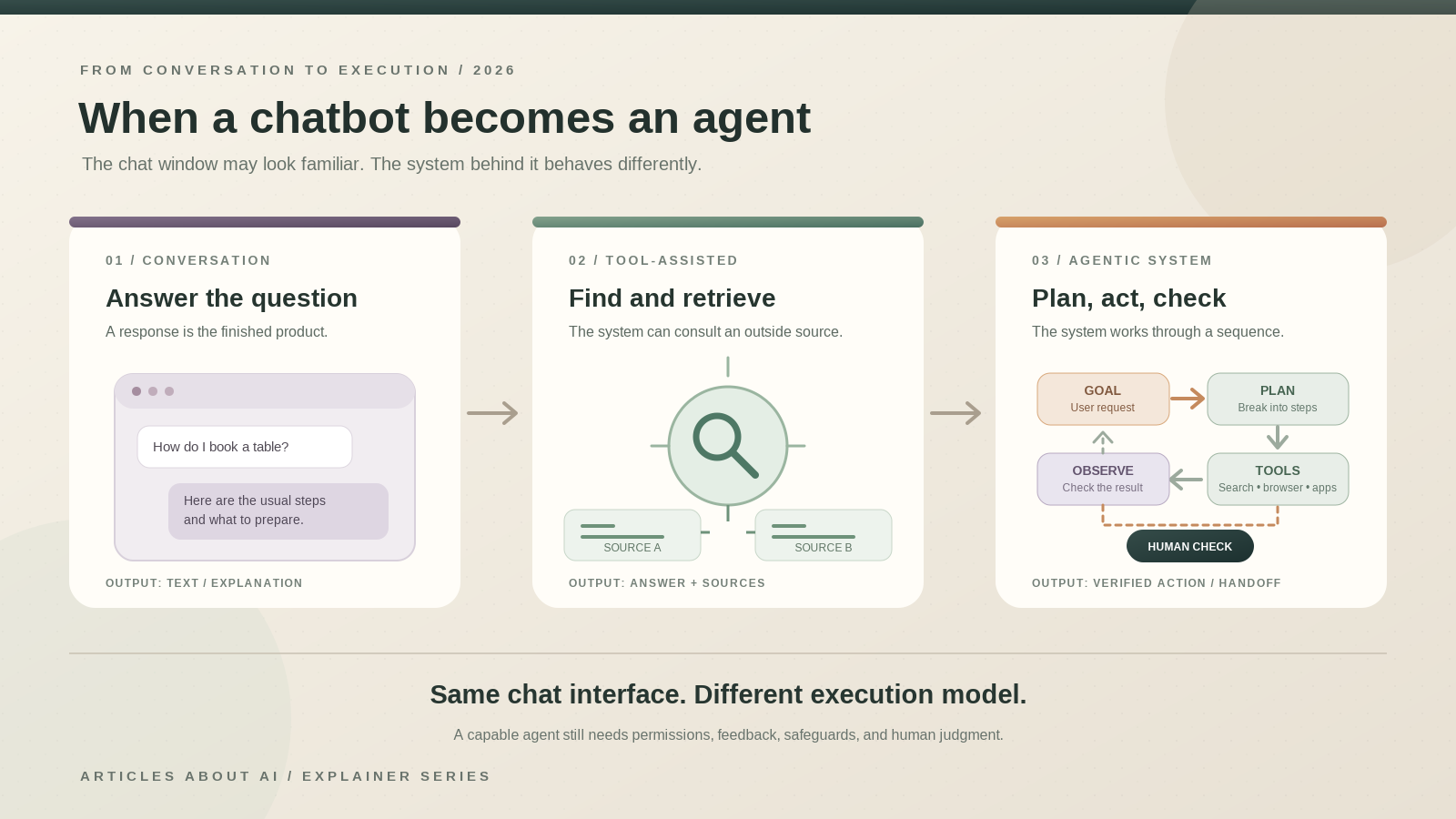
A traditional AI chatbot is built to respond to a person in conversation. An AI agent is designed to use that conversation as the starting point for work: it can interpret a goal, plan steps, call tools, interact with external systems, inspect what happened, and continue until it reaches a result or needs human input.
That sounds like a clean divide, but modern AI products make the distinction less obvious. A chatbot can search the web, retrieve documents, or call a tool without becoming a fully autonomous agent. Conversely, an agent may use an ordinary chat window as its interface. The important difference is not whether the product looks like a messaging app. It is whether the system only generates a response or can also carry out and verify a sequence of actions.
Instinct AI is a useful example of the newer personal-assistant model. Its official website says people can text or call it and that it can use a phone and computer to handle practical tasks. This guide explains what separates a conventional chatbot from an agentic assistant, where the categories overlap, and when the extra autonomy is genuinely useful.
Instinct AI vs traditional AI chatbots: the quick difference
| Capability | Conventional conversational chatbot | Agentic personal assistant |
|---|---|---|
| Main job | Explain, answer, draft, summarize, and discuss | Work toward a goal by combining reasoning with actions |
| Typical interaction | A question followed by a response and follow-up questions | A goal followed by planning, execution, feedback, and a result |
| External information | May use search, retrieval, or connected knowledge | Can use information sources as part of a larger task |
| Tools | Often absent or limited to a specific tool call | Uses multiple tools or services as the task requires |
| Multi-step work | Describes the steps for the user | Can attempt to perform supported steps itself |
| State and context | Often centered on the current conversation or selected memory | May maintain task state, connected context, and progress between steps |
| Error handling | The user notices a weak answer and asks again | The agent can inspect a tool result, retry, change approach, or ask for help |
| Real-world effects | Usually produces information or content | May send messages, edit records, book services, or initiate transactions when authorized |
| Human role | Reads and applies the answer | Sets limits, grants access, reviews progress, and approves consequential actions |
This table describes common patterns, not rigid product categories. A chatbot with search or a single API integration is still conversational software, but it already has capabilities beyond a text-only response. An agent can also be deliberately constrained to a short, predictable workflow. The boundary is a spectrum.
1. What is a traditional AI chatbot?
A conventional chatbot is a conversational interface that receives a message and generates a reply. The underlying model predicts and produces text based on the prompt, conversation context, and any other information supplied to it. It can explain a topic, translate a passage, write an email, summarize a document, compare ideas, or help someone reason through a decision.
For many tasks, this is exactly what people need. If the request is to explain compound interest, rewrite a paragraph, outline a presentation, or suggest questions for a doctor, a direct answer is usually faster and easier to review than an agent that opens several websites and takes actions.
Traditional chatbots can also be sophisticated. They may use retrieval-augmented generation to search a knowledge base, cite documents, or use a web-search tool. These features make answers more grounded, but retrieving information is not the same as completing an external task. A system that finds three restaurant options and explains their opening hours has not necessarily booked a table.
The term traditional chatbot should therefore be understood as a description of a response-centered interaction pattern, not a claim that every chatbot is technically limited to one model call or has no tools.
2. What makes an AI agent different?
An AI agent is organized around a goal rather than a single reply. It can decide which step should happen next, choose from available tools, observe the result, and adjust its plan.
Anthropic’s engineering guide makes a useful distinction between workflows and agents. A workflow follows predefined code paths that orchestrate models and tools. An agent dynamically directs its own process and tool use. Both are agentic systems in the broader sense, but they provide different degrees of flexibility. Anthropic also cautions that autonomous systems can cost more, take longer, and compound errors, so additional complexity should be justified by the task.
A simplified agent loop looks like this:
- Understand the goal. Identify the requested outcome, constraints, preferences, and missing information.
- Plan the work. Break the goal into smaller steps and decide what information or tools are needed.
- Choose an action. Search, open a website, read a connected account, draft a message, or call an available service.
- Observe the result. Check whether the tool succeeded and whether the returned information matches the task.
- Continue or revise. Take the next step, correct an error, or ask the user for clarification.
- Verify and hand back. Report what was completed, what remains, and which actions need approval.
The model is only one part of this process. Tools, permissions, task state, feedback, and safeguards determine what the system can actually do. A more capable language model does not automatically turn a chat interface into a reliable agent.
3. Where Instinct AI fits
Instinct describes itself as a personal assistant that understands what a user is working on and what matters to them. Its public interface is deliberately simple: users can text or call the assistant, which the company says can use a phone and computer in a similar way to a person. The official examples include ordering groceries or recipe ingredients, booking a train, sending flowers, and finding a place to play sport.
Its Privacy Policy provides more detail about the service model. It says Instinct can process prompts and other information, use connected third-party services, and interact through browser functionality with websites and applications that may not have been separately connected. The policy gives examples such as booking a restaurant reservation or writing an email. It also describes everyday tasks including appointment scheduling, travel research and booking, and subscription management.
That is the key difference from a response-only chatbot: Instinct is presented as a service that can attempt actions on a user’s behalf, not merely explain how the user could perform them.
However, the company’s public materials do not disclose every internal component of its agent architecture or guarantee that every action works for every account, website, or region. It is more accurate to describe the documented product behavior than to speculate about its internal model, planner, or execution stack.
For a broader product overview, read What Is Instinct AI? How the Personal AI Agent Works, and for a capability-by-capability guide see Instinct AI Features Explained: What Can the AI Agent Actually Do?.
4. A chatbot can search; an agent can pursue the outcome
One of the most common sources of confusion is web access. A chatbot may search the web and return links, summaries, and citations. That is valuable because the answer can reflect current information rather than relying only on the model’s training data. But the user may still need to visit the sites, compare the options, fill out forms, and complete the transaction.
A tool-using agent can connect those steps into one task. It might search for available appointments, compare the options against a calendar, open a supported booking page, enter the requested details, and pause before confirming the appointment.
The difference is visible in current products. ChatGPT Search can find current information and provide source links. ChatGPT Work’s cloud browser goes further: OpenAI says it can read web pages, click buttons, enter information into forms, and carry out steps on supported public and signed-in websites. It pauses when it needs input, sign-in, or confirmation. OpenAI also notes that site compatibility varies and that some final steps may still need the user’s review.
This is why the distinction should not be framed as “chatbots cannot use tools.” Modern conversational products increasingly combine chat, search, connected apps, and agentic work modes. The same product may offer both a response-centered chat experience and a separate agentic environment.
5. Real-world examples: answer versus action
The easiest way to understand the difference is to compare what a user asks with what the system returns or attempts to do.
| User request | Response-centered chatbot | Agentic assistant |
|---|---|---|
| “Find a restaurant for Friday.” | Suggests restaurants and explains what to compare | Checks suitable options and availability, then prepares or makes a supported reservation with the required approval |
| “Help me manage my inbox.” | Summarizes messages or drafts replies from supplied text | With permission, reviews connected messages, groups follow-ups, drafts responses, and may send approved messages |
| “Compare these two products.” | Explains specifications and trade-offs | Checks current listings, variants, delivery costs, stock, and return terms across supported sites |
| “Arrange my trip.” | Produces an itinerary and travel checklist | Researches routes, checks dates, coordinates connected calendar details, and can proceed through supported booking steps |
| “Remind me about this bill.” | Explains how to create a reminder | Can create a reminder in a connected service if the required integration and permission are available |
The agentic column is not a promise that the software can complete every task. A site may block automated access, an account may not be connected, a payment step may require the user, or the service may not support the requested action. A well-designed agent should make those limits visible instead of presenting an attempted action as a completed result.
For practical examples of the tasks Instinct is intended to handle, see How to Use Instinct AI to Manage Everyday Tasks, How to Use Instinct AI to Manage Emails and Follow-Ups, and How to Use Instinct AI to Organize Your Calendar and Appointments.
6. What changes technically?
Moving from a chatbot to an agent usually requires several additional components. They are not necessarily separate products, but they change how the system operates.
Tool access. The agent needs defined ways to interact with the outside world: APIs, connected apps, search, a browser, files, or other services. Each tool should have a clear purpose and permission boundary.
Task state. A multi-step task needs a record of what has been requested, what has already happened, what remains, and which constraints must be preserved. Without state, an agent may repeat work or lose track of a decision.
Feedback from the environment. A tool call is not proof of success. The system needs to inspect the result, detect errors, and decide whether to continue. A booking request, for example, is not a confirmed reservation until the provider returns confirmation.
Planning and control. The agent must decide which action is appropriate and when to stop. Some tasks follow a fixed workflow; others require the model to choose the next step dynamically.
Permissions and approval. An agent should receive only the access needed for the task. Sending a draft, deleting a file, placing an order, and transferring money are not equivalent actions. The system should apply stronger checks as the potential consequences increase.
These components explain why agentic software is more than a chatbot with a longer prompt. It combines a model with an execution environment and a control system.
7. Advantages and limitations of agentic AI
Agents can reduce the amount of manual coordination required for tasks that cross several services. They can keep track of intermediate steps, retrieve information when it is needed, and perform supported actions without asking the user to copy and paste between applications. This is especially useful when a task has a clear goal but an unpredictable sequence of steps.
The trade-off is complexity. More tool calls create more opportunities for failure. A website can change its layout, a connector can return incomplete data, a login can expire, or an instruction embedded in a webpage can attempt to manipulate the agent. Errors can also compound: an incorrect assumption early in a task may affect every later action.
Agents can be slower and more expensive than a direct response because they may need multiple model calls, external tools, browser sessions, and verification steps. They also require more careful privacy and security decisions because they may access personal accounts or affect other people.
A chatbot is often the better choice when the task ends with information, explanation, or a draft. An agent is more useful when the task requires a sequence of external actions and the system has reliable tools for those actions. The goal should be the simplest system that can complete the job safely—not maximum autonomy for its own sake.
8. Privacy, access, and human oversight
A conversational assistant may only need the prompt and the information supplied in the chat. An agent may need access to email, calendars, files, location, browser sessions, or payment services. That access changes the risk profile.
Instinct’s Privacy Policy says that connected-service access depends on what a user chooses to connect. It specifically explains that Google Workspace data is used to provide the service and is not used to train or improve AI models. The policy also describes a separate opt-out for model training on other eligible information. Users should read the full policy rather than assume that every category of data receives identical treatment.
The Terms of Service state that Instinct may take actions when initiated and directed by the user. They also require meaningful human oversight, including reviewing actions, checking for errors, and using approval workflows appropriate to the consequences. The terms warn that actions can be incorrect or irreversible.
A sensible operating rule applies to every agent:
- Connect only the accounts needed for the task.
- Give narrow instructions and clear limits.
- Review the website, recipient, amount, and details before a consequential action.
- Require confirmation before purchases, bookings, account changes, or sensitive messages.
- Verify the result in the service where the action occurred.
- Disconnect integrations that are no longer needed.
The same principle applies to other agentic products. OpenAI’s cloud-browser documentation, for example, says that consequential actions such as confirming a booking or making a payment require confirmation, while also warning that supported websites and actions vary.
9. Availability and pricing: check the actual feature, not the label
The word chatbot does not tell you what a product costs or which capabilities are included. Access can differ between a free conversational interface, a paid agentic mode, and a feature that is still rolling out.
Instinct’s Terms of Service, last revised on November 17, 2026, state that the service is currently available without charge. They also reserve the right to introduce fees in the future, with notice before those fees become payable. The terms do not guarantee that every feature will be available in every geographic location. Mobile data, messaging, and third-party services may also carry separate costs.
For ChatGPT, web search is available across Free, Go, Plus, Pro, Business, Enterprise, and Edu, subject to plan limits. The cloud browser is a separate ChatGPT Work capability and is available on paid plans in supported regions, excluding Free and Go. Availability can also depend on rollout status and workspace permissions.
The practical lesson is to check the exact feature and region before choosing a product. A service may offer a free chatbot while reserving multi-step execution for a paid plan or a limited rollout.
10. How to decide whether you need a chatbot or an agent
Use a conventional chatbot when you need to understand something, draft content, translate, brainstorm, or compare ideas from information you provide. It keeps the user in control of the steps and usually has fewer account permissions to manage.
Choose an agentic assistant when the desired result requires several steps across supported tools or services—for example, researching options, checking a calendar, preparing a booking, or coordinating a follow-up. Before delegating, verify that the agent can access the required service and that its approval controls match the consequences of the task.
A useful test is to ask three questions:
- Does the task end with an answer or with an external change? If it ends with an explanation or draft, a chatbot may be enough. If it needs an email sent, a record updated, or a booking completed, an agent may help.
- Are the required tools and permissions available? An agent cannot act on a service it cannot access, and a connector may not support every operation.
- Can the result be checked? Prefer tasks where success has an observable signal, such as a confirmation number, sent-message record, updated calendar entry, or saved file.
For readers comparing current products, the earlier guides to Instinct AI vs ChatGPT, Instinct AI vs Claude, Instinct AI vs Gemini, Instinct AI vs Meta Muse, and Instinct AI vs OpenClaw compare different approaches to agentic assistance.
Frequently asked questions
Is an AI agent just a chatbot with tools?
Not exactly. Tools are one ingredient. An agent also uses task context, planning, feedback, and control logic to decide what to do next. A chatbot may call a search tool and still return a single answer; an agent can use several tools in a loop to pursue a goal.
Can a traditional chatbot become an AI agent?
Yes. A conversational interface can be connected to tools, memory, task state, and an execution loop. The user may still interact through the same chat window, even though the system behind it has changed.
Is Instinct AI a chatbot or an AI agent?
Instinct is presented by its developer as a personal assistant that can use a phone and computer and interact with third-party services on a user’s behalf. That makes it an agentic personal-assistant product rather than a response-only chatbot. Its exact internal architecture is not fully documented publicly.
Are AI agents always better than chatbots?
No. Agents are useful when a task requires external actions or several changing steps. For simple questions, explanations, translations, or drafts, a direct chatbot response is often faster, easier to inspect, and less demanding in terms of permissions.
Can an AI agent complete every task without supervision?
No. Websites may block automation, services may lack the necessary integration, and some actions require user authentication or confirmation. Agents can also make mistakes. Important results should be checked in the system where the action took place.
The difference is action, not the chat window
Traditional chatbots made AI accessible through conversation. Agentic systems extend that interaction into the tools and services where work happens. The shift is meaningful, but it does not make chat obsolete: answering a question is still the right solution for many tasks, while external actions demand stronger permissions, feedback, and verification.
Instinct illustrates the personal-assistant direction by presenting text and calls as a simple way to delegate practical tasks. More broadly, the future is unlikely to be a choice between chatbots and agents. It will be a spectrum of systems that combine conversation, retrieval, tools, and controlled execution—using only as much autonomy as the task actually needs.
Sources and further reading
- Instinct — Official Website
- Instinct — Terms of Service, last revised November 17, 2026.
- Instinct — Privacy Policy, last revised November 17, 2026.
- Anthropic — Building Effective Agents, December 19, 2024. The article distinguishes predefined workflows from agents that dynamically direct their own tool use, and discusses the cost and reliability trade-offs of autonomy.
- OpenAI Help Center — Using Cloud Browser in ChatGPT, updated October 2026. Describes supported browser actions, availability, confirmations, and limitations.
- OpenAI Help Center — Searching the Web with ChatGPT, updated November 2026. Describes search, source links, and plan availability.
- OpenAI Help Center — ChatGPT Release Notes, including the July 9, 2026 introduction of ChatGPT Work and subsequent product updates.
Product information checked November 26, 2026. Features, access, pricing, and regional availability may change.